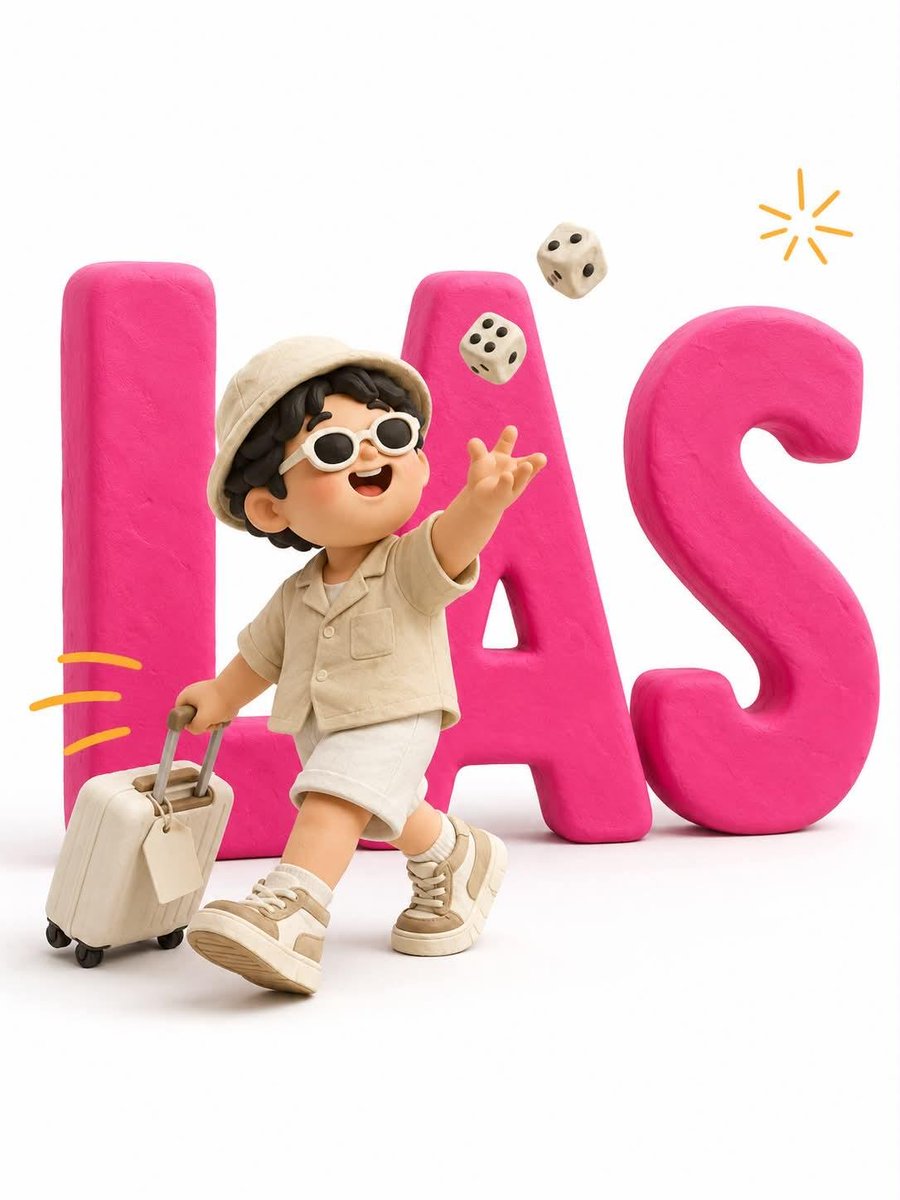
Minimalist 3D Clay Illustration Template
A customizable prompt for creating 3D clay illustrations with bold typography and stylized characters, perfect for editorial design.
This is a GPT Image 2 prompt case for Illustration & Art. Use the copy-ready prompt below to generate similar visuals, and review Awesome GPT Image 2 Prompts attribution plus commercial-use rights before reuse.
Free 1K preview
Generate one preview image instantly, no sign-up required.
Prompt
Copy-ready prompt
Minimalist 3D clay illustration. Giant bold typography reading "{argument name="text" default="[TEXT]"}" stands flat against a pure white background — thick chunky extruded letterforms in matte {argument name="letter color" default="[LETTER COLOR]"} plasticine (a single solid saturated color across all letters), soft rounded edges and bevels, subtle fingerprint texture, no gloss, a faint soft drop shadow beneath. A cute stylized clay character stands IN FRONT of the letters, overlapping them, full body visible from head to sneakers. The letters remain fully readable behind — the character never sits on, climbs, or merges into them. CHARACTER: chubby handmade proportions, oversized round head, big glossy black dot eyes, tiny smiling mouth, soft blush cheeks, mitten hands. {argument name="character description" default="[CHARACTER DESCRIPTION]"}. NOTE: the character wears NO colors matching the letters — use contrasting colors only, so the character separates cleanly from the typography. ACTION: [ACTION DESCRIPTION]. Body overlaps the first and middle letters; the final letter stays clear on the right. SCALE: character height about 65% of the letter height, centered slightly left. ACCENTS: [NUMBER] small hand-drawn [ACCENT COLOR] motion dashes trailing behind the character, one tiny doodled [ACCENT ELEMENT] arcing in the upper right — thin flat 2D marks, not 3D. RENDER: soft diffused studio light from upper left, gentle ambient occlusion, matte clay surfaces throughout, clean white seamless backdrop, slightly elevated eye-level camera, vertical 3:4. NEGATIVE: glossy plastic, metallic sheen, gradients on the letters, letters obscured or broken, character standing on or inside the letters, extra text, readable text on props, misspelled words, brand or commercial logos, realistic skin, harsh shadows, colored background.Prompt variables
Editable argument placeholders found in the prompt, with their default values.
Best for
- - Illustration & Art visual exploration
- - Image generation and reference-image edits
- - Reusable briefs that keep source attribution visible
Change these parts
- - Subject, product, character, or scene
- - Aspect ratio, camera, lighting, and background
- - Brand, text, color, and output constraints
Recommended model and settings
- - Model: gpt-image-2
- - Input mode: Text to Image
- - Aspect ratio: source
- - Commercial status: review original source
How to use this prompt
- 1. Copy the prompt and preserve its structure for the first test.
- 2. Replace the subject, context, and publishing channel.
- 3. Change one camera, lighting, or style variable per iteration.
- 4. Inspect the output, source, text, and rights before reuse.
Limitations, source, and reuse cautions
- - Generated output is an editable draft, not factual, legal, or rights evidence.
- - Review the linked source, people, brands, logos, text, and third-party media before commercial use.
More cases in this category
Prioritized by category, input mode compatibility, quality, and lower risk.


Reuse and source notes
Use this prompt safely after previewing the case.
- 1.Copy the prompt or open it directly in Dovoo with the generation button.
- 2.Adjust variables, aspect ratio, and reference images for your own use case.
- 3.Before publishing or paid usage, verify source rights, attribution requirements, and brand or likeness risks.
Can I use this prompt commercially?
Commercial-use status is allowed. Review the original source, license, brand constraints, and legal requirements before paid usage.
Where does this case come from?
This case is imported from Awesome GPT Image 2 Prompts; keep attribution visible and check the source URL before reuse.