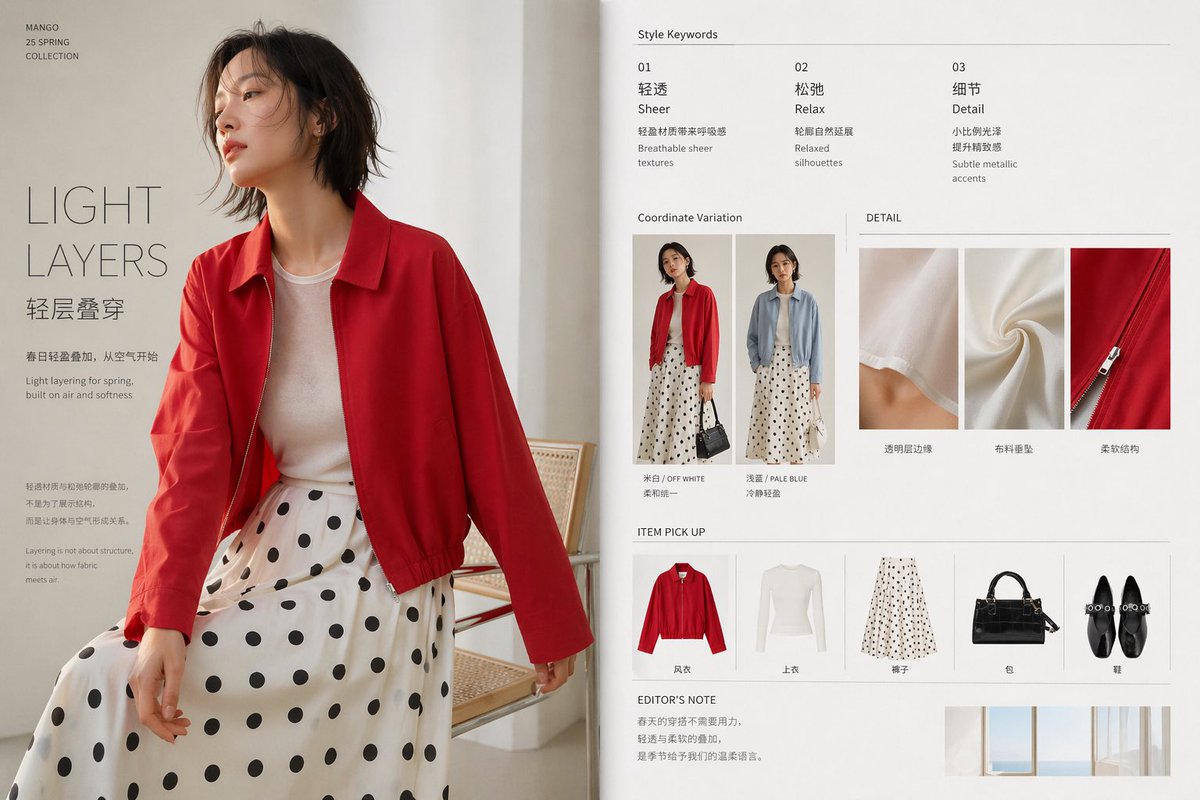
Minimal Spring Fashion Editorial Board
A clean luxury fashion presentation slide showing a spring layered outfit with editorial text, styling variations, fabric details, and product picks, ideal for apparel campaign decks and lookbook pages.
This is a GPT Image 2 prompt case for Fashion & Beauty. Use the copy-ready prompt below to generate similar visuals, and review Awesome GPT Image 2 Prompts attribution plus commercial-use rights before reuse.
Free 1K preview
Generate one preview image instantly, no sign-up required.
Prompt
Copy-ready prompt
{
  "brand": "MANGO",
  "collection": "25 SPRING COLLECTION",
  "layout": {
    "additional_note": {
      "text": "Spring dressing doesn't need to be forced; the layering of lightness and softness is the gentle language the season offers us.",
      "title": "EDITOR'S NOTE"
    },
    "bottom_right_inset": "small minimalist interior window photo strip",
    "format": "single fashion board with large left hero image and right information column",
    "hero_text": {
      "body": [
        "Light and airy layering for spring, starting with the air itself.",
        "Light layering for spring, built on air and softness.",
        "The layering of sheer fabrics and relaxed silhouettes isn't about showcasing a look, but about creating a relationship between the body and the air.",
        "Layering is not about structure, it's about how fabric meets air."
      ],
      "headline": "{argument name=\"headline text\" default=\"LIGHT LAYERS\"}",
      "subheadline": "Layering"
    },
    "sections": [
      {
        "count": 3,
        "labels": [
          "01 Sheer",
          "02 Relax",
          "03 Detail"
        ],
        "position": "top-right",
        "title": "Style Keywords"
      },
      {
        "count": 2,
        "labels": [
          "Zhu He Yi — / OFF WHITE",
          "Pale Blue"
        ],
        "position": "upper-mid-right",
        "title": "Coordinate Variation"
      },
      {
        "count": 3,
        "labels": [
          "Transparent edge feel",
          "Fabric drape",
          "Soft structure"
        ],
        "position": "upper-right below coordinate variation",
        "title": "DETAIL"
      },
      {
        "count": 5,
        "labels": [
          "Trench coat",
          "Tops",
          "Pants",
          "Bag",
          "Shoes"
        ],
        "position": "lower-mid-right",
        "title": "ITEM PICK UP"
      }
    ]
  },
  "rendering_notes": "create a polished fashion campaign slide or magazine-style apparel presentation in bilingual Chinese-English typography, with realistic clothing photography, elegant spacing, understated premium branding, and a calm spring atmosphere",
  "style": "minimal luxury magazine spread, clean white background, soft daylight, airy modern editorial design, high-end fashion lookbook board",
  "subject": {
    "accessories": {
      "bag": "structured black handbag shown in product row and styling variation",
      "shoes": "black flat shoes shown in product row"
    },
    "face": "Show every face clearly with natural, detailed facial features",
    "gender_presentation": "female",
    "outfit": {
      "bottom": {
        "color": "white",
        "item": "midi skirt",
        "pattern": "large black polka dots"
      },
      "outerwear": {
        "color": "{argument name=\"jacket color\" default=\"vivid red\"}",
        "item": "cropped lightweight zip jacket"
      },
      "top": {
        "color": "soft white",
        "item": "semi-sheer fitted long-sleeve knit top"
      }
    },
    "pose": "seated in a relaxed pose on a light cane chair, torso angled left, head turned away"
  },
  "type": "fashion editorial layout poster",
  "visual_details": {
    "color_palette": [
      "red",
      "white",
      "black",
      "soft beige",
      "pale blue"
    ],
    "composition": "left side dominated by large model image, right side arranged as neat editorial grid with thin divider lines and generous margins",
    "lighting": "soft natural morning light from the side",
    "materials": [
      "sheer knit",
      "soft draped fabric",
      "smooth zipper detail"
    ]
  }
}
Prompt variables
Editable argument placeholders found in the prompt, with their default values.
Best for
- - Fashion & Beauty visual exploration
- - Image generation and reference-image edits
- - Reusable briefs that keep source attribution visible
Change these parts
- - Subject, product, character, or scene
- - Aspect ratio, camera, lighting, and background
- - Brand, text, color, and output constraints
Recommended model and settings
- - Model: gpt-image-2
- - Input mode: Text to Image
- - Aspect ratio: source
- - Commercial status: review original source
How to use this prompt
- 1. Copy the prompt and preserve its structure for the first test.
- 2. Replace the subject, context, and publishing channel.
- 3. Change one camera, lighting, or style variable per iteration.
- 4. Inspect the output, source, text, and rights before reuse.
Limitations, source, and reuse cautions
- - Generated output is an editable draft, not factual, legal, or rights evidence.
- - Review the linked source, people, brands, logos, text, and third-party media before commercial use.
More cases in this category
Prioritized by category, input mode compatibility, quality, and lower risk.


Reuse and source notes
Use this prompt safely after previewing the case.
- 1.Copy the prompt or open it directly in Dovoo with the generation button.
- 2.Adjust variables, aspect ratio, and reference images for your own use case.
- 3.Before publishing or paid usage, verify source rights, attribution requirements, and brand or likeness risks.
Can I use this prompt commercially?
Commercial-use status is allowed. Review the original source, license, brand constraints, and legal requirements before paid usage.
Where does this case come from?
This case is imported from Awesome GPT Image 2 Prompts; keep attribution visible and check the source URL before reuse.