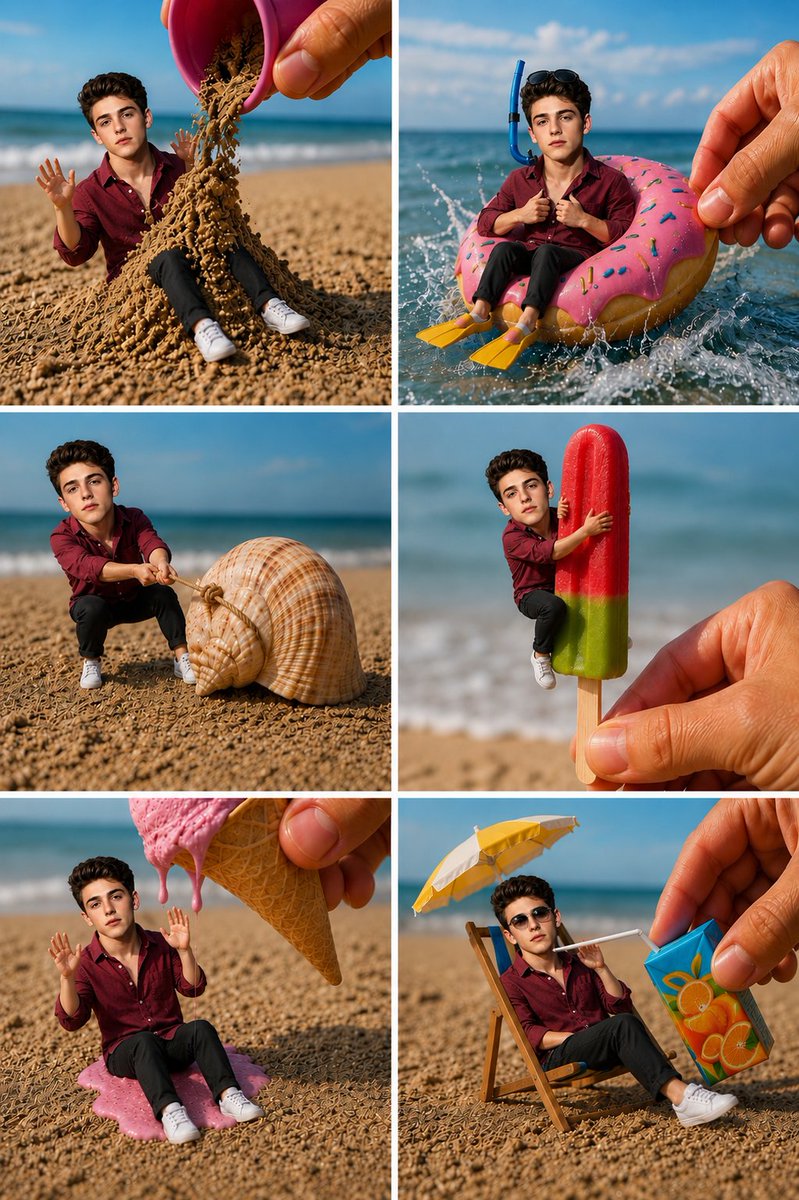
Miniature Beach Adventure Collage
Generates a playful six-panel hyper-realistic beach collage featuring a tiny person interacting with oversized summer objects.
This is a GPT Image 2 prompt case for Portrait & Character. Use the copy-ready prompt below to generate similar visuals, and review Awesome GPT Image 2 Prompts attribution plus commercial-use rights before reuse.
Free 1K preview
Generate one preview image instantly, no sign-up required.
Free text preview doesn’t preserve reference-image consistency.
Prompt
Copy-ready prompt
Goal: Create a whimsical hyper-realistic 2-column by 3-row photo collage showing a tiny miniature young man on a sunny beach, interacting with oversized summer objects as if he is a toy-sized person in a real world.

Canvas: Vertical collage, 768×1152 style aspect ratio, six equal rectangular panels separated by clean white gutters. Bright midday beach lighting, shallow depth of field, blue ocean horizon and sandy beach background in every panel.

Main subject: The same miniature young man appears in all 6 panels, about toy-sized, with a handsome youthful face, short dark wavy hair, light skin, wearing a burgundy button-up shirt, black pants, and white sneakers. Keep his identity and outfit consistent across the collage. Use {argument name="character name" default="a miniature young man"} as the recurring subject.

Panel count and contents: Use exactly 6 panels.
1. Top-left: A giant human hand tilts a small pink bucket, pouring a mound of dry sand over and around the tiny man while he sits on the beach with both hands raised in surprise.
2. Top-right: The tiny man sits inside a giant pink frosted donut-shaped float in splashing ocean water, wearing a blue snorkel mask/tube and yellow flippers, while a large human hand steadies the float from the right.
3. Middle-left: The tiny man crouches on the sand and pulls a rope tied around an enormous spiral seashell, as if trying to drag it.
4. Middle-right: A large human hand holds a red-and-green popsicle on a wooden stick; the tiny man clings to the popsicle with his arms and legs, as if hugging it.
5. Bottom-left: A giant waffle cone held by a human hand drips melting pink ice cream over the tiny man, who sits on a puddle of pink ice cream with both hands raised.
6. Bottom-right: The tiny man lounges in a miniature beach chair under a small yellow-and-white umbrella, wearing dark sunglasses, while a large human hand offers him a blue-orange juice box with a white straw.

Visual style: Ultra-realistic macro photography, playful forced-perspective miniature scene, crisp details on sand grains, realistic skin texture on the oversized hands, vivid beach colors, cinematic sunlight, natural shadows, glossy water splashes, realistic scale contrast, high-resolution editorial collage.

Constraints: No text, captions, logos, or watermarks. Keep the same character, clothing, and beach environment in every panel. Make the objects oversized relative to the miniature person, with believable contact shadows and realistic interactions.
Prompt variables
Editable argument placeholders found in the prompt, with their default values.
Best for
- - Portrait & Character visual exploration
- - Image generation and reference-image edits
- - Reusable briefs that keep source attribution visible
Change these parts
- - Subject, product, character, or scene
- - Aspect ratio, camera, lighting, and background
- - Brand, text, color, and output constraints
Recommended model and settings
- - Model: gpt-image-2
- - Input mode: Image to Image
- - Aspect ratio: source
- - Commercial status: review original source
How to use this prompt
- 1. Copy the prompt and preserve its structure for the first test.
- 2. Replace the subject, context, and publishing channel.
- 3. Change one camera, lighting, or style variable per iteration.
- 4. Inspect the output, source, text, and rights before reuse.
Limitations, source, and reuse cautions
- - Generated output is an editable draft, not factual, legal, or rights evidence.
- - Review the linked source, people, brands, logos, text, and third-party media before commercial use.
More cases in this category
Prioritized by category, input mode compatibility, quality, and lower risk.



Reuse and source notes
Use this prompt safely after previewing the case.
- 1.Copy the prompt or open it directly in Dovoo with the generation button.
- 2.Adjust variables, aspect ratio, and reference images for your own use case.
- 3.Before publishing or paid usage, verify source rights, attribution requirements, and brand or likeness risks.
Can I use this prompt commercially?
Commercial-use status is allowed. Review the original source, license, brand constraints, and legal requirements before paid usage.
Where does this case come from?
This case is imported from Awesome GPT Image 2 Prompts; keep attribution visible and check the source URL before reuse.