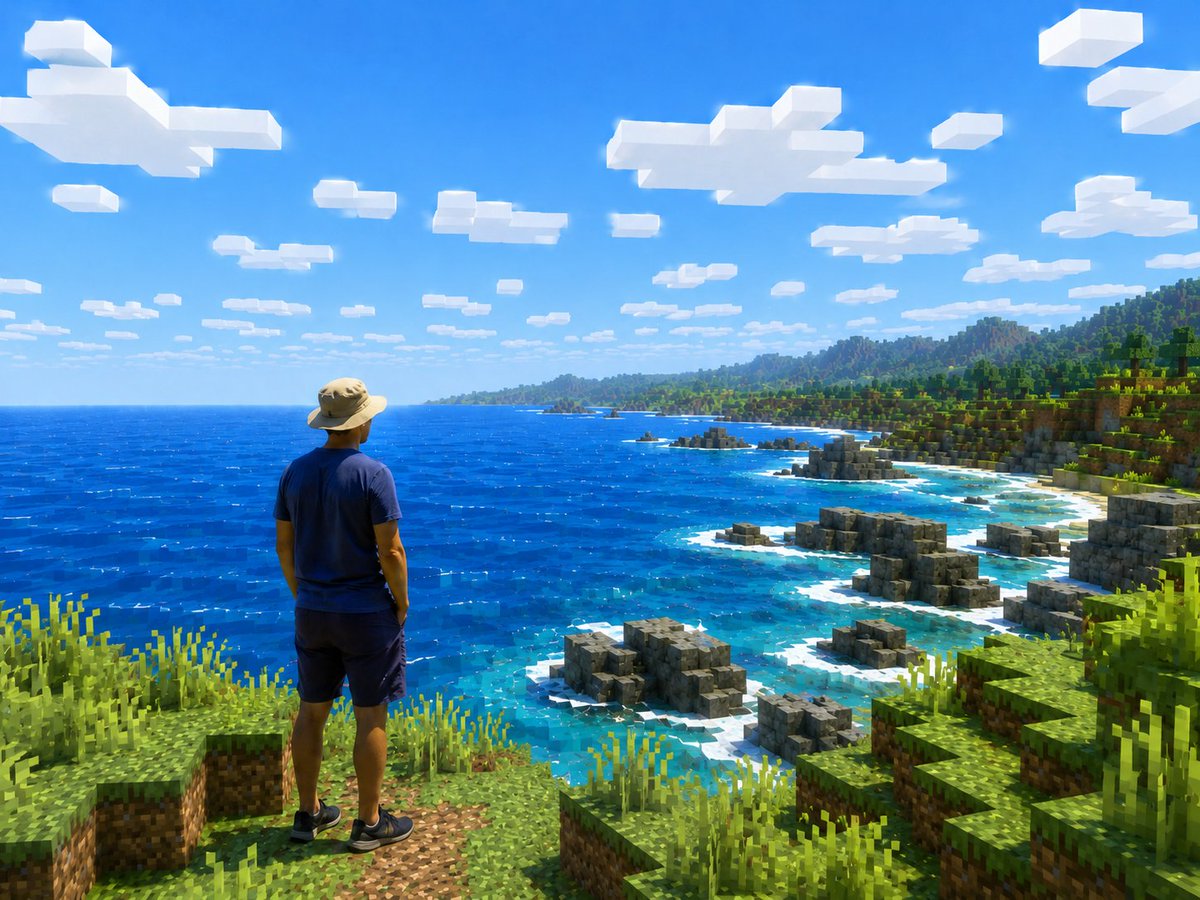
Real Person in Minecraft Coastal World
Generates a photorealistic traveler placed inside a vivid Minecraft-style coastal landscape for surreal travel or game-world edits.
This is a GPT Image 2 prompt case for Portrait & Character. Use the copy-ready prompt below to generate similar visuals, and review Awesome GPT Image 2 Prompts attribution plus commercial-use rights before reuse.
Free 1K preview
Generate one preview image instantly, no sign-up required.
Prompt
Copy-ready prompt
Create a realistic travel-photo composition transformed into a Minecraft-style open-world screenshot. Show one human figure viewed from behind, standing near the lower left foreground on a grassy blocky cliff, looking out over a vast bright blue ocean and rugged voxel coastline. The person should remain photorealistic and natural, wearing {argument name="outfit" default="a tan wide-brim hiking hat, navy blue T-shirt, dark shorts, and black sneakers"}, with relaxed posture and hands by the sides, facing the scenery. The entire environment must be rendered as Minecraft-like cubic blocks: square grass and dirt ledges in the foreground, tall pixelated grass clumps, stepped rocky gray block formations along the shore, turquoise shallow water with white surf around the rocks, a deep cobalt ocean stretching to the horizon, and a green blocky forested coastline with hills and mountains in the distance. Use {argument name="scene location" default="a tropical coastal cliff overlooking the ocean"} as the setting. The sky is vivid clear blue with exactly many flat rectangular white voxel clouds scattered across the upper half, strong midday sunlight, saturated colors, crisp shadows, and high contrast. Camera angle is a wide landscape view from slightly behind and above the person, emphasizing scale and adventure, like a screenshot from an upgraded high-resolution Minecraft shader pack mixed with a real person. Keep the person anatomically realistic, not blocky, while all terrain, water edges, rocks, plants, clouds, and distant mountains are voxel/block-based. No text, no UI, no watermark.Prompt variables
Editable argument placeholders found in the prompt, with their default values.
Best for
- - Portrait & Character visual exploration
- - Image generation and reference-image edits
- - Reusable briefs that keep source attribution visible
Change these parts
- - Subject, product, character, or scene
- - Aspect ratio, camera, lighting, and background
- - Brand, text, color, and output constraints
Recommended model and settings
- - Model: gpt-image-2
- - Input mode: Text to Image
- - Aspect ratio: source
- - Commercial status: review original source
How to use this prompt
- 1. Copy the prompt and preserve its structure for the first test.
- 2. Replace the subject, context, and publishing channel.
- 3. Change one camera, lighting, or style variable per iteration.
- 4. Inspect the output, source, text, and rights before reuse.
Limitations, source, and reuse cautions
- - Generated output is an editable draft, not factual, legal, or rights evidence.
- - Review the linked source, people, brands, logos, text, and third-party media before commercial use.
More cases in this category
Prioritized by category, input mode compatibility, quality, and lower risk.



Reuse and source notes
Use this prompt safely after previewing the case.
- 1.Copy the prompt or open it directly in Dovoo with the generation button.
- 2.Adjust variables, aspect ratio, and reference images for your own use case.
- 3.Before publishing or paid usage, verify source rights, attribution requirements, and brand or likeness risks.
Can I use this prompt commercially?
Commercial-use status is allowed. Review the original source, license, brand constraints, and legal requirements before paid usage.
Where does this case come from?
This case is imported from Awesome GPT Image 2 Prompts; keep attribution visible and check the source URL before reuse.