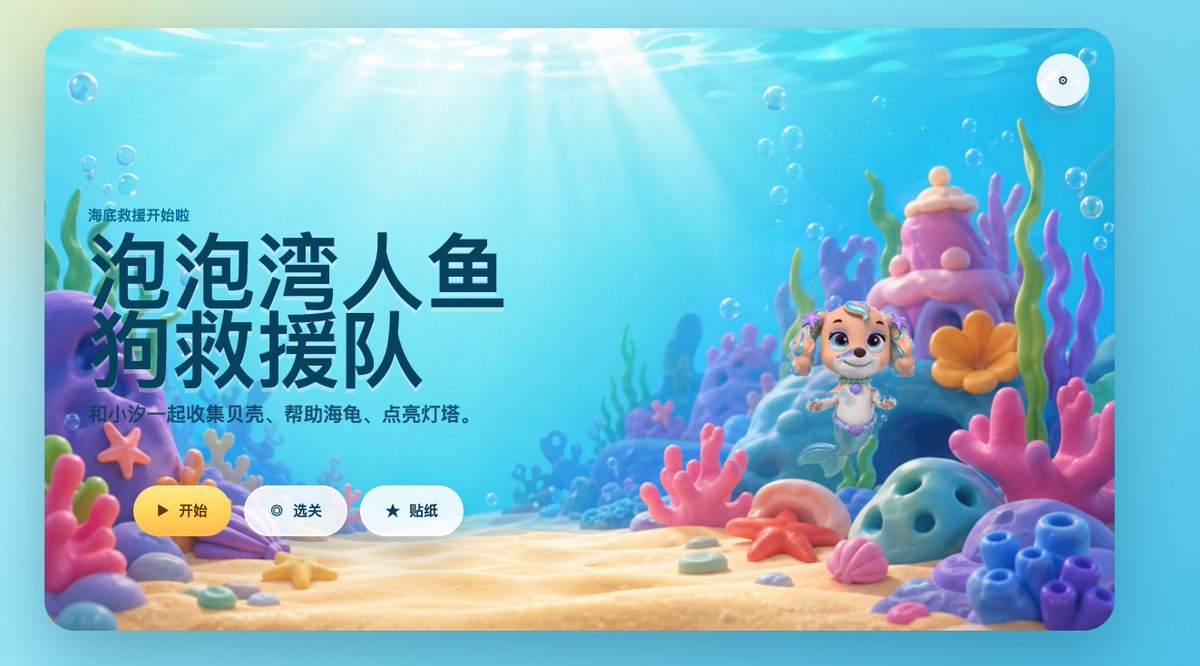
Cute Mermaid Puppy Undersea Game Start Screen
This prompt generates a polished children's underwater game landing screen with Chinese UI text, a mermaid puppy hero, and colorful 3D coral reef scenery for app mockups or game key art.
This is a GPT Image 2 prompt case for Anime & Game. Use the copy-ready prompt below to generate similar visuals, and review Awesome GPT Image 2 Prompts attribution plus commercial-use rights before reuse.
Free 1K preview
Generate one preview image instantly, no sign-up required.
Prompt
Copy-ready prompt
A bright, fantastical 3D underwater game launch screen, placed within a rounded rectangular app window, designed like a refined children's casual game login page. The scene is a colorful seabed, with warm sunlight streaming through clear turquoise water, surrounded by soft bubbles, and soft-toned corals and shells covering the sandy seabed. On the left, prominent large Chinese title text occupies the center of the composition: “Bubble Bay Mermaid Dog Rescue Team,” with a smaller line of text above it reading “Underwater Rescue Begins,” and a subtitle below: “Collect shells, help turtles, and light up the lighthouse with Xiao Wang.” All text uses a simple, modern UI font, with the title in very large dark navy blue characters. On the right, place a charming mermaid puppy character inspired by preschool adventure animation: a smiling dog with cream and light brown fur, large violet eyes, teal accessories on her drooping ears, a purple seashell necklace, and a mint green mermaid tail, floating vertically in the water. The character is surrounded by a magical coral reef environment, containing 10 prominent foreground and midground ocean elements: a purple rock arch on the far left, a pink starfish attached to coral on the left, a lavender clam shell in the lower left corner, a large pink branching coral in the foreground center, a pink shell in the lower right corner, an orange starfish on the beach in the mid-right, a blue porous rock in the foreground on the right, a cluster of blue tubular coral on the far right, a tall purple-pink coral tower behind the character, and a coral flower next to the tower. Use soft shades of water green, turquoise, pink, lavender, peach, and coral orange, presenting a glossy toy texture and soft depth of field. Three rounded UI buttons are arranged horizontally at the bottom left: a yellow main button with a play icon labeled “Start”; a white secondary button with a circular target icon labeled “Level Select”; and a white secondary button with a star icon labeled “Stickers.” In addition, add a small circular settings button with a gear icon in the upper right corner. Overall style: high-end children's mobile game launch screen, playful, healing, cinematic lighting, high-end 3D illustration, friendly and engaging.
Best for
- - Anime & Game visual exploration
- - Image generation and reference-image edits
- - Reusable briefs that keep source attribution visible
Change these parts
- - Subject, product, character, or scene
- - Aspect ratio, camera, lighting, and background
- - Brand, text, color, and output constraints
Recommended model and settings
- - Model: gpt-image-2
- - Input mode: Text to Image
- - Aspect ratio: source
- - Commercial status: review original source
How to use this prompt
- 1. Copy the prompt and preserve its structure for the first test.
- 2. Replace the subject, context, and publishing channel.
- 3. Change one camera, lighting, or style variable per iteration.
- 4. Inspect the output, source, text, and rights before reuse.
Limitations, source, and reuse cautions
- - Generated output is an editable draft, not factual, legal, or rights evidence.
- - Review the linked source, people, brands, logos, text, and third-party media before commercial use.
More cases in this category
Prioritized by category, input mode compatibility, quality, and lower risk.
Reuse and source notes
Use this prompt safely after previewing the case.
- 1.Copy the prompt or open it directly in Dovoo with the generation button.
- 2.Adjust variables, aspect ratio, and reference images for your own use case.
- 3.Before publishing or paid usage, verify source rights, attribution requirements, and brand or likeness risks.
Can I use this prompt commercially?
Commercial-use status is allowed. Review the original source, license, brand constraints, and legal requirements before paid usage.
Where does this case come from?
This case is imported from Awesome GPT Image 2 Prompts; keep attribution visible and check the source URL before reuse.