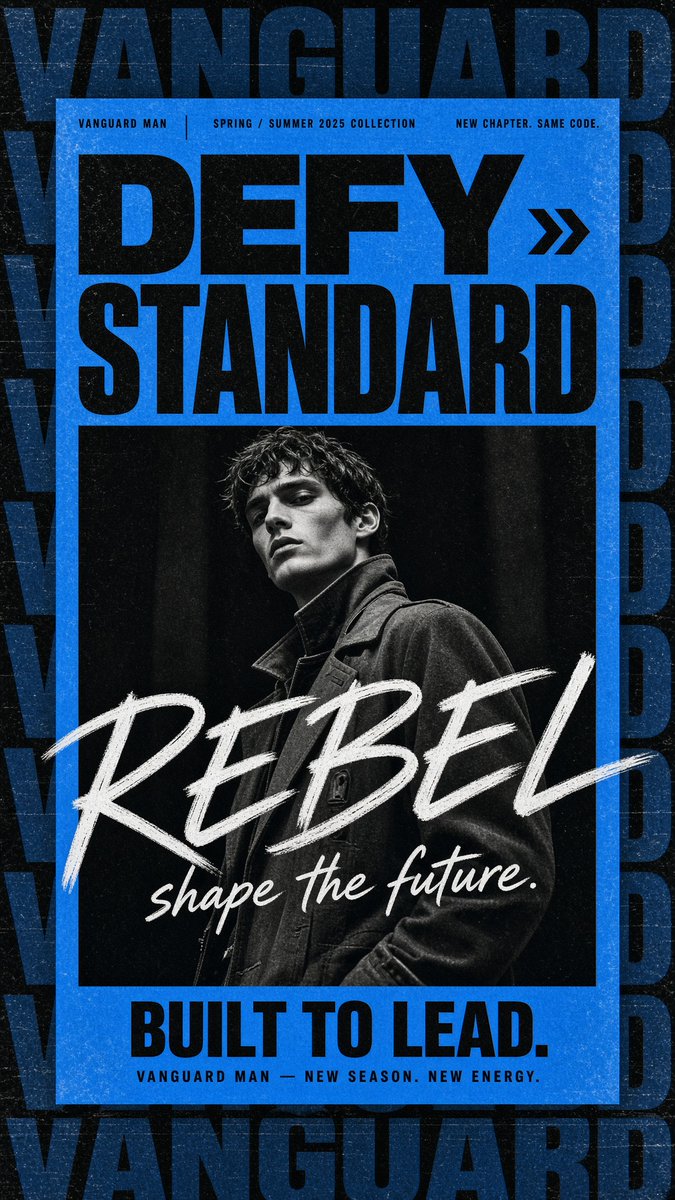
Gritty Vanguard Menswear Poster
Generates a bold blue-and-black streetwear fashion campaign poster with a monochrome male portrait, oversized typography, and distressed print texture.
This is a GPT Image 2 prompt case for Graphic & Poster. Use the copy-ready prompt below to generate similar visuals, and review Awesome GPT Image 2 Prompts attribution plus commercial-use rights before reuse.
Free 1K preview
Generate one preview image instantly, no sign-up required.
Prompt
Copy-ready prompt
Create a gritty high-fashion menswear campaign poster for {argument name="brand name" default="VANGUARD MAN"}, vertical 9:16 canvas. Use a black, distressed background with oversized repeated dark navy-blue block lettering spelling “VANGUARD” stacked and cropped along the top, sides, and bottom like a wallpaper pattern. Center a bright electric-blue rectangular poster panel with a thick blue border and worn print texture. At the top of the blue panel, place three small uppercase microtext labels in a thin condensed sans-serif: left “VANGUARD MAN”, center “SPRING / SUMMER 2025 COLLECTION”, right “NEW CHAPTER. SAME CODE.” separated by thin vertical dividers. Below, set the main headline in huge heavy black condensed sans-serif: {argument name="headline text" default="DEFY STANDARD"}, arranged as two lines, with a black double-chevron arrow icon to the right of “DEFY”. Under the headline, insert one large black-and-white editorial fashion portrait: a young male model with wet tousled dark hair, sharp cheekbones, serious expression, looking slightly downward at camera, wearing a dark structured coat with high collar, dramatic low-key studio lighting, high contrast, grainy monochrome. Across the lower half of the portrait, overlay an oversized rough white brush-script word {argument name="brush word" default="REBEL"} diagonally from left to right, with a smaller white handwritten tagline beneath it: {argument name="script tagline" default="shape the future."}. At the bottom of the blue panel, add a bold black condensed sans-serif slogan {argument name="bottom slogan" default="BUILT TO LEAD."}, and beneath it small spaced uppercase text “VANGUARD MAN — NEW SEASON. NEW ENERGY.” Make the whole design look like a worn screen-printed streetwear poster with visible dust, scratches, paper grain, ink speckles, slight scuffs, and strong black/blue/white contrast. Keep exactly one portrait, one double-chevron icon, three top microtext labels, one headline block, one brush-script overlay, one bottom slogan, and one small footer line; no extra logos or watermarks.Prompt variables
Editable argument placeholders found in the prompt, with their default values.
Best for
- - Graphic & Poster visual exploration
- - Image generation and reference-image edits
- - Reusable briefs that keep source attribution visible
Change these parts
- - Subject, product, character, or scene
- - Aspect ratio, camera, lighting, and background
- - Brand, text, color, and output constraints
Recommended model and settings
- - Model: gpt-image-2
- - Input mode: Text to Image
- - Aspect ratio: source
- - Commercial status: review original source
How to use this prompt
- 1. Copy the prompt and preserve its structure for the first test.
- 2. Replace the subject, context, and publishing channel.
- 3. Change one camera, lighting, or style variable per iteration.
- 4. Inspect the output, source, text, and rights before reuse.
Limitations, source, and reuse cautions
- - Generated output is an editable draft, not factual, legal, or rights evidence.
- - Review the linked source, people, brands, logos, text, and third-party media before commercial use.
More cases in this category
Prioritized by category, input mode compatibility, quality, and lower risk.






Reuse and source notes
Use this prompt safely after previewing the case.
- 1.Copy the prompt or open it directly in Dovoo with the generation button.
- 2.Adjust variables, aspect ratio, and reference images for your own use case.
- 3.Before publishing or paid usage, verify source rights, attribution requirements, and brand or likeness risks.
Can I use this prompt commercially?
Commercial-use status is allowed. Review the original source, license, brand constraints, and legal requirements before paid usage.
Where does this case come from?
This case is imported from Awesome GPT Image 2 Prompts; keep attribution visible and check the source URL before reuse.