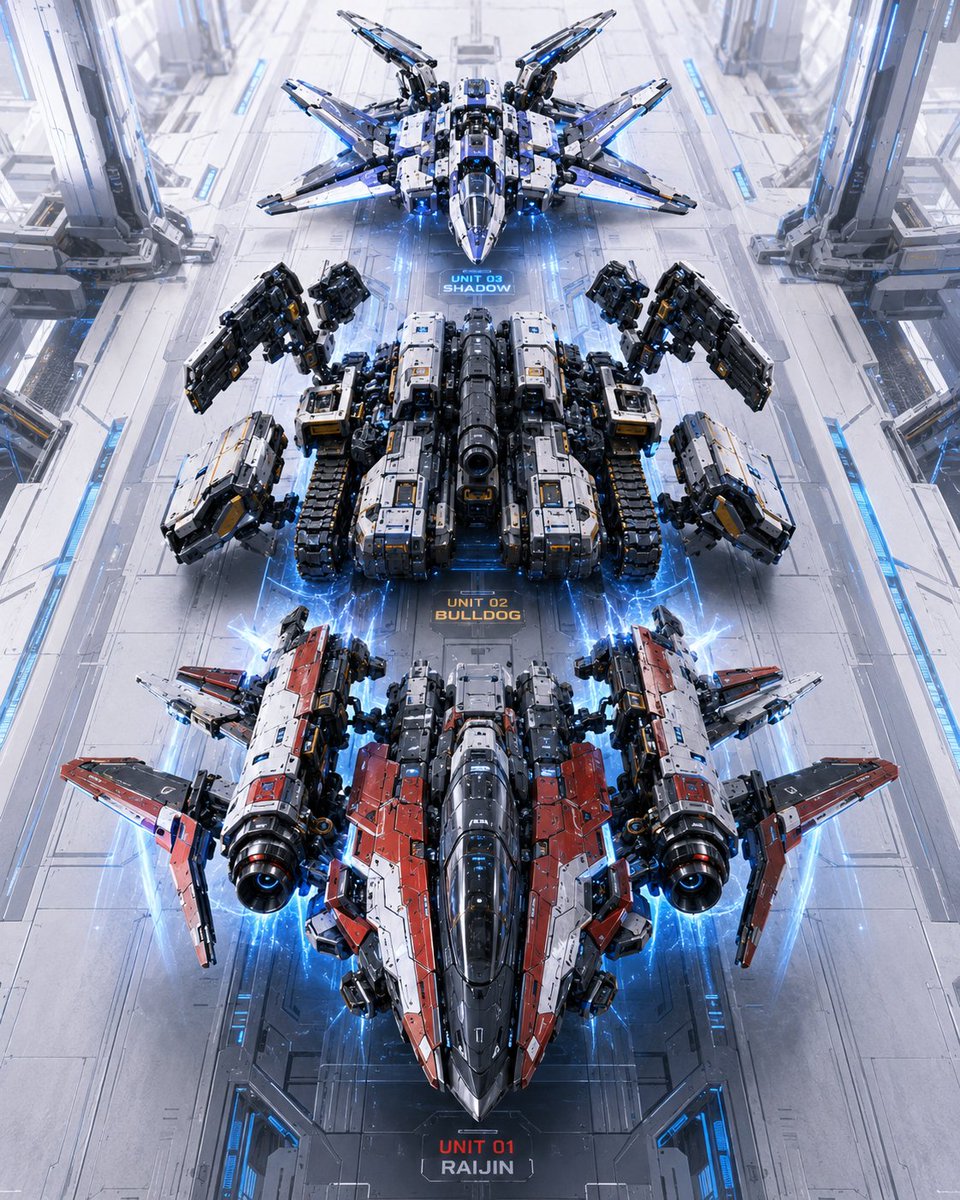
Three Mecha Combination Lineup
A cinematic sci-fi hangar scene showing three labeled transformable mecha units lined up for a robot combination sequence.
This is a GPT Image 2 prompt case for Anime & Game. Use the copy-ready prompt below to generate similar visuals, and review Awesome GPT Image 2 Prompts attribution plus commercial-use rights before reuse.
Free 1K preview
Generate one preview image instantly, no sign-up required.
Prompt
Copy-ready prompt
Create a high-detail vertical sci-fi concept art scene showing a “combination sequence” lineup of three futuristic transformable combat mecha vehicles inside a vast white-and-silver orbital hangar. Use a centered, perfectly symmetrical top-down / high three-quarter perspective looking down a long runway, with the three units aligned in a straight vertical column from top to bottom, as if waiting to combine into one giant robot. The hangar floor is glossy pale metal with panel seams, blue illuminated guide strips, recessed tracks, and tall mechanical support pylons along both left and right sides. Add electric blue energy arcs, glowing thruster halos, and holographic aura effects around each unit.

Subject details: include exactly 3 discrete mecha units, each with a visible floor label directly beneath or near it: 1) top unit labeled “UNIT 03 SHADOW”, a sleek white, black, and blue winged stealth fighter-drone mecha with eight sharp radiating wing/fin assemblies and a pointed nose; 2) middle unit labeled “UNIT 02 BULLDOG”, a heavy black, gray, and white tank-like armored mecha with caterpillar treads, bulky rectangular shoulder weapons, large articulated mechanical arms raised outward, and a central cannon barrel; 3) bottom unit labeled “UNIT 01 RAIJIN”, the largest red, white, black, and gunmetal jet-mecha with twin cylindrical engine pods, angular red wing armor, a long dark cockpit nose, and blue thruster glow. Make the bottom unit dominate the foreground, the middle unit occupy the center, and the top unit appear smaller in the distance.

Text content: render the three labels clearly in a compact futuristic HUD font on the floor: “UNIT 03 SHADOW” in blue, “UNIT 02 BULLDOG” in orange, and “UNIT 01 RAIJIN” in red and white. Optional customization: the unit names may be {argument name="unit names" default="UNIT 03 SHADOW, UNIT 02 BULLDOG, UNIT 01 RAIJIN"}.

Visual style: ultra-detailed hard-surface mecha design, cinematic Japanese robot-anime inspiration, photorealistic CGI rendering, crisp panel lines, micro decals, metallic bevels, exposed pistons, weapon mounts, glowing blue LEDs, volumetric light, clean futuristic industrial environment, high contrast but bright white hangar lighting. Use a vertical 4:5 composition, symmetrical layout, sharp focus throughout, no people, no smoke obscuring the units, no extra robots beyond the three listed units.
Prompt variables
Editable argument placeholders found in the prompt, with their default values.
Best for
- - Anime & Game visual exploration
- - Image generation and reference-image edits
- - Reusable briefs that keep source attribution visible
Change these parts
- - Subject, product, character, or scene
- - Aspect ratio, camera, lighting, and background
- - Brand, text, color, and output constraints
Recommended model and settings
- - Model: gpt-image-2
- - Input mode: Text to Image
- - Aspect ratio: source
- - Commercial status: review original source
How to use this prompt
- 1. Copy the prompt and preserve its structure for the first test.
- 2. Replace the subject, context, and publishing channel.
- 3. Change one camera, lighting, or style variable per iteration.
- 4. Inspect the output, source, text, and rights before reuse.
Limitations, source, and reuse cautions
- - Generated output is an editable draft, not factual, legal, or rights evidence.
- - Review the linked source, people, brands, logos, text, and third-party media before commercial use.
More cases in this category
Prioritized by category, input mode compatibility, quality, and lower risk.

Reuse and source notes
Use this prompt safely after previewing the case.
- 1.Copy the prompt or open it directly in Dovoo with the generation button.
- 2.Adjust variables, aspect ratio, and reference images for your own use case.
- 3.Before publishing or paid usage, verify source rights, attribution requirements, and brand or likeness risks.
Can I use this prompt commercially?
Commercial-use status is allowed. Review the original source, license, brand constraints, and legal requirements before paid usage.
Where does this case come from?
This case is imported from Awesome GPT Image 2 Prompts; keep attribution visible and check the source URL before reuse.