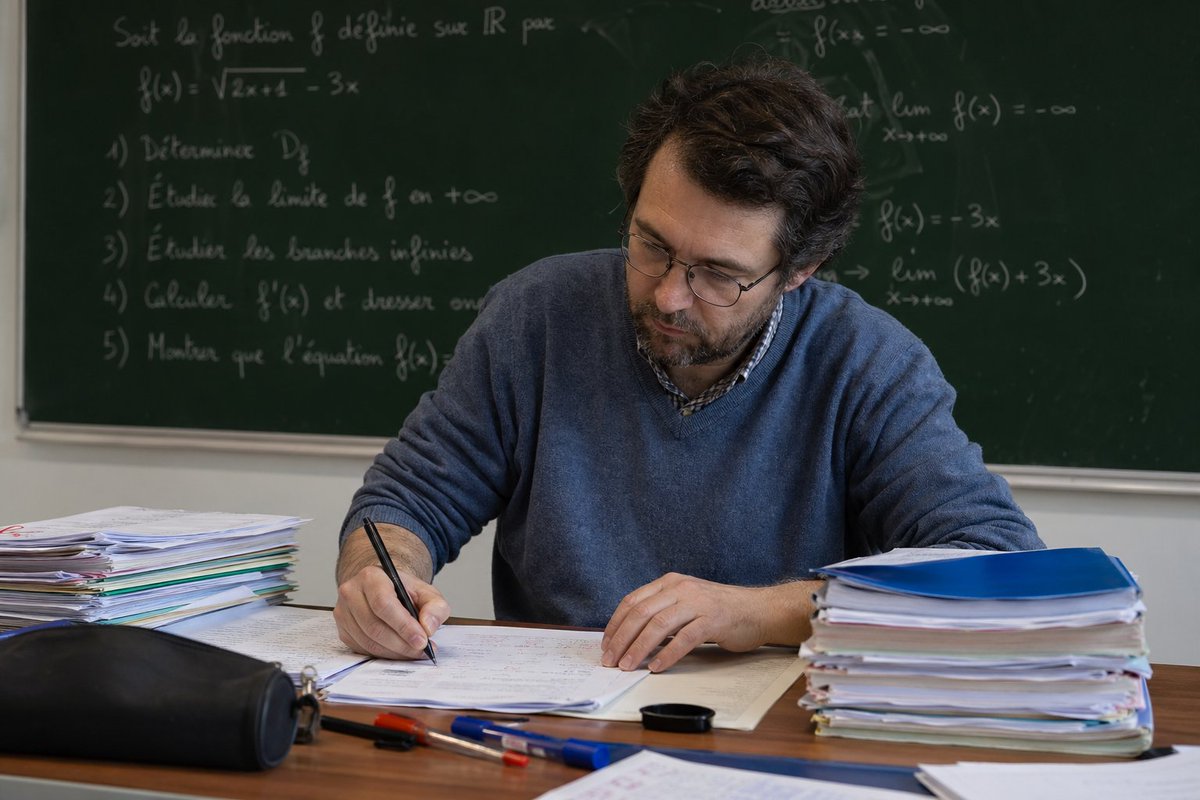
Math Teacher Grading Papers in Classroom
This prompt generates a realistic classroom photo of a math teacher correcting exams at his desk, useful for editorial, education, or academic-themed imagery.
This is a GPT Image 2 prompt case for Portrait & Character. Use the copy-ready prompt below to generate similar visuals, and review Awesome GPT Image 2 Prompts attribution plus commercial-use rights before reuse.
Free 1K preview
Generate one preview image instantly, no sign-up required.
Prompt
Copy-ready prompt
A realistic classroom photo of a middle-aged male math teacher seated at a wooden desk, grading student papers with his right hand while leaning slightly forward. He has wavy dark brown hair, light skin, and wears a muted blue crew-neck sweater over a checked collared shirt. Show every face clearly with natural, detailed facial features. On the desk are 2 tall stacks of paper and folders, one on the left and one on the right, an open exam sheet in front of him, 3 loose pens in the foreground in blue, red, and transparent blue, 1 black zip pencil case at the front left, and 1 small black round cap or lid near the center-right of the desk. Behind him is a large dark green chalkboard filled with handwritten French mathematics notes and formulas in white chalk, including a function definition, a square root expression, a list of 5 numbered tasks, and limit notation. The room has soft natural indoor lighting, shallow depth of field, and a documentary-style academic atmosphere. Composition is landscape, medium shot, teacher centered, desk in the foreground, chalkboard spanning the entire background, highly realistic photography.
Best for
- - Portrait & Character visual exploration
- - Image generation and reference-image edits
- - Reusable briefs that keep source attribution visible
Change these parts
- - Subject, product, character, or scene
- - Aspect ratio, camera, lighting, and background
- - Brand, text, color, and output constraints
Recommended model and settings
- - Model: gpt-image-2
- - Input mode: Text to Image
- - Aspect ratio: source
- - Commercial status: review original source
How to use this prompt
- 1. Copy the prompt and preserve its structure for the first test.
- 2. Replace the subject, context, and publishing channel.
- 3. Change one camera, lighting, or style variable per iteration.
- 4. Inspect the output, source, text, and rights before reuse.
Limitations, source, and reuse cautions
- - Generated output is an editable draft, not factual, legal, or rights evidence.
- - Review the linked source, people, brands, logos, text, and third-party media before commercial use.
More cases in this category
Prioritized by category, input mode compatibility, quality, and lower risk.



Reuse and source notes
Use this prompt safely after previewing the case.
- 1.Copy the prompt or open it directly in Dovoo with the generation button.
- 2.Adjust variables, aspect ratio, and reference images for your own use case.
- 3.Before publishing or paid usage, verify source rights, attribution requirements, and brand or likeness risks.
Can I use this prompt commercially?
Commercial-use status is allowed. Review the original source, license, brand constraints, and legal requirements before paid usage.
Where does this case come from?
This case is imported from Awesome GPT Image 2 Prompts; keep attribution visible and check the source URL before reuse.