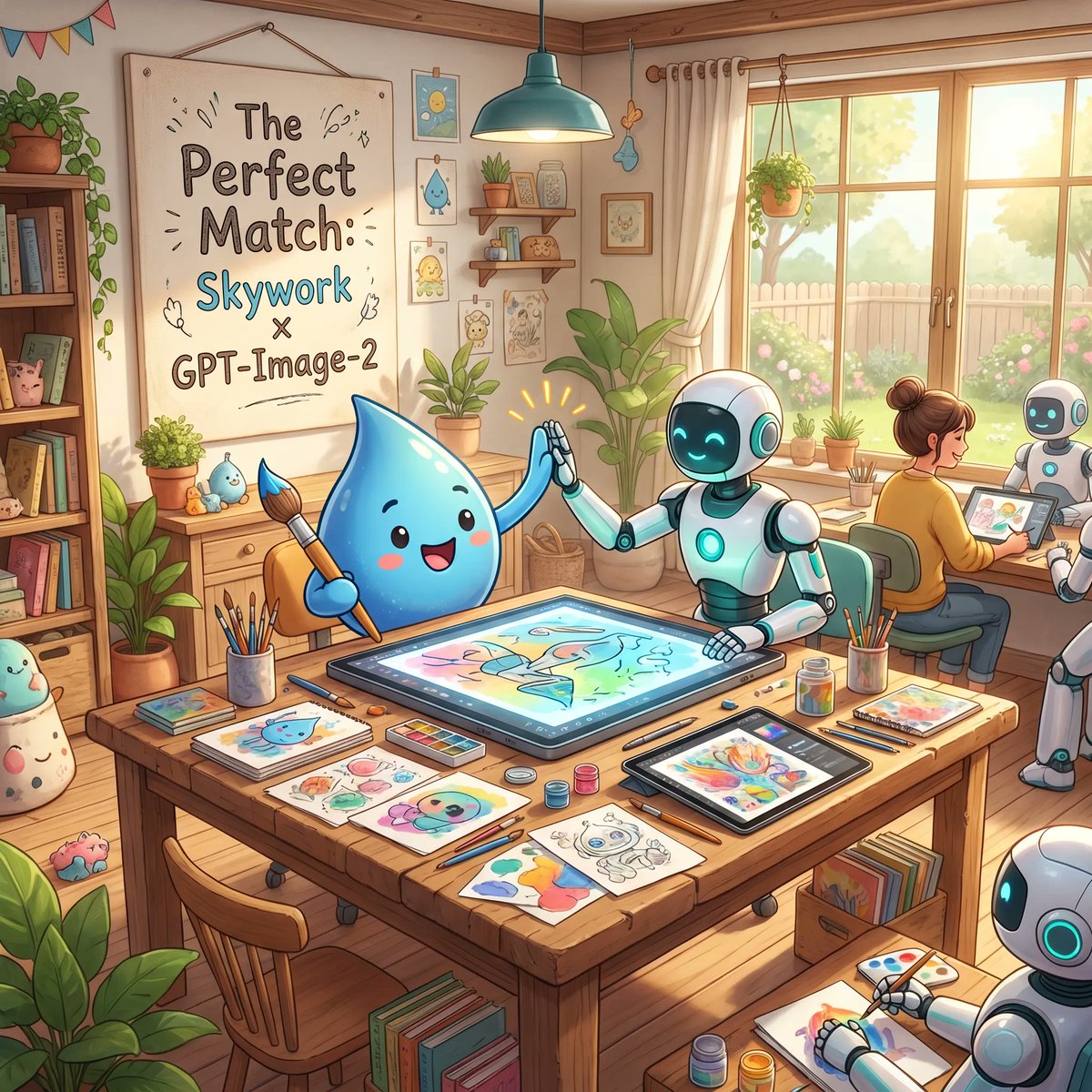
Cozy AI Art Studio Collaboration
A charming promotional illustration of a mascot and robots creating art together in a warm studio, ideal for showcasing creative AI tools or brand collaborations.
This is a GPT Image 2 prompt case for Illustration & Art. Use the copy-ready prompt below to generate similar visuals, and review Awesome GPT Image 2 Prompts attribution plus commercial-use rights before reuse.
Free 1K preview
Generate one preview image instantly, no sign-up required.
Prompt
Copy-ready prompt
A warm, whimsical digital illustration of a cozy sunlit art studio showing a friendly collaboration between a cute blue water-drop mascot and cheerful white-and-teal robots. In the foreground, a large wooden worktable is covered with art supplies and finished sketches: exactly 3 paintbrush cups, multiple pencils and pens, watercolor palettes, small paint jars, loose character drawings, and 2 digital drawing tablets. At the center of the table, one large horizontal pen-display tablet shows a colorful pastel illustration in progress. The blue droplet character, with glossy rounded body, tiny arms, rosy cheeks, and a happy open smile, sits on the left holding a paintbrush and giving a high-five to a humanoid robot seated on the right. The robot has a smooth white body with teal glowing accents, a dark face screen with bright cyan smiling eyes, and one hand touching the tablet while the other meets the mascot’s hand, with small celebratory spark lines around the high-five. In the midground on the right, exactly 2 more robots are visible: one seated beside a human artist and one partially visible in the lower-right corner drawing on paper. The human artist is seen from behind, hair in a bun, sitting at a desk near the window and working on a tablet. The studio is filled with cozy decorative details: a large framed poster on the left wall reading "The Perfect Match: Skywork x GPT-Image-2", a bookshelf packed with books and cute objects, potted plants throughout the room, framed mini art prints, wall shelves with jars and decor, hanging bunting in the upper left, a teal pendant lamp above the table, and a large window on the right with cream curtains revealing a bright garden, fence, and soft greenery outside. Use soft golden morning light, pastel colors, polished children’s-book-style rendering, clean linework, gentle shading, inviting creative atmosphere, highly detailed props, and a polished cinematic composition that feels like an uplifting promotional illustration for {argument name="brand collaboration text" default="Skywork x GPT-Image-2"}.Prompt variables
Editable argument placeholders found in the prompt, with their default values.
Best for
- - Illustration & Art visual exploration
- - Image generation and reference-image edits
- - Reusable briefs that keep source attribution visible
Change these parts
- - Subject, product, character, or scene
- - Aspect ratio, camera, lighting, and background
- - Brand, text, color, and output constraints
Recommended model and settings
- - Model: gpt-image-2
- - Input mode: Text to Image
- - Aspect ratio: source
- - Commercial status: review original source
How to use this prompt
- 1. Copy the prompt and preserve its structure for the first test.
- 2. Replace the subject, context, and publishing channel.
- 3. Change one camera, lighting, or style variable per iteration.
- 4. Inspect the output, source, text, and rights before reuse.
Limitations, source, and reuse cautions
- - Generated output is an editable draft, not factual, legal, or rights evidence.
- - Review the linked source, people, brands, logos, text, and third-party media before commercial use.
More cases in this category
Prioritized by category, input mode compatibility, quality, and lower risk.





Reuse and source notes
Use this prompt safely after previewing the case.
- 1.Copy the prompt or open it directly in Dovoo with the generation button.
- 2.Adjust variables, aspect ratio, and reference images for your own use case.
- 3.Before publishing or paid usage, verify source rights, attribution requirements, and brand or likeness risks.
Can I use this prompt commercially?
Commercial-use status is allowed. Review the original source, license, brand constraints, and legal requirements before paid usage.
Where does this case come from?
This case is imported from Awesome GPT Image 2 Prompts; keep attribution visible and check the source URL before reuse.