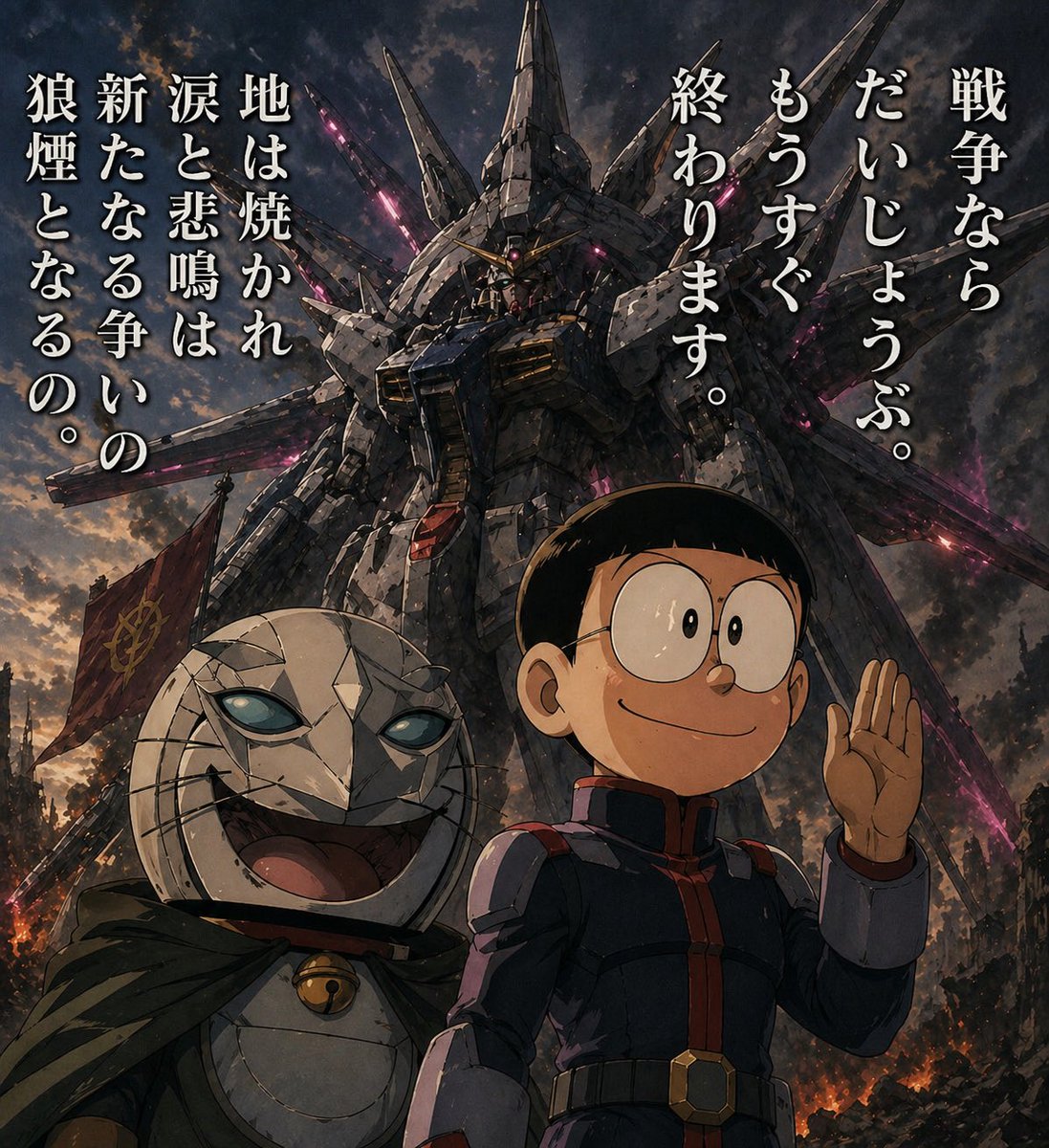
Manga Panel to Apocalyptic Mecha Poster
This prompt transforms a simple reference manga panel into a cinematic anime war poster with the same characters and dialogue but a newly added giant mecha battlefield setting.
This is a GPT Image 2 prompt case for Anime & Game. Use the copy-ready prompt below to generate similar visuals, and review Awesome GPT Image 2 Prompts attribution plus commercial-use rights before reuse.
Free 1K preview
Generate one preview image instantly, no sign-up required.
Free text preview doesn’t preserve reference-image consistency.
Prompt
Copy-ready prompt
Using the provided reference image, remake the original manga panel as a dramatic cinematic anime key visual. Keep the same 2 characters, their relative placement, and the exact Japanese dialogue from the speech bubbles, but remove the manga panel borders and speech balloons and recompose the text as 2 large vertical copy blocks floating in the sky: on the right, 「戦争なら だいじょうぶ。 もうすぐ 終わります。」; on the left, 「地は焼かれ 涙と悲鳴は 新たなる争いの 狼煙となるの。」 Transform the simple black-and-white drawing into a highly detailed painted scene with realistic lighting, weathered textures, and an apocalyptic battlefield atmosphere at dusk. Replace the plain background with a colossal Gundam-like mecha towering behind them, covered in sharp wing-like protrusions and glowing magenta energy cracks, with smoke, embers, ruined city debris, and a dark cloudy sky. Upgrade the boy into a full-color anime version wearing a dark military-style uniform with red trim, still smiling and raising one hand. Upgrade the cat-like masked character into a sinister but expressive full-color figure with cracked white armor-like face plating, glowing pale blue eyes, a wide grin, a dark hooded cloak, and a small bell at the neck. Add a red war flag near the lower left background. Make it feel like an epic war poster, low-angle composition, ultra-detailed, high contrast, gritty, ominous, and cinematic.
Best for
- - Anime & Game visual exploration
- - Image generation and reference-image edits
- - Reusable briefs that keep source attribution visible
Change these parts
- - Subject, product, character, or scene
- - Aspect ratio, camera, lighting, and background
- - Brand, text, color, and output constraints
Recommended model and settings
- - Model: gpt-image-2
- - Input mode: Image to Image
- - Aspect ratio: source
- - Commercial status: review original source
How to use this prompt
- 1. Copy the prompt and preserve its structure for the first test.
- 2. Replace the subject, context, and publishing channel.
- 3. Change one camera, lighting, or style variable per iteration.
- 4. Inspect the output, source, text, and rights before reuse.
Limitations, source, and reuse cautions
- - Generated output is an editable draft, not factual, legal, or rights evidence.
- - Review the linked source, people, brands, logos, text, and third-party media before commercial use.
More cases in this category
Prioritized by category, input mode compatibility, quality, and lower risk.



Reuse and source notes
Use this prompt safely after previewing the case.
- 1.Copy the prompt or open it directly in Dovoo with the generation button.
- 2.Adjust variables, aspect ratio, and reference images for your own use case.
- 3.Before publishing or paid usage, verify source rights, attribution requirements, and brand or likeness risks.
Can I use this prompt commercially?
Commercial-use status is allowed. Review the original source, license, brand constraints, and legal requirements before paid usage.
Where does this case come from?
This case is imported from Awesome GPT Image 2 Prompts; keep attribution visible and check the source URL before reuse.