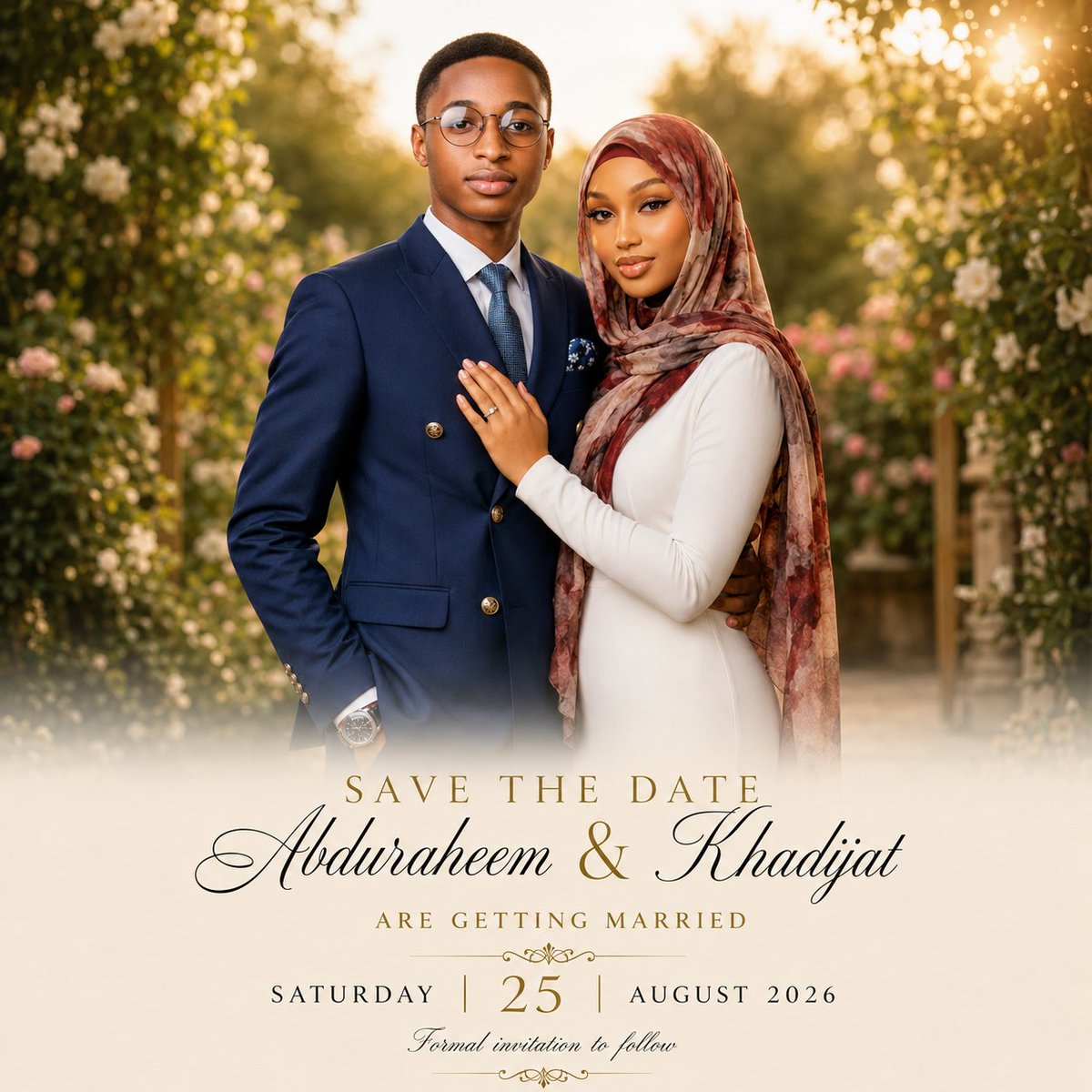
Luxury Garden Save-the-Date Card
Generates a romantic editorial wedding save-the-date card with a golden-hour couple portrait and elegant calligraphy typography.
This is a GPT Image 2 prompt case for Graphic & Poster. Use the copy-ready prompt below to generate similar visuals, and review Awesome GPT Image 2 Prompts attribution plus commercial-use rights before reuse.
Free 1K preview
Generate one preview image instantly, no sign-up required.
Prompt
Copy-ready prompt
Create a premium romantic save-the-date editorial photo card for a Muslim couple. Use a square 1:1 canvas with a luxurious wedding stationery look. The top two-thirds should be a warm golden-hour portrait of a young Black couple standing close together in a lush garden aisle framed by flowering greenery and soft bokeh sunlight. The groom stands on the left, facing forward with a calm elegant expression, wearing round glasses, a navy double-breasted suit with gold buttons, white dress shirt, blue tie, pocket square, and wristwatch. The bride stands on the right, leaning into him with one hand on his chest showing a ring, wearing a fitted long-sleeve ivory dress and a flowing muted rose-and-brown patterned hijab, with polished bridal makeup and a serene smile. The scene should feel cinematic, high-end, softly retouched, and photorealistic, with shallow depth of field, creamy highlights, warm sun flare in the upper right, and white/pink roses in the background. The lower third should fade into a soft ivory mist overlay for typography. Add centered elegant wedding text: small spaced serif uppercase “SAVE THE DATE” in gold; below it, very large black calligraphy names “{argument name="couple names" default="Abduraheem & Khadijat"}”; below that, small spaced gold serif uppercase “ARE GETTING MARRIED”; then a date line with “SATURDAY” on the left, a large gold “{argument name="day number" default="25"}” in the center, and “{argument name="month and year" default="AUGUST 2026"}” on the right, separated by thin vertical gold lines. Add delicate gold ornamental flourishes above and below the date area, and a small cursive line at the bottom reading “{argument name="bottom note" default="Formal invitation to follow"}”. Keep the card refined and uncluttered, with perfect typography alignment, no extra text, no watermark, and no border.Prompt variables
Editable argument placeholders found in the prompt, with their default values.
Best for
- - Graphic & Poster visual exploration
- - Image generation and reference-image edits
- - Reusable briefs that keep source attribution visible
Change these parts
- - Subject, product, character, or scene
- - Aspect ratio, camera, lighting, and background
- - Brand, text, color, and output constraints
Recommended model and settings
- - Model: gpt-image-2
- - Input mode: Text to Image
- - Aspect ratio: source
- - Commercial status: review original source
How to use this prompt
- 1. Copy the prompt and preserve its structure for the first test.
- 2. Replace the subject, context, and publishing channel.
- 3. Change one camera, lighting, or style variable per iteration.
- 4. Inspect the output, source, text, and rights before reuse.
Limitations, source, and reuse cautions
- - Generated output is an editable draft, not factual, legal, or rights evidence.
- - Review the linked source, people, brands, logos, text, and third-party media before commercial use.
More cases in this category
Prioritized by category, input mode compatibility, quality, and lower risk.





Reuse and source notes
Use this prompt safely after previewing the case.
- 1.Copy the prompt or open it directly in Dovoo with the generation button.
- 2.Adjust variables, aspect ratio, and reference images for your own use case.
- 3.Before publishing or paid usage, verify source rights, attribution requirements, and brand or likeness risks.
Can I use this prompt commercially?
Commercial-use status is allowed. Review the original source, license, brand constraints, and legal requirements before paid usage.
Where does this case come from?
This case is imported from Awesome GPT Image 2 Prompts; keep attribution visible and check the source URL before reuse.