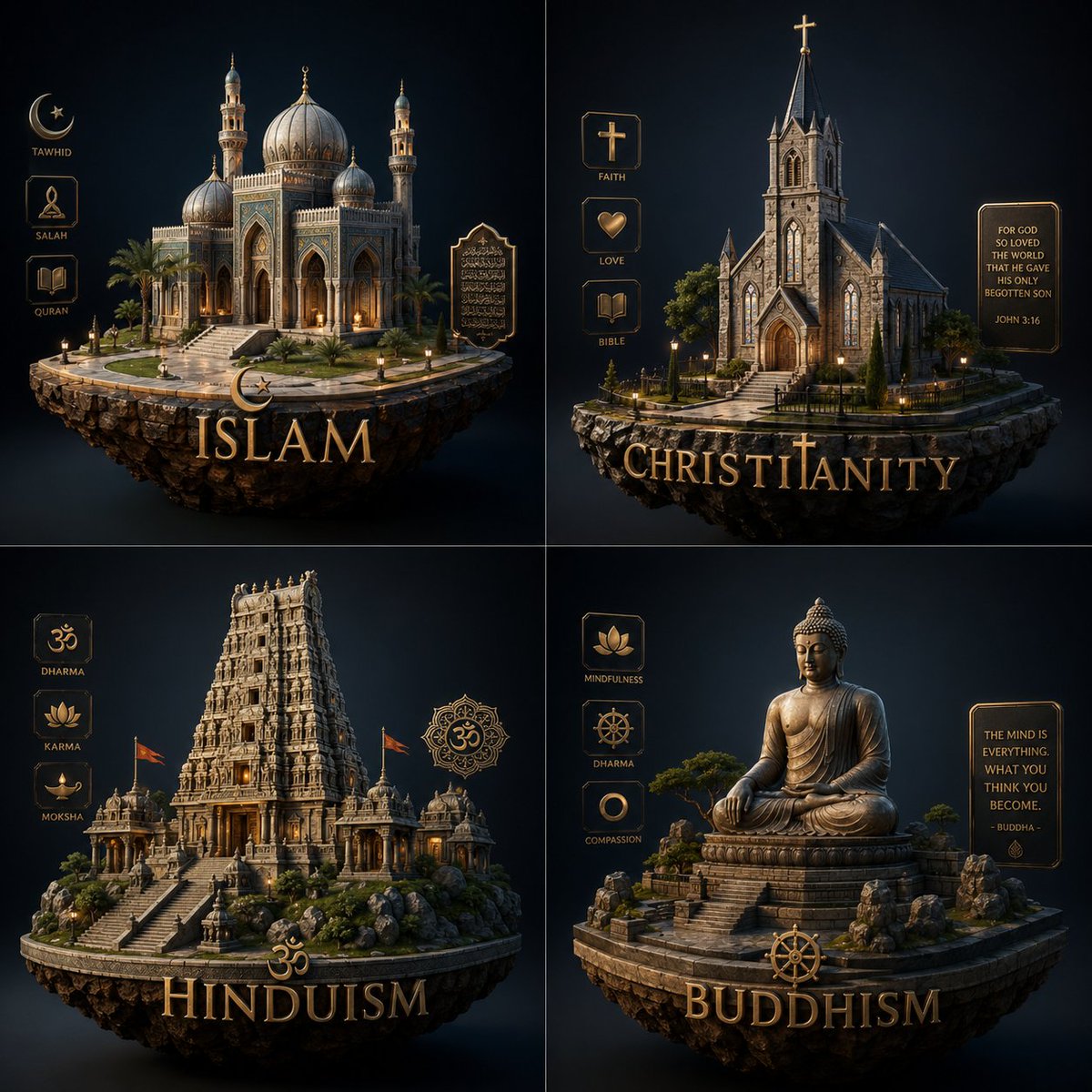
Luxury Religion Concept Poster Grid
A premium four-panel infographic-style artwork visualizing major religions as floating monument islands, ideal for conceptual editorial art, social posts, or AI image model comparisons.
This is a GPT Image 2 prompt case for Graphic & Poster. Use the copy-ready prompt below to generate similar visuals, and review Awesome GPT Image 2 Prompts attribution plus commercial-use rights before reuse.
Free 1K preview
Generate one preview image instantly, no sign-up required.
Prompt
Copy-ready prompt
Create a luxurious concept-entity infographic poster about the {argument name="theme" default="religion"}, arranged as a clean 2x2 grid on a deep navy-to-black cinematic background. Each quadrant contains one floating stone island rendered as a highly detailed miniature monument scene, lit with warm golden rim light and soft volumetric shadows, in an elegant dark fantasy editorial style with realistic materials, symmetrical composition, and refined gold typography. Top left: Islam, featuring a grand ornate mosque with a large central dome, smaller domes, two minarets, arched entry, palm trees, stone steps, and glowing windows, on a circular floating island; on the left side, exactly 3 vertical icon labels reading “TAWHID”, “SALAH”, and “QURAN”; on the right side, one decorative plaque with Arabic calligraphy; at the bottom, a crescent symbol above the large gold title “ISLAM”. Top right: Christianity, featuring a Gothic stone church with tall central steeple topped by a cross, pointed arch doorway, stained-glass style windows, small trees, and a fenced stone path on a floating island; on the left side, exactly 3 vertical icon labels reading “FAITH”, “LOVE”, and “BIBLE”; on the right side, one framed quote plaque reading “FOR GOD SO LOVED THE WORLD THAT HE GAVE HIS ONLY BEGOTTEN SON” and “JOHN 3:16”; at the bottom, a cross symbol integrated into the large gold title “CHRISTIANITY”. Bottom left: Hinduism, featuring an elaborate South Indian temple tower rising above a stepped stone complex with smaller shrines, flags, rocky landscaping, and warm interior glow on a floating island; on the left side, exactly 3 vertical icon labels reading “DHARMA”, “KARMA”, and “MOKSHA”; on the right side, one ornamental mandala-like emblem with the Om symbol; at the bottom, an Om symbol above the large gold title “HINDUISM”. Bottom right: Buddhism, featuring a monumental seated Buddha statue in meditation on a layered stone pedestal, surrounded by rocks, bonsai-like trees, and temple steps on a floating island; on the left side, exactly 3 vertical icon labels reading “MINDFULNESS”, “DHARMA”, and “COMPASSION”; on the right side, one framed quote plaque reading “THE MIND IS EVERYTHING. WHAT YOU THINK YOU BECOME. - BUDDHA -”; at the bottom, a Dharma wheel above the large gold title “BUDDHISM”. Keep all 4 sections visually consistent, with premium gold UI frames, engraved icon badges, polished serif lettering, dramatic studio lighting, high contrast, subtle glow, and immaculate centered presentation.Prompt variables
Editable argument placeholders found in the prompt, with their default values.
Best for
- - Graphic & Poster visual exploration
- - Image generation and reference-image edits
- - Reusable briefs that keep source attribution visible
Change these parts
- - Subject, product, character, or scene
- - Aspect ratio, camera, lighting, and background
- - Brand, text, color, and output constraints
Recommended model and settings
- - Model: gpt-image-2
- - Input mode: Text to Image
- - Aspect ratio: source
- - Commercial status: review original source
How to use this prompt
- 1. Copy the prompt and preserve its structure for the first test.
- 2. Replace the subject, context, and publishing channel.
- 3. Change one camera, lighting, or style variable per iteration.
- 4. Inspect the output, source, text, and rights before reuse.
Limitations, source, and reuse cautions
- - Generated output is an editable draft, not factual, legal, or rights evidence.
- - Review the linked source, people, brands, logos, text, and third-party media before commercial use.
More cases in this category
Prioritized by category, input mode compatibility, quality, and lower risk.





Reuse and source notes
Use this prompt safely after previewing the case.
- 1.Copy the prompt or open it directly in Dovoo with the generation button.
- 2.Adjust variables, aspect ratio, and reference images for your own use case.
- 3.Before publishing or paid usage, verify source rights, attribution requirements, and brand or likeness risks.
Can I use this prompt commercially?
Commercial-use status is allowed. Review the original source, license, brand constraints, and legal requirements before paid usage.
Where does this case come from?
This case is imported from Awesome GPT Image 2 Prompts; keep attribution visible and check the source URL before reuse.