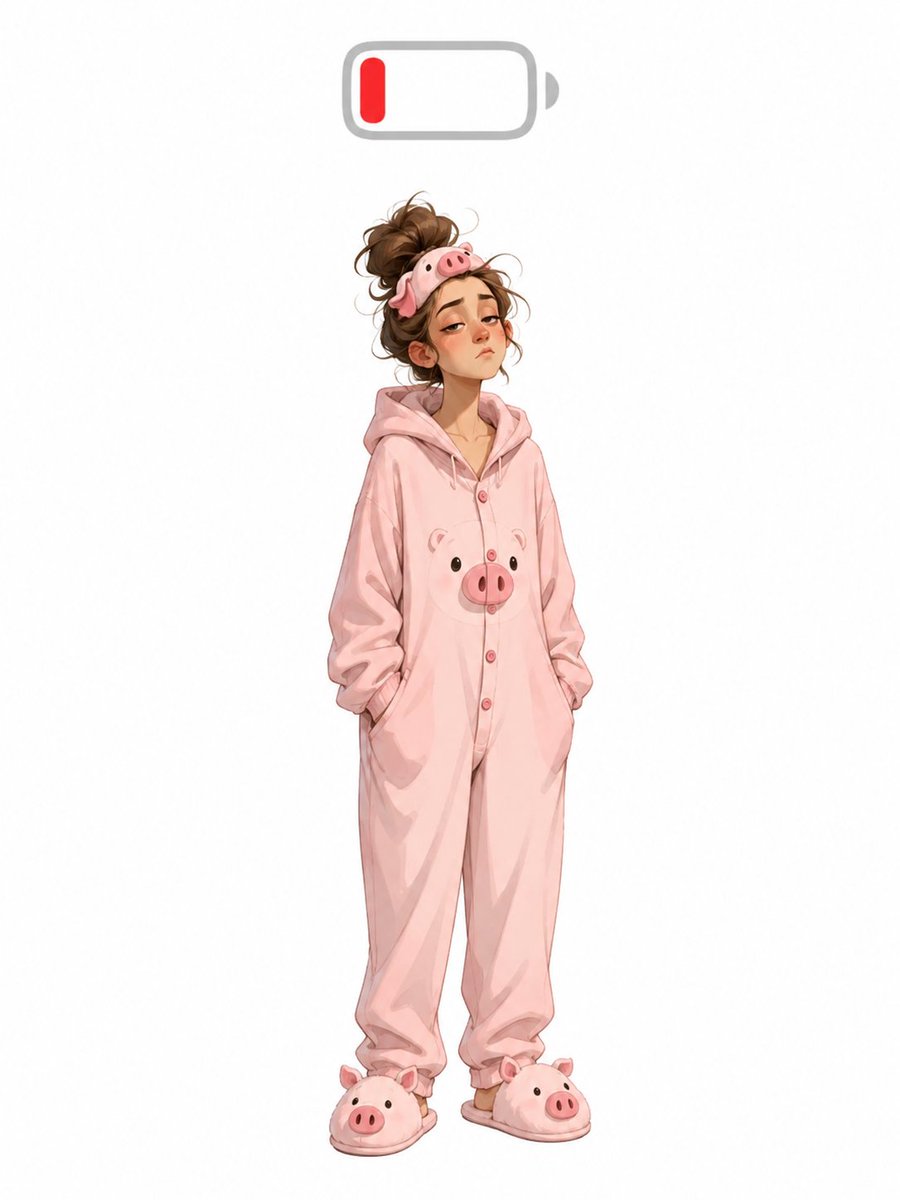
Low Battery Pig Pajama Character
Generates a cute full-body low-energy character illustration in pig pajamas with a low battery icon overhead.
This is a GPT Image 2 prompt case for Portrait & Character. Use the copy-ready prompt below to generate similar visuals, and review Awesome GPT Image 2 Prompts attribution plus commercial-use rights before reuse.
Free 1K preview
Generate one preview image instantly, no sign-up required.
Prompt
Copy-ready prompt
Create a full-body whimsical fashion character illustration on a clean white background: a tired young woman standing front-facing with a slight slouch and both hands tucked into the pockets of an oversized {argument name="pajama color" default="pastel pink"} hooded onesie. The onesie has a cute pig theme with exactly 1 pig face printed on the chest, a row of small pink buttons down the front, loose wrinkled fabric, and baggy legs gathered near the ankles. She wears exactly 2 matching plush pig slippers, one on each foot, each with a rounded pig snout and tiny ears. Her messy {argument name="hair color" default="brown"} hair is piled into a loose bun with flyaway strands, and she wears exactly 1 pig sleep mask pushed up on top of her head. Her face is covered by a centered skin-toned rectangular blur, hiding all facial features. Above her head, centered near the top of the image, place exactly 1 simple low-battery icon: rounded gray outline, small gray terminal nub on the right, mostly empty white interior, and exactly 1 short red vertical charge bar on the left to symbolize low energy. Use soft digital watercolor/anime-inspired rendering, gentle shading, delicate linework, and lots of empty white space around the character. No text, no logo, no watermark.Prompt variables
Editable argument placeholders found in the prompt, with their default values.
Best for
- - Portrait & Character visual exploration
- - Image generation and reference-image edits
- - Reusable briefs that keep source attribution visible
Change these parts
- - Subject, product, character, or scene
- - Aspect ratio, camera, lighting, and background
- - Brand, text, color, and output constraints
Recommended model and settings
- - Model: gpt-image-2
- - Input mode: Text to Image
- - Aspect ratio: source
- - Commercial status: review original source
How to use this prompt
- 1. Copy the prompt and preserve its structure for the first test.
- 2. Replace the subject, context, and publishing channel.
- 3. Change one camera, lighting, or style variable per iteration.
- 4. Inspect the output, source, text, and rights before reuse.
Limitations, source, and reuse cautions
- - Generated output is an editable draft, not factual, legal, or rights evidence.
- - Review the linked source, people, brands, logos, text, and third-party media before commercial use.
More cases in this category
Prioritized by category, input mode compatibility, quality, and lower risk.





Reuse and source notes
Use this prompt safely after previewing the case.
- 1.Copy the prompt or open it directly in Dovoo with the generation button.
- 2.Adjust variables, aspect ratio, and reference images for your own use case.
- 3.Before publishing or paid usage, verify source rights, attribution requirements, and brand or likeness risks.
Can I use this prompt commercially?
Commercial-use status is allowed. Review the original source, license, brand constraints, and legal requirements before paid usage.
Where does this case come from?
This case is imported from Awesome GPT Image 2 Prompts; keep attribution visible and check the source URL before reuse.