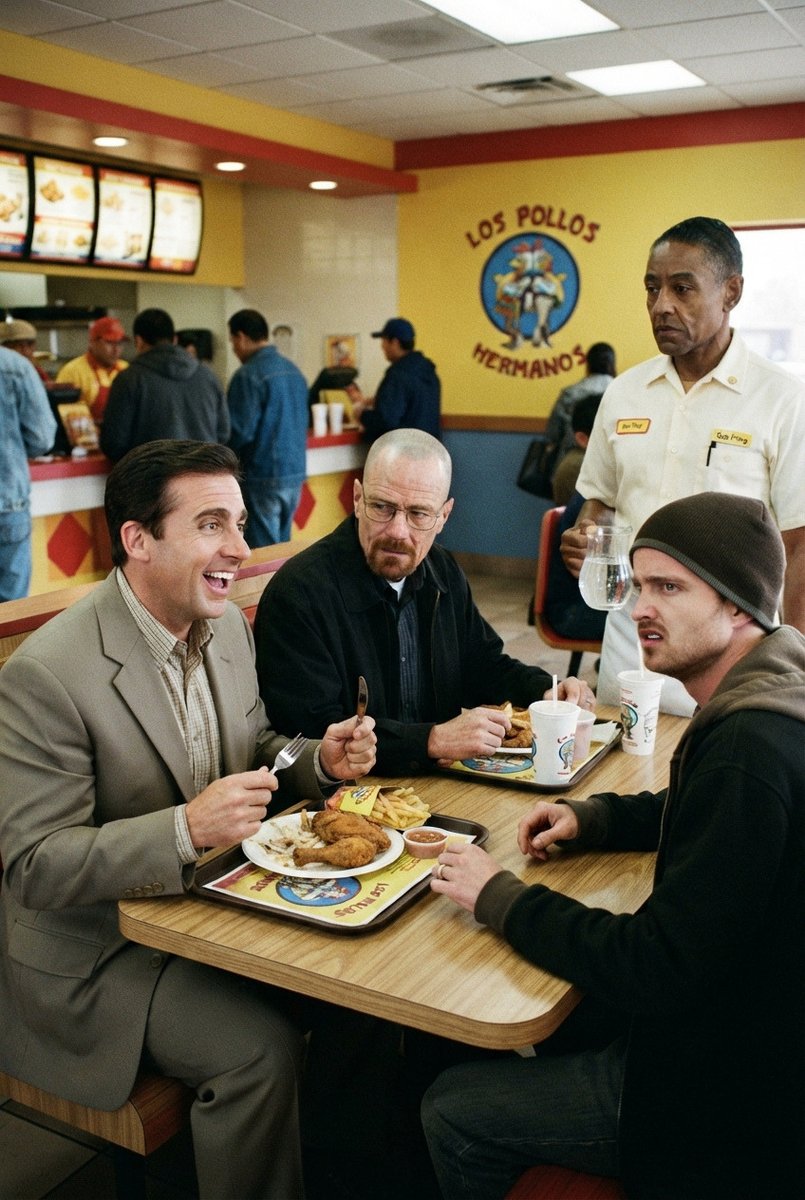
Candid Los Pollos Hermanos Booth Scene
A realistic 1990s film-style fast-food restaurant scene with anonymized diners eating fried chicken in a Los Pollos Hermanos booth.
This is a GPT Image 2 prompt case for Food & Beverage. Use the copy-ready prompt below to generate similar visuals, and review Awesome GPT Image 2 Prompts attribution plus commercial-use rights before reuse.
This prompt is designed for multiple reference images. We will open Dovoo with the prompt and the available preview image; add the remaining references in Dovoo before generating.
Free 1K preview
Generate one preview image instantly, no sign-up required.
Free text preview doesn’t preserve reference-image consistency.
Prompt
Copy-ready prompt
Create a realistic 1990s-style candid film photograph inside a brightly lit fast-food fried chicken restaurant named {argument name="restaurant name" default="Los Pollos Hermanos"}. The scene is a vertical 2:3 image shot from slightly above table height with a mild wide-angle documentary look, visible film grain, soft focus, and warm yellow indoor fluorescent lighting. In the foreground, show exactly four adult male diners seated around one square wood-laminate booth table: 1) a dark-haired man in a light gray suit on the left holding a fork and eating from a tray, 2) a bald man in a dark jacket at the back center holding a utensil and looking down toward his food, 3) a man on the right wearing a dark beanie and black hoodie leaning toward the table, and 4) a partially visible seated man implied by the grouping only if needed, Show every face clearly with natural, detailed facial features. Their table contains exactly three visible meal trays with fried chicken pieces and French fries, two small sauce cups, and two branded white paper drink cups. Behind them, place one standing restaurant employee in a crisp white short-sleeve button-up uniform shirt with yellow name badges, holding a clear pitcher of water; Show every face clearly with natural, detailed facial features. The background should show a busy counter area with exactly six customers or staff figures waiting or ordering, illuminated menu boards along the upper left, red-and-yellow counter accents, blue lower wall trim, and a large circular chicken logo on the yellow wall with the curved text {argument name="wall logo text" default="LOS POLLOS HERMANOS"}. Use the color palette {argument name="color palette" default="warm yellow walls, red trim, blue accents, beige table wood, muted 1990s clothing"}. Make the image feel like a plausible behind-the-scenes still from a crime drama, but do not include weapons, police, gore, or explicit branding other than the fictional restaurant name. Keep the composition natural and slightly imperfect, with realistic cafeteria clutter, ceiling tiles, fluorescent light panels, and soft background blur.Prompt variables
Editable argument placeholders found in the prompt, with their default values.
Best for
- - Food & Beverage visual exploration
- - Image generation and reference-image edits
- - Reusable briefs that keep source attribution visible
Change these parts
- - Subject, product, character, or scene
- - Aspect ratio, camera, lighting, and background
- - Brand, text, color, and output constraints
Recommended model and settings
- - Model: gpt-image-2
- - Input mode: Multi Image to Image
- - Aspect ratio: source
- - Commercial status: review original source
How to use this prompt
- 1. Copy the prompt and preserve its structure for the first test.
- 2. Replace the subject, context, and publishing channel.
- 3. Change one camera, lighting, or style variable per iteration.
- 4. Inspect the output, source, text, and rights before reuse.
Limitations, source, and reuse cautions
- - Generated output is an editable draft, not factual, legal, or rights evidence.
- - Review the linked source, people, brands, logos, text, and third-party media before commercial use.
More cases in this category
Prioritized by category, input mode compatibility, quality, and lower risk.
Reuse and source notes
Use this prompt safely after previewing the case.
- 1.Copy the prompt or open it directly in Dovoo with the generation button.
- 2.Adjust variables, aspect ratio, and reference images for your own use case.
- 3.Before publishing or paid usage, verify source rights, attribution requirements, and brand or likeness risks.
Can I use this prompt commercially?
Commercial-use status is allowed. Review the original source, license, brand constraints, and legal requirements before paid usage.
Where does this case come from?
This case is imported from Awesome GPT Image 2 Prompts; keep attribution visible and check the source URL before reuse.