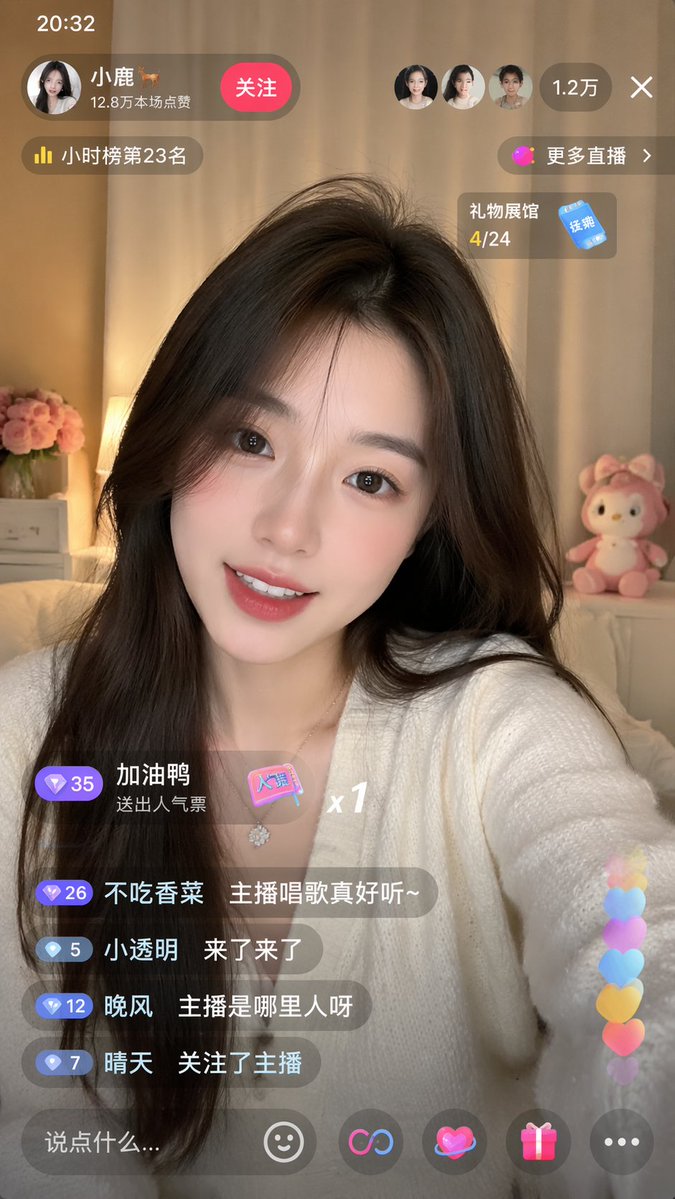
Live-Streaming App Interface Mockup
Generates a realistic mobile live-streaming UI overlay featuring a broadcaster, chat messages, and interactive icons.
This is a GPT Image 2 prompt case for Graphic & Poster. Use the copy-ready prompt below to generate similar visuals, and review Awesome GPT Image 2 Prompts attribution plus commercial-use rights before reuse.
Free 1K preview
Generate one preview image instantly, no sign-up required.
Prompt
Copy-ready prompt
{
  "type": "mobile live-streaming app interface mockup",
  "subject": {
    "description": "young Asian woman, long dark hair, smiling at camera",
    "outfit": "{argument name=\"broadcaster outfit\" default=\"white V-neck cardigan\"}",
    "background": "cozy room, warm lighting, pink flowers, pink plush toy"
  },
  "layout": {
    "top_bar": {
      "time": "20:32",
      "broadcaster": {
        "name": "{argument name=\"broadcaster name\" default=\"Little deer 🦌\"}",
        "stats": "128,000 likes in this livestream"
      },
      "action_button": "Follow",
      "viewers": {
        "avatar_count": 3,
        "total": "{argument name=\"viewer count\" default=\"12,000\"}"
      },
      "close_button": "X"
    },
    "floating_widgets": [
      "Ranked 23rd on the Hourly Chart",
      "More Live Streams >",
      "Gift Shop 4/24"
    ],
    "chat_area": {
      "message_count": 4,
      "gift_alert": "Jiayaya sent a popularity vote x1",
      "messages": [
        "Don't eat cilantro: {argument name=\"chat message 1\" default=\"The streamer's singing is really nice~\"}",
        "Xiao Touming: Here they come",
        "Wanfeng: Where is the streamer from?",
        "Qingtian: Followed the streamer"
      ]
    },
    "bottom_bar": {
      "input_placeholder": "{argument name=\"input placeholder\" default=\"Say something...\"}",
      "icon_count": 5,
      "icons": [
        "smiley face",
        "link symbol",
        "heart with halo",
        "gift box",
        "three dots"
      ]
    },
    "overlay_effects": "vertical stream of 6 colorful floating hearts on the bottom right"
  }
}
Prompt variables
Editable argument placeholders found in the prompt, with their default values.
Best for
- - Graphic & Poster visual exploration
- - Image generation and reference-image edits
- - Reusable briefs that keep source attribution visible
Change these parts
- - Subject, product, character, or scene
- - Aspect ratio, camera, lighting, and background
- - Brand, text, color, and output constraints
Recommended model and settings
- - Model: gpt-image-2
- - Input mode: Text to Image
- - Aspect ratio: source
- - Commercial status: review original source
How to use this prompt
- 1. Copy the prompt and preserve its structure for the first test.
- 2. Replace the subject, context, and publishing channel.
- 3. Change one camera, lighting, or style variable per iteration.
- 4. Inspect the output, source, text, and rights before reuse.
Limitations, source, and reuse cautions
- - Generated output is an editable draft, not factual, legal, or rights evidence.
- - Review the linked source, people, brands, logos, text, and third-party media before commercial use.
More cases in this category
Prioritized by category, input mode compatibility, quality, and lower risk.



Reuse and source notes
Use this prompt safely after previewing the case.
- 1.Copy the prompt or open it directly in Dovoo with the generation button.
- 2.Adjust variables, aspect ratio, and reference images for your own use case.
- 3.Before publishing or paid usage, verify source rights, attribution requirements, and brand or likeness risks.
Can I use this prompt commercially?
Commercial-use status is allowed. Review the original source, license, brand constraints, and legal requirements before paid usage.
Where does this case come from?
This case is imported from Awesome GPT Image 2 Prompts; keep attribution visible and check the source URL before reuse.