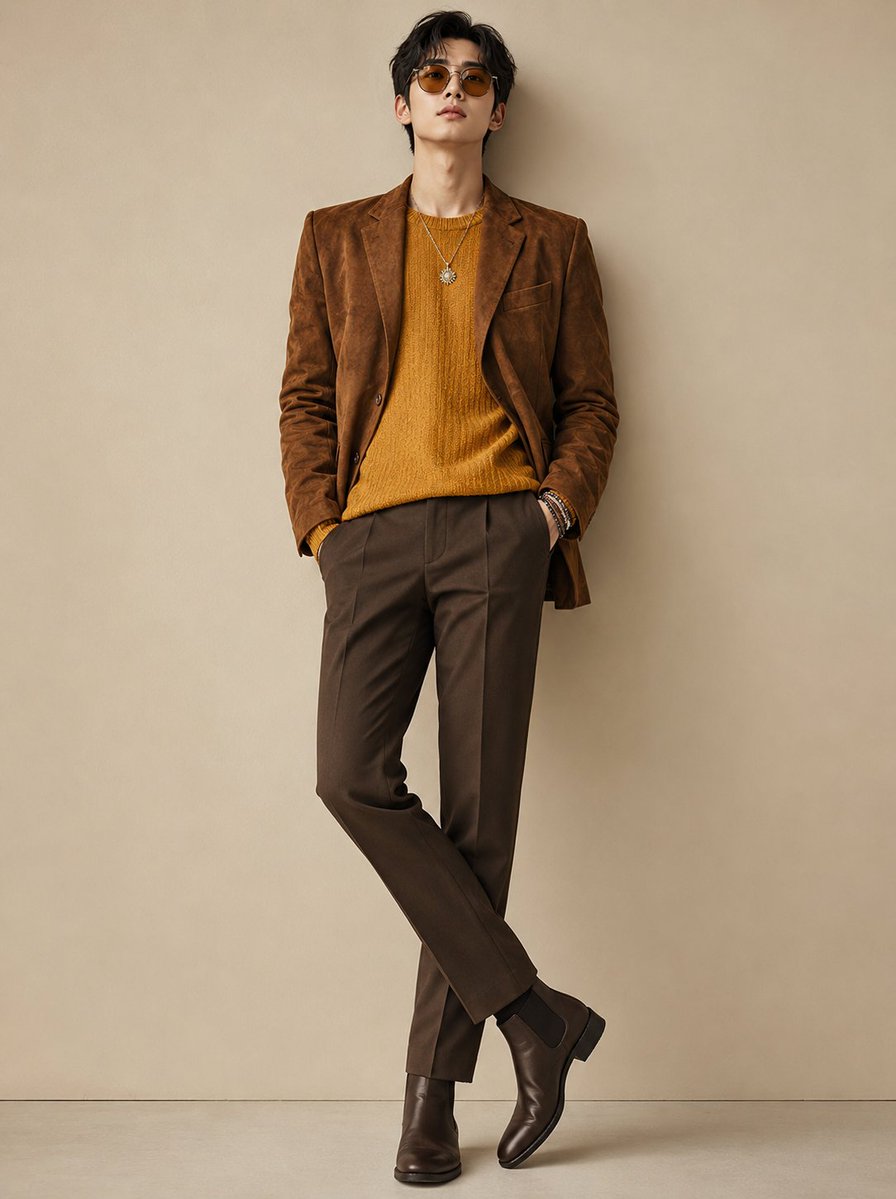
Modern Korean Men's Fashion Editorial
An editorial-style prompt for high-end masculine fashion photography, focusing on sophisticated earth-tone layers and luxury studio lighting.
This is a GPT Image 2 prompt case for 时尚美妆. Use the copy-ready prompt below to generate similar visuals, and review Awesome GPT Image 2 Prompts attribution plus commercial-use rights before reuse.
Prompt
Copy-ready prompt
创作一张超写实的现代韩系男装时尚大片肖像,主角是一位身着精致大地色系穿搭的时尚年轻男性。他身穿一件 {argument name="blazer type" default="驼棕色麂皮西装外套"},内搭一件 {argument name="sweater style" default="芥末黄质感毛衣"},下身搭配 {argument name="trousers" default="定制棕色长裤"} 和光泽感深棕色切尔西靴。佩戴时尚的琥珀色墨镜、叠戴手链以及带有太阳吊坠的银色项链,营造出奢华休闲的审美风格。

他留着打理得当的柔顺黑发,下颌线分明,皮肤细腻无瑕,表情沉稳自信。姿态放松,单手插兜,极简男性化造型,比例优雅。

背景为干净的中性米色摄影棚,配以柔和的专业灯光和微妙的阴影,呈现高端编辑构图,具备奢华男装广告大片的质感,灵感源自《Vogue Korea》时尚摄影,超精细面料纹理,照片级皮肤细节,焦点清晰,电影级调色,85mm 镜头,全身构图,现代奢华风格,8k 超写实。
Prompt variables
Editable argument placeholders found in the prompt, with their default values.
More cases in this category
Prioritized by category, input mode compatibility, quality, and lower risk.
Reuse and source notes
Use this prompt safely after previewing the case.
- 1.Copy the prompt or open it directly in Dovoo with the generation button.
- 2.Adjust variables, aspect ratio, and reference images for your own use case.
- 3.Before publishing or paid usage, verify source rights, attribution requirements, and brand or likeness risks.
Can I use this prompt commercially?
Commercial-use status is allowed. Review the original source, license, brand constraints, and legal requirements before paid usage.
Where does this case come from?
This case is imported from Awesome GPT Image 2 Prompts; keep attribution visible and check the source URL before reuse.