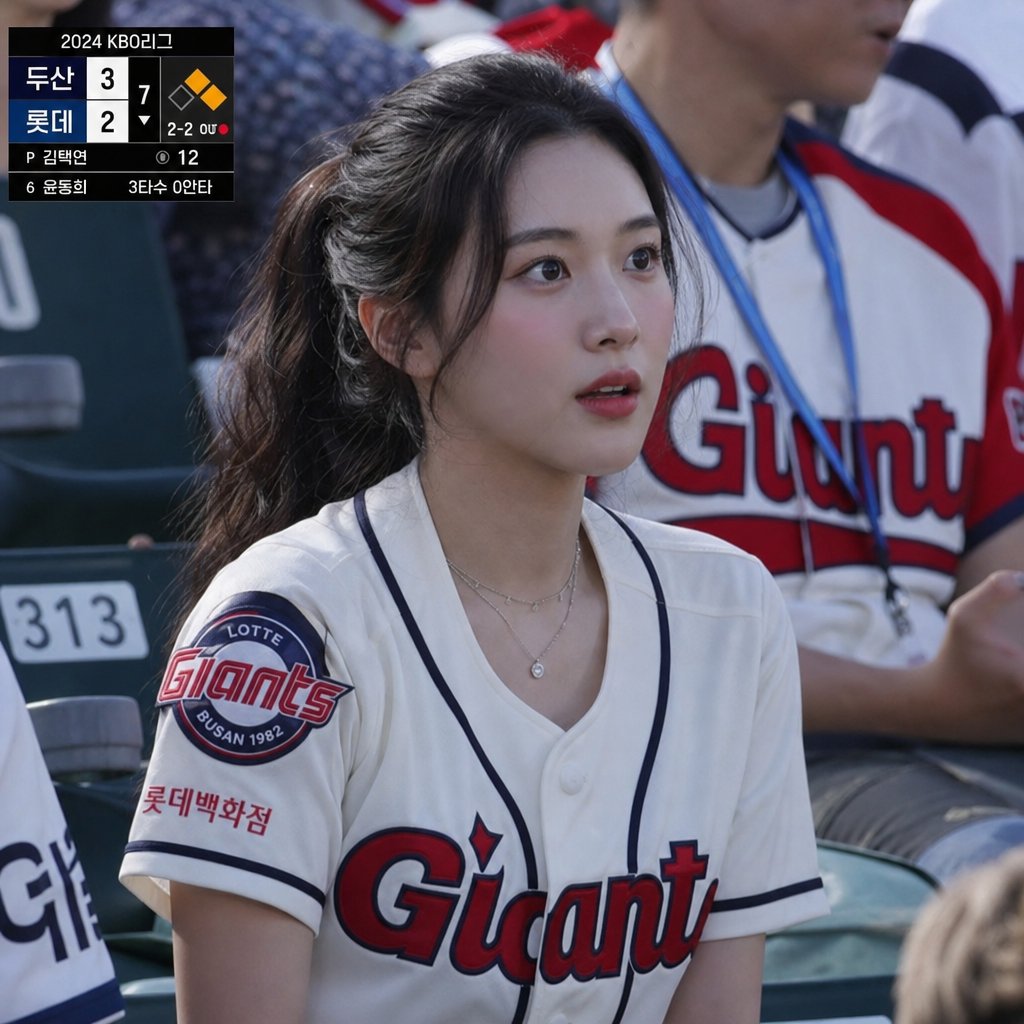
KBO Lotte Giants Broadcast Fan Shot
Generates a realistic Korean baseball broadcast-style spectator photo with a Lotte Giants fan, privacy-obscured face, and on-screen scoreboard overlay.
This is a GPT Image 2 prompt case for Portrait & Character. Use the copy-ready prompt below to generate similar visuals, and review Awesome GPT Image 2 Prompts attribution plus commercial-use rights before reuse.
Free 1K preview
Generate one preview image instantly, no sign-up required.
Prompt
Copy-ready prompt
Create a realistic sports broadcast still photo from a 2024 KBO League baseball game, shot from the spectator seats in bright daylight with shallow depth of field. The main subject is a young female fan seated in the stands wearing a white Lotte Giants baseball jersey with navy piping, red-and-navy “Giants” chest lettering, a circular Lotte Giants Busan 1982 sleeve patch, and small Korean sponsor text on the sleeve; she has long dark hair tied in a ponytail, layered delicate necklaces, and her face is intentionally covered by a centered opaque rectangular privacy blur in a muted gray-brown gradient. Behind her are stadium seats and another fan wearing a white Giants jersey with red sleeves and a blue lanyard, softly out of focus. Add a black TV broadcast scoreboard overlay in the upper-left corner with exactly 2 team rows labeled {argument name="away team" default="두산"} and {argument name="home team" default="롯데"}, scores 3 and 2, inning marker 7, a small baseball diamond graphic with one orange base highlighted, count text “2-2 0U,” pitcher line “P 김택연,” pitch count “12,” and bottom batter information “6 윤동희 3타수 0안타.” Use authentic Korean baseball broadcast styling, natural camera perspective, realistic fabric texture, accurate stadium lighting, documentary photography look, and a slightly compressed telephoto crop.Prompt variables
Editable argument placeholders found in the prompt, with their default values.
Best for
- - Portrait & Character visual exploration
- - Image generation and reference-image edits
- - Reusable briefs that keep source attribution visible
Change these parts
- - Subject, product, character, or scene
- - Aspect ratio, camera, lighting, and background
- - Brand, text, color, and output constraints
Recommended model and settings
- - Model: gpt-image-2
- - Input mode: Text to Image
- - Aspect ratio: source
- - Commercial status: review original source
How to use this prompt
- 1. Copy the prompt and preserve its structure for the first test.
- 2. Replace the subject, context, and publishing channel.
- 3. Change one camera, lighting, or style variable per iteration.
- 4. Inspect the output, source, text, and rights before reuse.
Limitations, source, and reuse cautions
- - Generated output is an editable draft, not factual, legal, or rights evidence.
- - Review the linked source, people, brands, logos, text, and third-party media before commercial use.
More cases in this category
Prioritized by category, input mode compatibility, quality, and lower risk.


Reuse and source notes
Use this prompt safely after previewing the case.
- 1.Copy the prompt or open it directly in Dovoo with the generation button.
- 2.Adjust variables, aspect ratio, and reference images for your own use case.
- 3.Before publishing or paid usage, verify source rights, attribution requirements, and brand or likeness risks.
Can I use this prompt commercially?
Commercial-use status is allowed. Review the original source, license, brand constraints, and legal requirements before paid usage.
Where does this case come from?
This case is imported from Awesome GPT Image 2 Prompts; keep attribution visible and check the source URL before reuse.