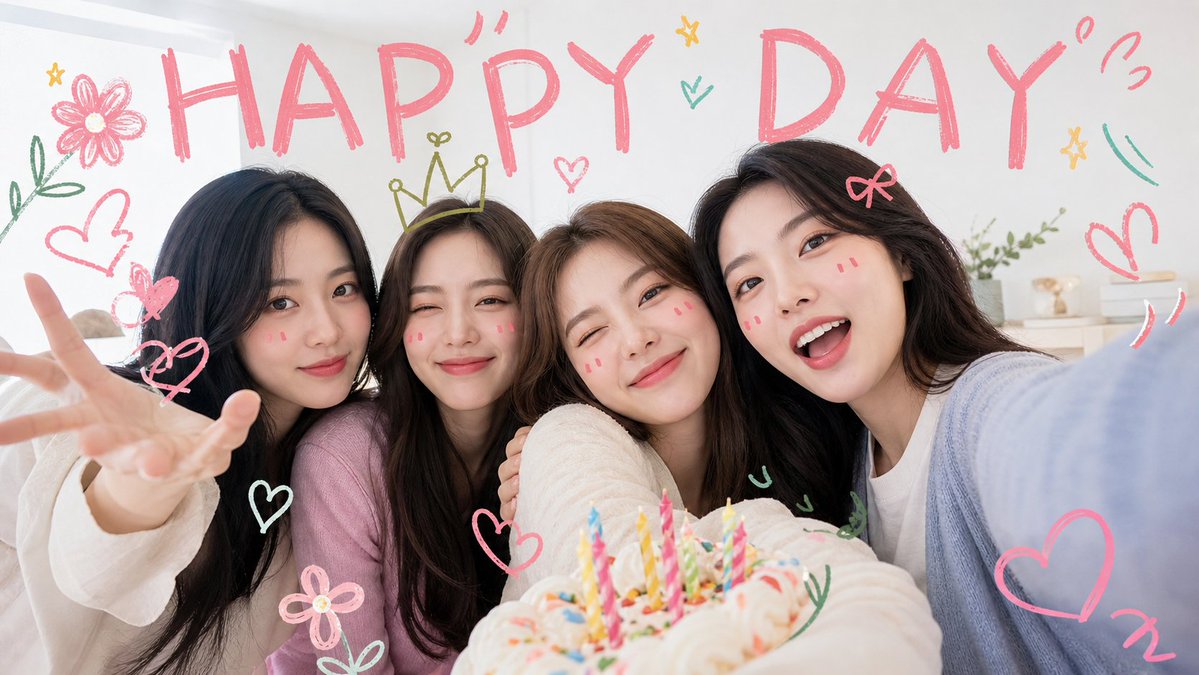
Kawaii Birthday Group Selfie
Generates a pastel, doodle-decorated birthday selfie scene for cute friendship or celebration visuals.
This is a GPT Image 2 prompt case for Portrait & Character. Use the copy-ready prompt below to generate similar visuals, and review Awesome GPT Image 2 Prompts attribution plus commercial-use rights before reuse.
Free 1K preview
Generate one preview image instantly, no sign-up required.
Prompt
Copy-ready prompt
Create a cheerful, kawaii-style wide selfie photo of {argument name="group description" default="four young female friends"} celebrating around a birthday cake indoors. The camera is held close at arm’s length from the right side, creating a playful group selfie angle with everyone leaning tightly together toward the lens. Use a bright cozy bedroom or party-room background with soft daylight, white walls, pastel bedding, and small shelf decor. Place a frosted birthday cake in the lower foreground, slightly out of focus, topped with exactly 12 colorful lit birthday candles in pink, yellow, blue, green, and striped patterns. The people wear soft pastel casual sweaters and tops in cream, pink, white, and pale blue, with long dark or brown hair; Show every face clearly with natural, detailed facial features, clothing, hands, and poses visible. The left person reaches one hand toward the camera in a playful open-palm gesture, and the right person’s pale blue sleeve fills the near-right edge like they are taking the selfie. Add hand-drawn crayon doodles over the photo in a cute energetic style: a huge pink uppercase headline reading {argument name="headline text" default="HAPPY DAY"} across the top; exactly 10 heart doodles including pink and white hearts around the group; exactly 3 flower doodles, one large pink flower at top left, one small pink flower near bottom left, and one small yellow star-flower near the center; exactly 1 yellow crown doodle above the second person’s head; exactly 3 star doodles; exactly 5 green leafy sprig or curved accent doodles; and exactly 5 small pink motion marks or exclamation squiggles near the headline and right side. Use a clean bright aesthetic with high-key lighting, pastel pink and mint marker colors, whimsical birthday energy, shallow depth of field, and a polished social-media photo look. Avoid extra people, avoid realistic printed text besides the headline, and do not add watermarks.Prompt variables
Editable argument placeholders found in the prompt, with their default values.
Best for
- - Portrait & Character visual exploration
- - Image generation and reference-image edits
- - Reusable briefs that keep source attribution visible
Change these parts
- - Subject, product, character, or scene
- - Aspect ratio, camera, lighting, and background
- - Brand, text, color, and output constraints
Recommended model and settings
- - Model: gpt-image-2
- - Input mode: Text to Image
- - Aspect ratio: source
- - Commercial status: review original source
How to use this prompt
- 1. Copy the prompt and preserve its structure for the first test.
- 2. Replace the subject, context, and publishing channel.
- 3. Change one camera, lighting, or style variable per iteration.
- 4. Inspect the output, source, text, and rights before reuse.
Limitations, source, and reuse cautions
- - Generated output is an editable draft, not factual, legal, or rights evidence.
- - Review the linked source, people, brands, logos, text, and third-party media before commercial use.
More cases in this category
Prioritized by category, input mode compatibility, quality, and lower risk.



Reuse and source notes
Use this prompt safely after previewing the case.
- 1.Copy the prompt or open it directly in Dovoo with the generation button.
- 2.Adjust variables, aspect ratio, and reference images for your own use case.
- 3.Before publishing or paid usage, verify source rights, attribution requirements, and brand or likeness risks.
Can I use this prompt commercially?
Commercial-use status is allowed. Review the original source, license, brand constraints, and legal requirements before paid usage.
Where does this case come from?
This case is imported from Awesome GPT Image 2 Prompts; keep attribution visible and check the source URL before reuse.