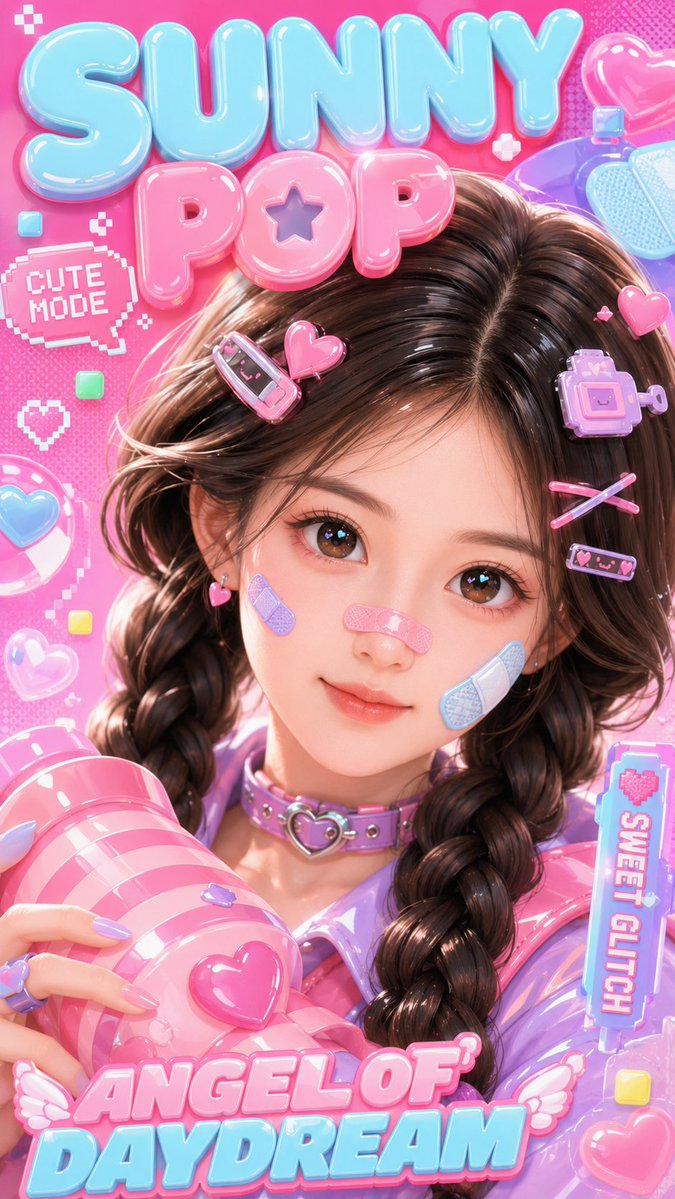
3D Kawaii Y2K Portrait Conversion
Transforms a real portrait into a glossy, toy-like 3D kawaii character in a Y2K pop style, preserving facial features while applying stylized rendering.
This is a GPT Image 2 prompt case for 人像角色. Use the copy-ready prompt below to generate similar visuals, and review Awesome GPT Image 2 Prompts attribution plus commercial-use rights before reuse.
Free 1K preview
Generate one preview image instantly, no sign-up required.
Free text preview doesn’t preserve reference-image consistency.
2 free previews per device every 30 days
Prompt
Copy-ready prompt
仅将上传的人像作为身份参考。保留人物的脸型、五官、眼型、自然的深棕色/黑色发色、中分双麻花辫以及整体可爱年轻的氛围。将人像转换为具有光泽感的 3D Kawaii 角色,而非写实风格,呈现出精致的玩具质感 Y2K 流行风格。创作一张 9:16 的竖版 3D Kawaii 海报封面。画面是一个可爱的 3D 女孩,拥有柔软的玩偶般面部比例、闪亮的大眼睛、自然的深棕色麻花辫、糖果粉和淡蓝色发夹、脸颊和鼻梁上的可爱创可贴、带有心形扣的淡紫色颈圈,以及闪亮的淡紫粉色服装。她正拿着一个巨大的粉色条纹光泽道具靠近镜头。背景为明亮的亮粉色,带有气泡字体、像素贴纸、爱心、光泽气泡和俏皮的 Y2K 流行图形。使其看起来像是从真实照片转换而来的风格化 3D 人像,具有干净平滑的阴影、高细节、丰富的质感和强烈的可爱海报感。所有文字必须仅使用英文:“{argument name="text 1" default="SUNNY POP"}”,“{argument name="text 2" default="CUTE MODE"}”,“{argument name="text 3" default="SWEET GLITCH"}”,“ANGEL OF DAYDREAM”。无水印,无Chinese。负面提示词:写实照片、真实照片风格、绿发、错误的发色、短发、凌乱的发型、低细节、面部模糊、解剖结构错误、多余的手指、畸形的手、扭曲的脸、平淡的灯光、暗淡的颜色、凌乱的文字、不可读的文字、Chinese字符、水印、Logo、重复的配饰、丑陋的眼睛、塑料伪影、低质量Prompt variables
Editable argument placeholders found in the prompt, with their default values.
Best for
- - 人像角色 visual exploration
- - Image generation and reference-image edits
- - Reusable briefs that keep source attribution visible
Change these parts
- - Subject, product, character, or scene
- - Aspect ratio, camera, lighting, and background
- - Brand, text, color, and output constraints
Recommended model and settings
- - Model: gpt-image-2
- - Input mode: Image to Image
- - Aspect ratio: source
- - Commercial status: review original source
How to use this prompt
- 1. Copy the prompt and preserve its structure for the first test.
- 2. Replace the subject, context, and publishing channel.
- 3. Change one camera, lighting, or style variable per iteration.
- 4. Inspect the output, source, text, and rights before reuse.
Limitations, source, and reuse cautions
- - Generated output is an editable draft, not factual, legal, or rights evidence.
- - Review the linked source, people, brands, logos, text, and third-party media before commercial use.
More cases in this category
Prioritized by category, input mode compatibility, quality, and lower risk.


Reuse and source notes
Use this prompt safely after previewing the case.
- 1.Copy the prompt or open it directly in Dovoo with the generation button.
- 2.Adjust variables, aspect ratio, and reference images for your own use case.
- 3.Before publishing or paid usage, verify source rights, attribution requirements, and brand or likeness risks.
Can I use this prompt commercially?
Commercial-use status is allowed. Review the original source, license, brand constraints, and legal requirements before paid usage.
Where does this case come from?
This case is imported from Awesome GPT Image 2 Prompts; keep attribution visible and check the source URL before reuse.