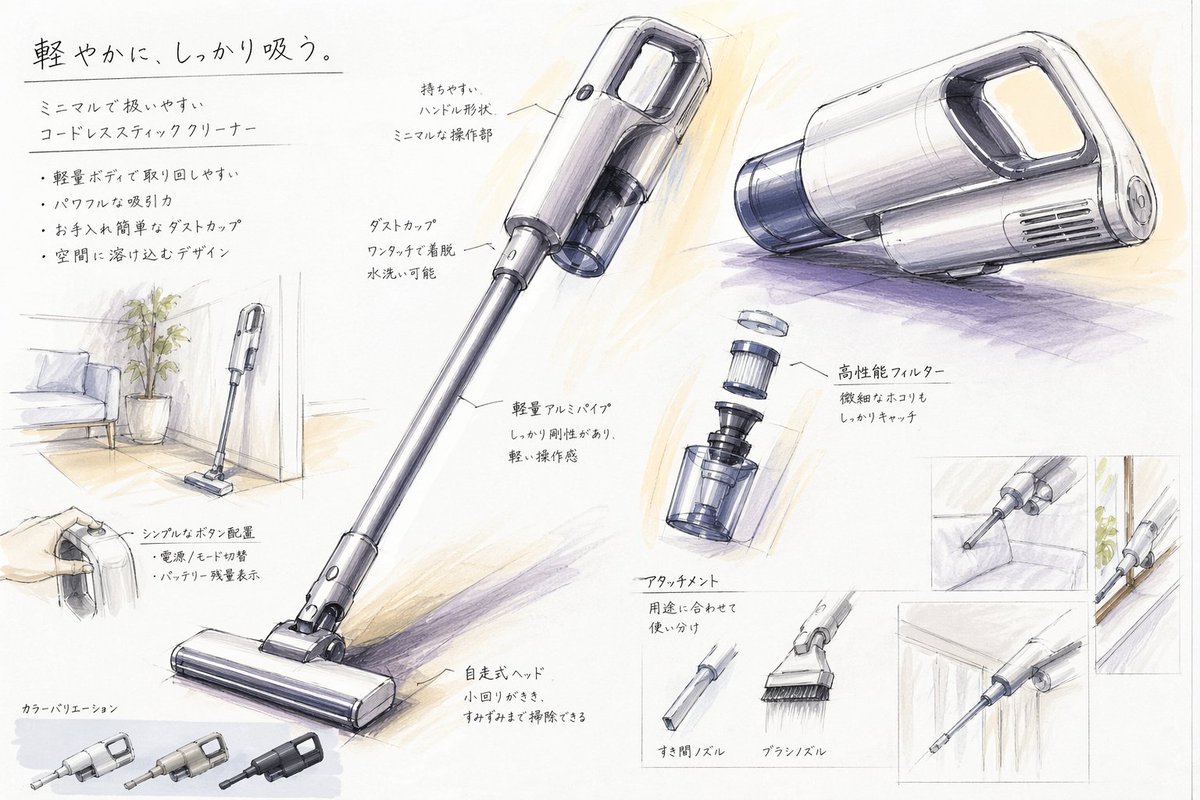
Japanese Vacuum Design Sketch Board
A hand-rendered industrial design presentation sheet for a minimalist cordless stick vacuum, useful for generating concept boards, portfolio pages, or product proposal visuals.
This is a GPT Image 2 prompt case for Illustration & Art. Use the copy-ready prompt below to generate similar visuals, and review Awesome GPT Image 2 Prompts attribution plus commercial-use rights before reuse.
Free 1K preview
Generate one preview image instantly, no sign-up required.
Prompt
Copy-ready prompt
{
  "type": "industrial design presentation board",
  "style": "hand-rendered product concept sketch, marker and colored pencil rendering on white paper, clean Japanese product design school presentation aesthetic, light gray linework with soft purple and warm beige shading",
  "subject": {
    "product": "minimal cordless stick vacuum cleaner",
    "headline": "{argument name=\"headline text\" default=\"軽やかに、しっかり吸う。\"}",
    "subheadline": "ミニマルで扱いやすい コードレススティッククリーナー",
    "features": [
      "軽量ボディで取り回しやすい",
      "パワフルな吸引力",
      "お手入れ簡単なダストカップ",
      "空間に溶け込むデザイン"
    ],
    "color": "{argument name=\"product color\" default=\"pearl white and smoky transparent gray\"}",
    "materials": "matte plastic body, translucent dust cup, metallic aluminum pipe"
  },
  "layout": {
    "orientation": "landscape presentation sheet",
    "sections": [
      {
        "title": "hero product views",
        "position": "center and upper right",
        "count": 3,
        "labels": [
          "full stick vacuum in three-quarter view",
          "main body perspective view from upper center",
          "main body side perspective view from upper right"
        ]
      },
      {
        "title": "feature callouts",
        "position": "around the hero views",
        "count": 7,
        "labels": [
          "持ちやすい ハンドル形状 ミニマルな操作部",
          "ダストカップ ワンタッチで着脱 水洗い可能",
          "軽量アルミパイプ しっかり剛性もあり、軽い操作感",
          "高性能フィルター 微細なほこりもしっかりキャッチ",
          "シンプルなボタン配置 電源 / モード切替 バッテリー残量表示",
          "自走式ヘッド 小回りがきき、すみずみまで掃除できる",
          "アタッチメント 用途に合わせて使い分け"
        ]
      },
      {
        "title": "usage and context sketches",
        "position": "left side and right side insets",
        "count": 5,
        "labels": [
          "vacuum standing in a living room corner beside a potted plant and sofa",
          "hand holding the handle close-up",
          "crevice nozzle cleaning sofa gap",
          "vacuum body stored along a wall or narrow space",
          "crevice nozzle cleaning under cabinet or edge"
        ]
      },
      {
        "title": "attachment accessories",
        "position": "lower center-right",
        "count": 2,
        "labels": [
          "すき間ノズル",
          "ブラシノズル"
        ]
      },
      {
        "title": "exploded component view",
        "position": "mid-right",
        "count": 1,
        "labels": [
          "filter and dust cup separated vertically"
        ]
      },
      {
        "title": "color variations",
        "position": "bottom left",
        "count": 3,
        "labels": [
          "light silver",
          "warm gray",
          "matte black"
        ]
      }
    ],
    "text_language": "Japanese",
    "composition": "large central full-length vacuum diagonally across the page, supporting perspective renderings and small inset usability sketches, generous white margins, handwritten annotations with leader lines"
  },
  "rendering": {
    "line_quality": "loose but precise industrial sketch lines",
    "shading": "soft marker gradients and pencil cross-shading",
    "paper": "slightly textured white sketchbook paper",
    "mood": "premium, approachable, student concept board meets professional product proposal"
  }
}
Prompt variables
Editable argument placeholders found in the prompt, with their default values.
Best for
- - Illustration & Art visual exploration
- - Image generation and reference-image edits
- - Reusable briefs that keep source attribution visible
Change these parts
- - Subject, product, character, or scene
- - Aspect ratio, camera, lighting, and background
- - Brand, text, color, and output constraints
Recommended model and settings
- - Model: gpt-image-2
- - Input mode: Text to Image
- - Aspect ratio: source
- - Commercial status: review original source
How to use this prompt
- 1. Copy the prompt and preserve its structure for the first test.
- 2. Replace the subject, context, and publishing channel.
- 3. Change one camera, lighting, or style variable per iteration.
- 4. Inspect the output, source, text, and rights before reuse.
Limitations, source, and reuse cautions
- - Generated output is an editable draft, not factual, legal, or rights evidence.
- - Review the linked source, people, brands, logos, text, and third-party media before commercial use.
More cases in this category
Prioritized by category, input mode compatibility, quality, and lower risk.

Reuse and source notes
Use this prompt safely after previewing the case.
- 1.Copy the prompt or open it directly in Dovoo with the generation button.
- 2.Adjust variables, aspect ratio, and reference images for your own use case.
- 3.Before publishing or paid usage, verify source rights, attribution requirements, and brand or likeness risks.
Can I use this prompt commercially?
Commercial-use status is allowed. Review the original source, license, brand constraints, and legal requirements before paid usage.
Where does this case come from?
This case is imported from Awesome GPT Image 2 Prompts; keep attribution visible and check the source URL before reuse.