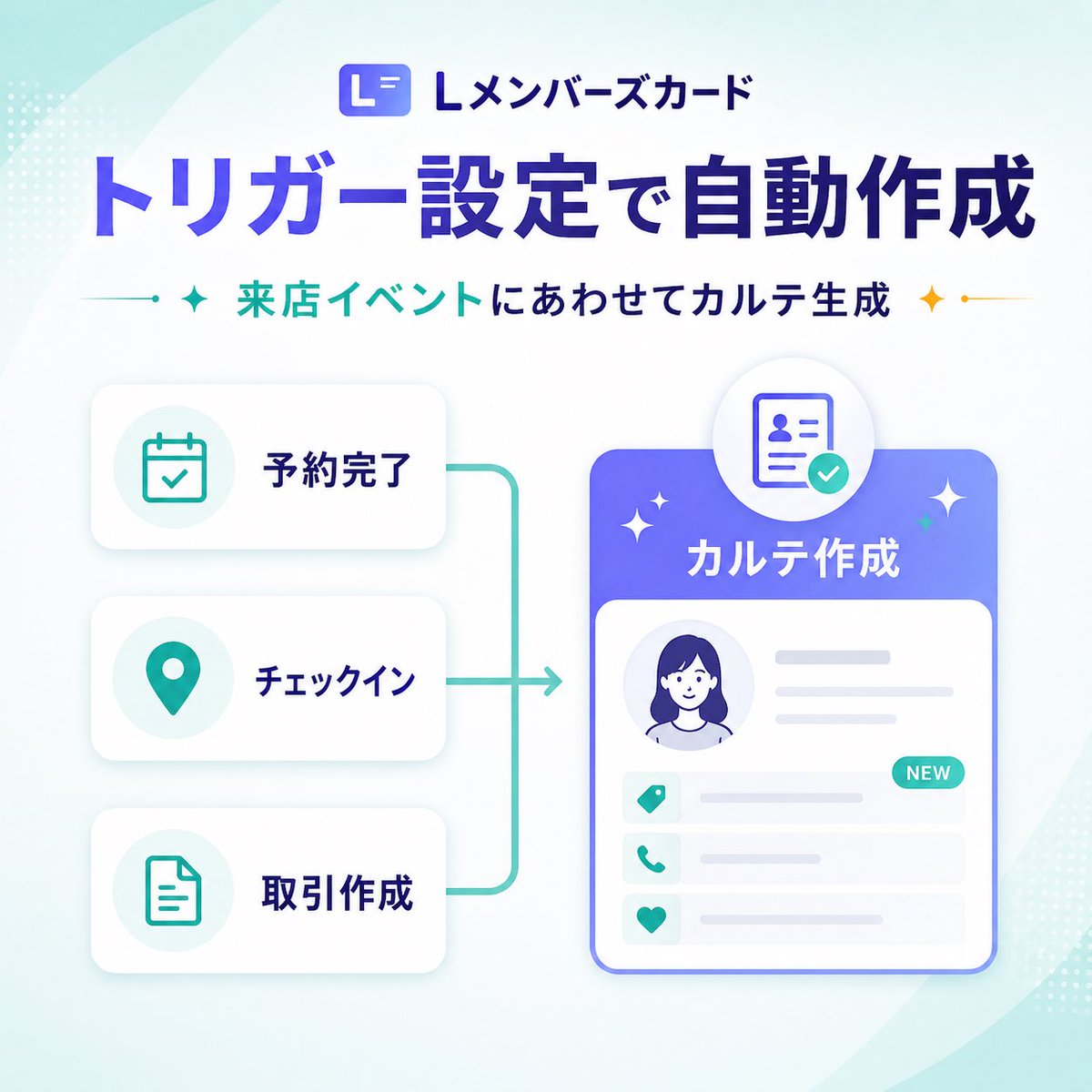
Japanese SaaS Trigger Automation Banner
A polished square Japanese SaaS marketing banner showing trigger-based automatic record creation with a clean infographic layout for product update announcements.
This is a GPT Image 2 prompt case for 平面海报. Use the copy-ready prompt below to generate similar visuals, and review Awesome GPT Image 2 Prompts attribution plus commercial-use rights before reuse.
Prompt
Copy-ready prompt
{
  "type": "SaaS Feature Update Banner Info",
  "style": "Clean and modern Japanese technology marketing graphics, high-quality corporate infographics, soft gradients, rounded corner UI cards, subtle shadows, and minimalist vector illustrations.",
  "format": "Square social media banner",
  "aspect_ratio": "1:1",
  "brand": {
    "logo_text": "L Member Card",
    "logo_icon": "Rounded square app icon with a white L-shaped design on a blue-purple gradient background."
  },
  "background": {
    "base": "A gradient from very light white to pale mint green",
    "decorations": {
      "count": 6,
      "items": [
        "A large, semi-transparent arc that swept across the upper left corner",
        "A large, semi-transparent arc that swept across the bottom right corner",
        "Small dotted halftone clusters at the upper left edge",
        "Small dotted halftone clusters on the lower right edge",
        "Soft ambient light behind the main card",
        "A faint cyan gradient diffused in the corner"
      ]
    }
  },
  "layout": {
    "sections": [
      {
        "title": "header",
        "position": "top center",
        "count": 3,
        "labels": [
          "L Member Card",
          "Automatic creation via trigger settings",
          "Generate archives based on in-store events"
        ]
      },
      {
        "title": "left trigger cards",
        "position": "left center",
        "count": 3,
        "labels": [
          "Appointment completed",
          "Sign in",
          "Create a transaction"
        ]
      },
      {
        "title": "right output card",
        "position": "right center",
        "count": 1,
        "labels": [
          "Create a file"
        ]
      }
    ],
    "flow": "The three stacked trigger cards on the left are connected by a cyan bracket-shaped line, pointing to a large personal profile record card on the right."
  },
  "text": {
    "headline": "{argument name=\"headline text\" default=\"Automatic creation via trigger settings\"}",
    "subheadline": "{argument name=\"subheadline text\" default=\"Generate archives based on in-store events\"}"
  },
  "left_panel": {
    "cards": [
      {
        "label": "Appointment completed",
        "icon": "Calendar with checkmark",
        "icon_color": "teal",
        "card_style": "White rounded rectangle with soft gray shading"
      },
      {
        "label": "Sign in",
        "icon": "Map pins",
        "icon_color": "teal",
        "card_style": "White rounded rectangle with soft gray shading"
      },
      {
        "label": "Create a transaction",
        "icon": "Document outline",
        "icon_color": "teal",
        "card_style": "White rounded rectangle with soft gray shading"
      }
    ]
  },
  "connector": {
    "color": "teal",
    "shape": "Connect the three cards on the left to the vertical bracket line of the arrow on the right.",
    "stroke": "Medium thickness rounded corner lines"
  },
  "right_panel": {
    "title": "{argument name=\"feature label\" default=\"Create a file\"}",
    "container": "Large rounded rectangular card with a blue-purple gradient title and a white body",
    "top_badge": "The circular badge floating above the card displays an ID/profile document icon with a cyan checkmark.",
    "body_elements": {
      "count": 6,
      "items": [
        "Circular avatar placeholder for a woman with dark blue hair",
        "Two lines of horizontal gray text to the right of the profile picture",
        "Three lines of information with cyan icons",
        "The first line has a cyan NEW tag.",
        "Light gray placeholder lines for recording details",
        "The thin blue outline around the main card"
      ]
    },
    "row_icons": [
      "tag",
      "phone",
      "heart"
    ]
  },
  "accent_graphics": {
    "count": 4,
    "items": [
      "The blue flash next to the subtitle on the left",
      "The golden glitter next to the right of the subtitle",
      "The two small white dots around the main right card are flashing.",
      "Small blue dot at the end of the connector"
    ]
  },
  "color_palette": {
    "primary": "Deep blue-purple",
    "secondary": "blue",
    "accent": "gold",
    "background": "White and light mint green"
  },
  "generation_notes": "Uses clear Japanese fonts, bold, large headings, balanced white space, refined SaaS product announcement aesthetics, vector UI mockup style, without photorealism or complex textures."
}
Prompt variables
Editable argument placeholders found in the prompt, with their default values.
More cases in this category
Prioritized by category, input mode compatibility, quality, and lower risk.

Reuse and source notes
Use this prompt safely after previewing the case.
- 1.Copy the prompt or open it directly in Dovoo with the generation button.
- 2.Adjust variables, aspect ratio, and reference images for your own use case.
- 3.Before publishing or paid usage, verify source rights, attribution requirements, and brand or likeness risks.
Can I use this prompt commercially?
Commercial-use status is allowed. Review the original source, license, brand constraints, and legal requirements before paid usage.
Where does this case come from?
This case is imported from Awesome GPT Image 2 Prompts; keep attribution visible and check the source URL before reuse.