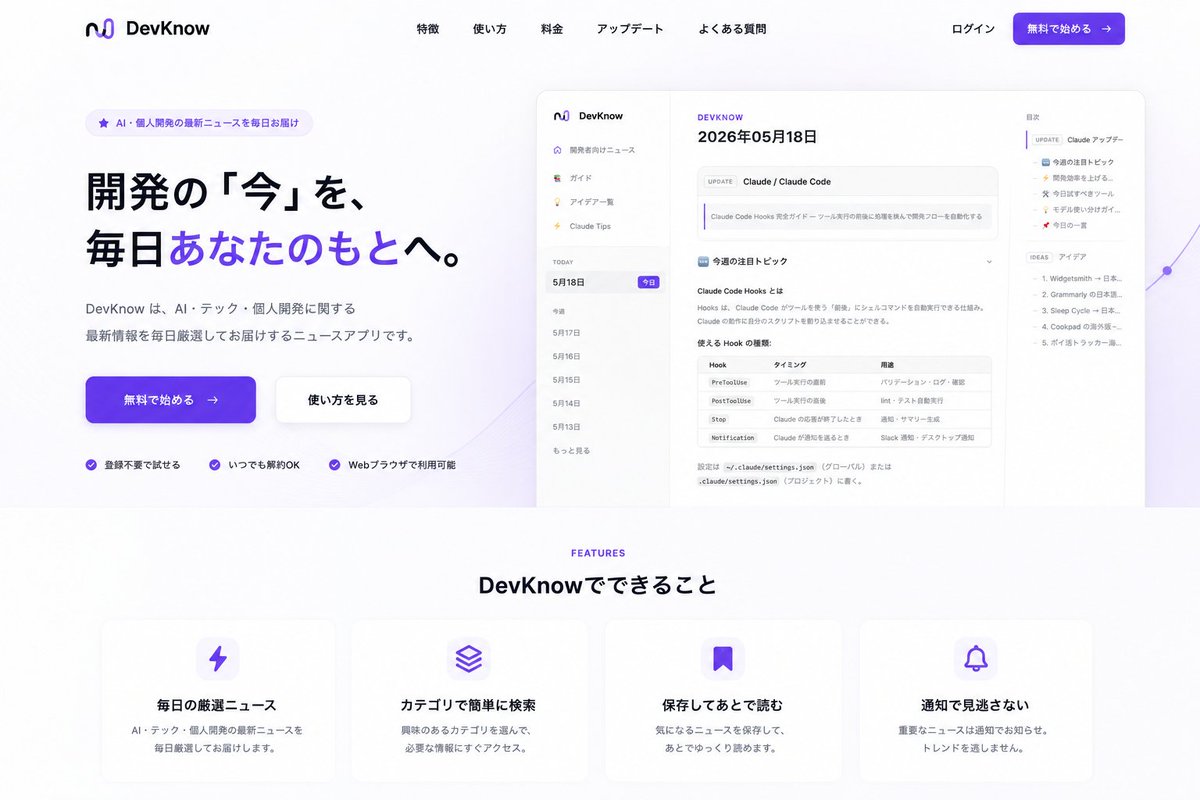
DevKnow SaaS Landing Page
Generates a polished Japanese SaaS landing page from an existing app screenshot, with hero CTA, product mockup, navigation, and feature cards.
Prompt
Copy-ready prompt
Using REFERENCE_0 as the product UI screenshot, turn it into a polished Japanese SaaS landing page for {argument name="product name" default="DevKnow"}. Keep the app screenshot recognizable but place it inside a large rounded browser/mockup preview on the right side of the hero section, slightly scaled down with soft shadow and a subtle purple abstract line/gradient accent behind it.

Layout: Create a clean desktop landing page with a white background and purple brand accents. Add a top navigation bar with the existing logo/name on the left, five centered menu links labeled 「特徴」, 「使い方」, 「料金」, 「アップデート」, 「よくある質問」, and on the right 「ログイン」 plus a purple CTA button labeled 「無料で始める →」.

Hero section: On the left, add a small rounded badge reading 「AI・個人開発の最新ニュースを毎日お届け」. Add a large bold Japanese headline: {argument name="hero headline" default="開発の「今」を、毎日あなたのもとへ。"} with the phrase 「あなたのもとへ」 highlighted in purple. Below it, add supporting copy: {argument name="hero description" default="DevKnow は、AI・テック・個人開発に関する最新情報を毎日厳選してお届けするニュースアプリです。"}. Add two hero buttons: a primary purple 「無料で始める →」 button and a secondary white 「使い方を見る」 button. Under the buttons, add exactly 3 trust points with small purple check icons: 「登録不要で始める」, 「いつでも解約OK」, 「Webブラウザで利用可能」.

Features section: Beneath the hero, add a centered section label “FEATURES” in purple and the heading 「DevKnow でできること」. Create exactly 4 rounded feature cards in one row with soft shadows and purple icons: 1) lightning icon, title 「毎日の厳選ニュース」, description 「AI・テック・個人開発の最新ニュースを毎日厳選してお届けします。」; 2) stacked layers icon, title 「カテゴリで簡単に検索」, description 「興味のあるカテゴリを選んで、必要な情報にすぐアクセス。」; 3) bookmark icon, title 「保存してあとで読む」, description 「気になるニュースを保存して、あとでゆっくり読めます。」; 4) bell icon, title 「通知で見逃さない」, description 「重要なニュースは通知でお知らせ。トレンドを逃しません。」

Style constraints: Make it look like a modern production-ready landing page, not a raw app screenshot. Use spacious margins, rounded corners, subtle shadows, purple gradient buttons, crisp Japanese typography, and remove any clutter outside the composed landing page. Keep the reference app UI content visible but secondary to the landing page design.
Prompt variables
Editable argument placeholders found in the prompt, with their default values.
Variable
product name
Default
DevKnow
Variable
hero headline
Default
開発の「今」を、毎日あなたのもとへ。
Variable
hero description
Default
DevKnow は、AI・テック・個人開発に関する最新情報を毎日厳選してお届けするニュースアプリです。
More cases in this category
Prioritized by category, input mode compatibility, quality, and lower risk.


Reuse and source notes
Use this prompt safely after previewing the case.
- 1.Copy the prompt or open it directly in Dovoo with the generation button.
- 2.Adjust variables, aspect ratio, and reference images for your own use case.
- 3.Before publishing or paid usage, verify source rights, attribution requirements, and brand or likeness risks.
Can I use this prompt commercially?
Commercial-use status is unknown. Review the original source, license, brand constraints, and legal requirements before paid usage.
Where does this case come from?
This case is imported from GPT Image 2 OpenLab gpt-image-2-prompts; keep attribution visible and check the source URL before reuse.