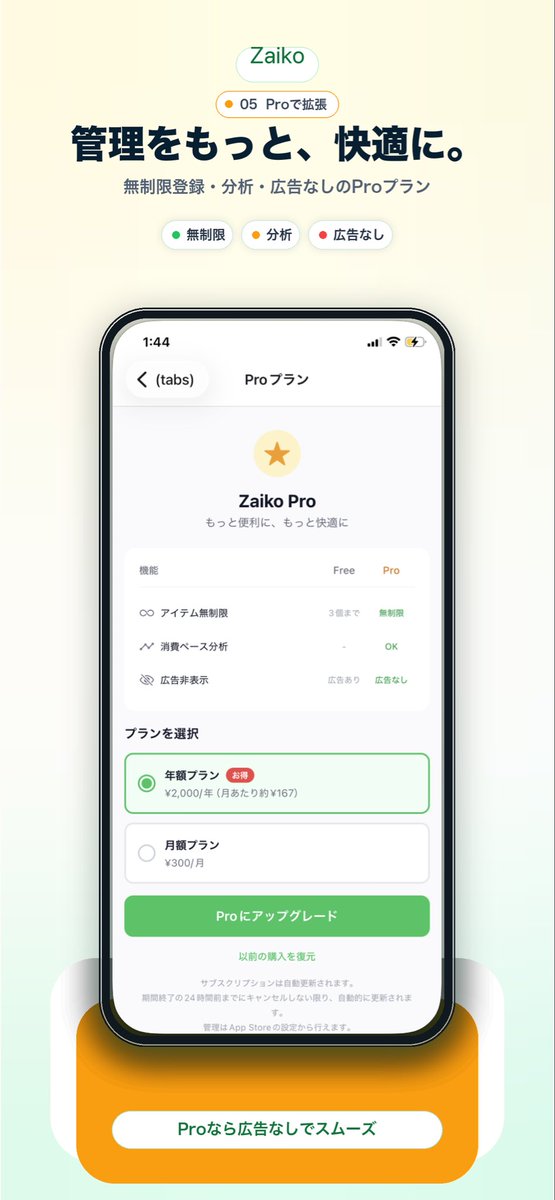
Japanese Pro Plan App Promo
This generates a polished Japanese mobile app marketing screenshot showcasing a Pro subscription screen for use in landing pages, app store visuals, or social media promotion.
This is a GPT Image 2 prompt case for Product & Commercial. Use the copy-ready prompt below to generate similar visuals, and review Awesome GPT Image 2 Prompts attribution plus commercial-use rights before reuse.
Free 1K preview
Generate one preview image instantly, no sign-up required.
Prompt
Copy-ready prompt
Create a clean modern promotional hero image for a Japanese inventory management app landing page on a soft warm off-white background with a subtle pale mint gradient rising from the bottom. Center the composition vertically. At the top, place a rounded white pill logo with the text "Zaiko" in green. Directly below it, add a small rounded badge with a tiny yellow dot and the text "05 Proで拡張". Then add a large bold Japanese headline in dark navy reading "管理をもっと、快適に。" and a smaller gray subheadline reading "無制限登録・分析・広告なしのProプラン". Under that, show exactly 3 small rounded feature chips in one row: a white chip with a green dot and the label "無制限", a white chip with a yellow dot and the label "分析", and a white chip with a red dot and the label "広告なし". In the center, display a large realistic iPhone front view with thin black bezel, rounded corners, subtle reflections, and a soft shadow. On the phone screen, show an app subscription page in Japanese with the top bar time 1:44, back chevron, a left tab label "(tabs)", and the centered title "Proプラン". The page content should feature a pale gold circular icon with a gold star, the title "Zaiko Pro", and the subtitle "もっと便利に、もっと快適に". Below that, include a rounded white comparison card with 3 feature rows and 3 column headers "機能", "Free", "Pro". The 3 rows should be: "アイテム無制限" with "3個まで" under Free and "無制限" in green under Pro; "消費ベース分析" with "-" under Free and "OK" in green under Pro; "広告非表示" with "広告あり" under Free and "広告なし" in green under Pro. Beneath the card, add a section title "プランを選択" and exactly 2 stacked plan options: a selected annual plan outlined in green with a green radio button, the label "年額プラン", a small red badge "お得", and the price line "¥2,000/年 (月あたり約¥167)"; then an unselected monthly plan with a gray radio button, the label "月額プラン", and the price "¥300/月". Under the plans, place a large rounded green call-to-action button reading "Proにアップグレード". Below it, add a centered text link "以前の購入を復元" and several lines of tiny gray subscription disclaimer text. At the very bottom behind the phone, add a large rounded orange pedestal card with a white pill label containing the text "Proなら広告なしでスムーズ" in green. Use a polished startup-app marketing style, soft shadows, airy spacing, rounded UI, crisp Japanese typography, and a premium minimal aesthetic.
Best for
- - Product & Commercial visual exploration
- - Image generation and reference-image edits
- - Reusable briefs that keep source attribution visible
Change these parts
- - Subject, product, character, or scene
- - Aspect ratio, camera, lighting, and background
- - Brand, text, color, and output constraints
Recommended model and settings
- - Model: gpt-image-2
- - Input mode: Text to Image
- - Aspect ratio: source
- - Commercial status: review original source
How to use this prompt
- 1. Copy the prompt and preserve its structure for the first test.
- 2. Replace the subject, context, and publishing channel.
- 3. Change one camera, lighting, or style variable per iteration.
- 4. Inspect the output, source, text, and rights before reuse.
Limitations, source, and reuse cautions
- - Generated output is an editable draft, not factual, legal, or rights evidence.
- - Review the linked source, people, brands, logos, text, and third-party media before commercial use.
More cases in this category
Prioritized by category, input mode compatibility, quality, and lower risk.




Reuse and source notes
Use this prompt safely after previewing the case.
- 1.Copy the prompt or open it directly in Dovoo with the generation button.
- 2.Adjust variables, aspect ratio, and reference images for your own use case.
- 3.Before publishing or paid usage, verify source rights, attribution requirements, and brand or likeness risks.
Can I use this prompt commercially?
Commercial-use status is allowed. Review the original source, license, brand constraints, and legal requirements before paid usage.
Where does this case come from?
This case is imported from Awesome GPT Image 2 Prompts; keep attribution visible and check the source URL before reuse.