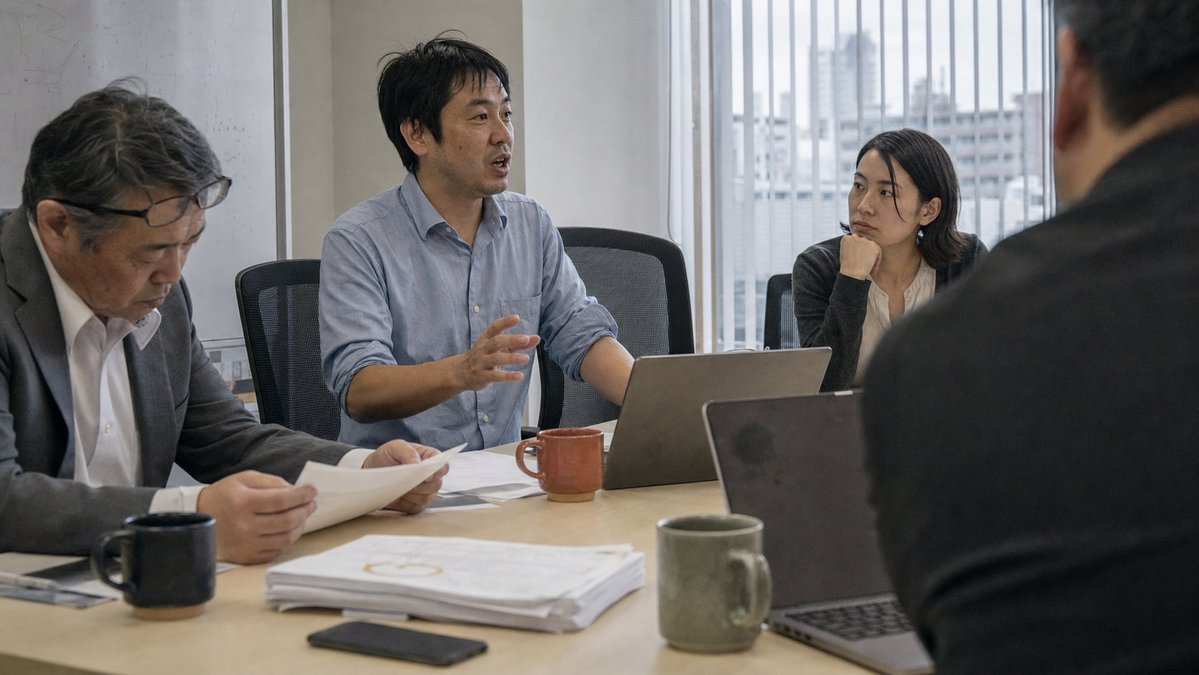
Japanese Office Meeting Photo
A realistic wide corporate meeting scene for illustrating business discussion, teamwork, or workplace communication.
This is a GPT Image 2 prompt case for Portrait & Character. Use the copy-ready prompt below to generate similar visuals, and review Awesome GPT Image 2 Prompts attribution plus commercial-use rights before reuse.
Free 1K preview
Generate one preview image instantly, no sign-up required.
Prompt
Copy-ready prompt
Create a realistic documentary-style office meeting photograph in a modern conference room. Show exactly 4 Japanese businesspeople around a light wood meeting table: 1 middle-aged man on the left in a dark suit and glasses looking down while reading printed papers, 1 man in the center wearing a pale blue button-down shirt speaking and gesturing with one hand, 1 young woman on the right side in a dark cardigan resting her chin on her hand and listening attentively, and 1 out-of-focus man in the extreme right foreground seen from behind in a dark jacket. The central speaker is {argument name="main speaker" default="a Japanese man in his late 30s to early 40s with short black hair"}, wearing {argument name="speaker shirt" default="a light blue button-down shirt with sleeves casually rolled"}. Use a candid corporate photography style, natural window light, muted colors, shallow depth of field, and realistic skin texture. The room has tall windows with vertical blinds and a hazy urban city view outside, white walls, and black mesh office chairs. On the table include exactly 3 ceramic mugs: 1 black mug near the left man, 1 reddish-brown mug near the central speaker, and 1 olive-green mug in the foreground; exactly 2 open laptops: 1 silver laptop in front of the speaker and 1 dark laptop in the foreground; plus a stack of printed documents, loose papers being held by the left man, and 1 dark smartphone lying flat near the front edge. Compose as a wide 16:9 horizontal image from table height, with the center speaker as the focal point, the foreground person and laptop softly blurred, and no visible logos or readable text.Prompt variables
Editable argument placeholders found in the prompt, with their default values.
Best for
- - Portrait & Character visual exploration
- - Image generation and reference-image edits
- - Reusable briefs that keep source attribution visible
Change these parts
- - Subject, product, character, or scene
- - Aspect ratio, camera, lighting, and background
- - Brand, text, color, and output constraints
Recommended model and settings
- - Model: gpt-image-2
- - Input mode: Text to Image
- - Aspect ratio: source
- - Commercial status: review original source
How to use this prompt
- 1. Copy the prompt and preserve its structure for the first test.
- 2. Replace the subject, context, and publishing channel.
- 3. Change one camera, lighting, or style variable per iteration.
- 4. Inspect the output, source, text, and rights before reuse.
Limitations, source, and reuse cautions
- - Generated output is an editable draft, not factual, legal, or rights evidence.
- - Review the linked source, people, brands, logos, text, and third-party media before commercial use.
More cases in this category
Prioritized by category, input mode compatibility, quality, and lower risk.
Reuse and source notes
Use this prompt safely after previewing the case.
- 1.Copy the prompt or open it directly in Dovoo with the generation button.
- 2.Adjust variables, aspect ratio, and reference images for your own use case.
- 3.Before publishing or paid usage, verify source rights, attribution requirements, and brand or likeness risks.
Can I use this prompt commercially?
Commercial-use status is allowed. Review the original source, license, brand constraints, and legal requirements before paid usage.
Where does this case come from?
This case is imported from Awesome GPT Image 2 Prompts; keep attribution visible and check the source URL before reuse.