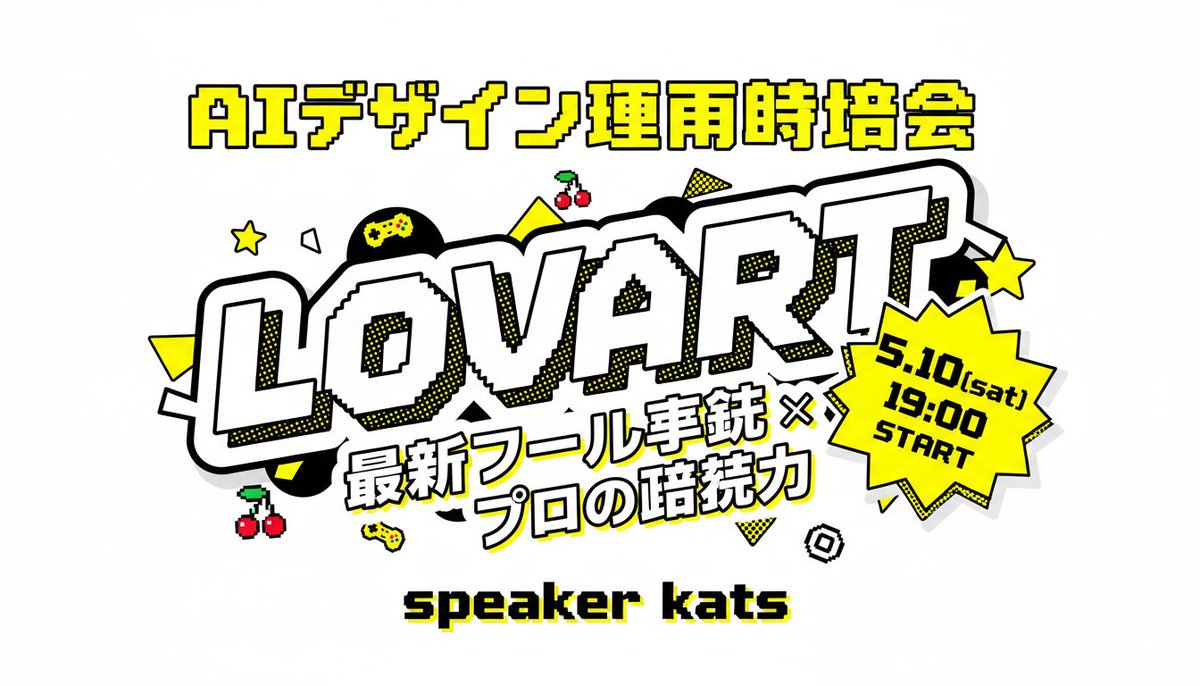
Retro Japanese Lovart Event Poster
A bold arcade-style Japanese event thumbnail poster with large readable text, gaming icons, and a pop-art promotional layout ideal for social media announcements.
This is a GPT Image 2 prompt case for Graphic & Poster. Use the copy-ready prompt below to generate similar visuals, and review Awesome GPT Image 2 Prompts attribution plus commercial-use rights before reuse.
Free 1K preview
Generate one preview image instantly, no sign-up required.
Prompt
Copy-ready prompt
A bold Japanese event thumbnail poster on a light gray background in a retro arcade pop-art style. Center the composition around a huge diagonal wordmark reading “LOVART” in oversized white block letters with thick black outline, chunky 3D feel, subtle pixel-stepped inner edges, and yellow halftone shadow accents. Above it, place one line of large Japanese header text in bright yellow with black outline: “AIデザイン運用時培会”. Below the main wordmark, add a two-line Japanese subtitle in heavy white lettering with black outline and slight tilt: “最新ツール実銃 ×” on the first line and “プロの暗続力” on the second line. At the lower center, place a pixel-style black text label with a yellow drop shadow reading “speaker kats”. On the right side overlapping the main logo, add a bright yellow jagged starburst badge with thick black outline containing 3 stacked lines of black text: “5.10(sat)”, “19:00”, “START”. Decorate the layout with exactly 12 playful gaming-style accent icons and shapes scattered around the logo: 2 yellow five-point stars, 2 pairs of red cherries with green stems, 2 small yellow game controllers, 1 black circle with a yellow gamepad symbol inside, 2 solid yellow triangles, 1 yellow dotted triangle, 1 white outlined polygon, and 1 small black-and-white spiral square. Use a high-contrast palette of yellow, black, white, and light gray, with thick outlines, sticker-like layering, comic halftone dots, and crisp readable Japanese typography.
Best for
- - Graphic & Poster visual exploration
- - Image generation and reference-image edits
- - Reusable briefs that keep source attribution visible
Change these parts
- - Subject, product, character, or scene
- - Aspect ratio, camera, lighting, and background
- - Brand, text, color, and output constraints
Recommended model and settings
- - Model: gpt-image-2
- - Input mode: Text to Image
- - Aspect ratio: source
- - Commercial status: review original source
How to use this prompt
- 1. Copy the prompt and preserve its structure for the first test.
- 2. Replace the subject, context, and publishing channel.
- 3. Change one camera, lighting, or style variable per iteration.
- 4. Inspect the output, source, text, and rights before reuse.
Limitations, source, and reuse cautions
- - Generated output is an editable draft, not factual, legal, or rights evidence.
- - Review the linked source, people, brands, logos, text, and third-party media before commercial use.
More cases in this category
Prioritized by category, input mode compatibility, quality, and lower risk.





Reuse and source notes
Use this prompt safely after previewing the case.
- 1.Copy the prompt or open it directly in Dovoo with the generation button.
- 2.Adjust variables, aspect ratio, and reference images for your own use case.
- 3.Before publishing or paid usage, verify source rights, attribution requirements, and brand or likeness risks.
Can I use this prompt commercially?
Commercial-use status is allowed. Review the original source, license, brand constraints, and legal requirements before paid usage.
Where does this case come from?
This case is imported from Awesome GPT Image 2 Prompts; keep attribution visible and check the source URL before reuse.