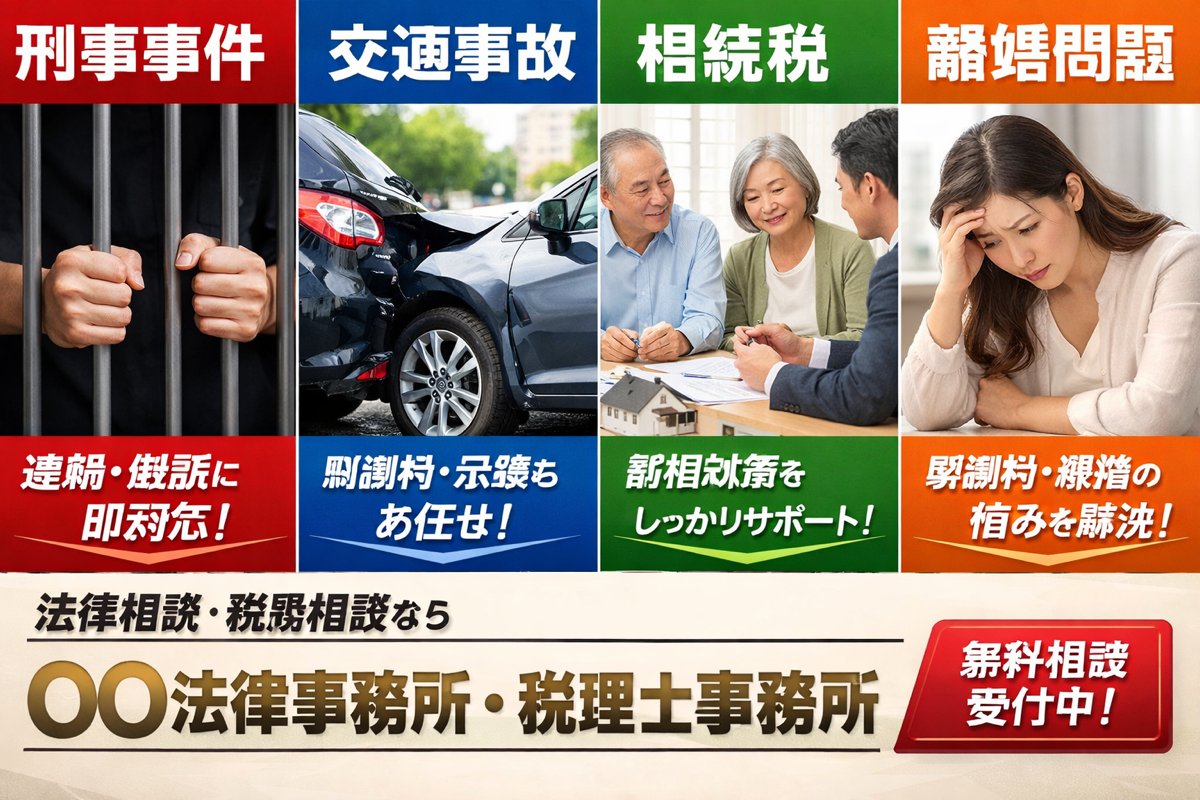
Japanese Legal Services LP Banner
A bold Japanese landing-page hero image for a fictional law and tax office, useful for legal service ads, listing pages, and corporate LP mockups.
This is a GPT Image 2 prompt case for Graphic & Poster. Use the copy-ready prompt below to generate similar visuals, and review Awesome GPT Image 2 Prompts attribution plus commercial-use rights before reuse.
Free 1K preview
Generate one preview image instantly, no sign-up required.
Prompt
Copy-ready prompt
A Japanese listing-ad style landing page hero banner for a fictional law office and tax accountant office, designed like a bold web advertisement with four equal vertical panels across the top and a strong call-to-action area across the bottom. The top row contains exactly 4 service panels, each with a colored header bar, a photo-realistic stock-photo image, and a colored caption bar at the bottom. Panel 1 is red and labeled 「刑事事件」 at the top, showing a close-up of two hands gripping dark prison bars against a black background; the bottom red caption reads 「逮捕・訴訟に即対応!」 in large bold white Japanese text. Panel 2 is blue and labeled 「交通事故」 at the top, showing a realistic rear-end car crash with two damaged dark-colored sedans on a city street in daylight; the bottom blue caption reads 「慰謝料・示談もお任せ!」 in large bold white Japanese text. Panel 3 is green and labeled 「相続税」 at the top, showing an elderly couple seated at a table consulting with a suited professional, with papers and a small house model visible; the bottom green caption reads 「税相続対策をしっかりサポート!」 in large bold white Japanese text. Panel 4 is orange and labeled 「離婚問題」 at the top, showing a distressed woman sitting indoors with her head resting on one hand; the bottom orange caption reads 「慰謝料・親権の悩みを解決!」 in large bold white Japanese text. Make the four panels touch edge-to-edge with clean white dividers, each panel occupying the same width, and use highly saturated primary colors with glossy ad-design styling. Beneath the four panels, create a cream or light beige background footer area. On the left side, place a smaller black subheadline in Japanese: 「法律相談・税務相談なら」. Centered below it, place the large main office name in metallic gold gradient bold Japanese lettering with a slight bevel effect: 「{argument name="office name" default="〇〇法律事務所・税理士事務所"}」. Add thin black horizontal divider lines above and below the main office name. On the lower right, place a large glossy red rounded rectangular button with a bright gradient and white bold Japanese text reading 「{argument name="button text" default="Free consultation available!"}」. The overall style should feel like a Japanese legal and tax services LP main visual from a listing ad: corporate, urgent, trustworthy, commercial, photo-based, clean grid layout, bold typography, high contrast, and realistic brochure-quality compositing.Prompt variables
Editable argument placeholders found in the prompt, with their default values.
Best for
- - Graphic & Poster visual exploration
- - Image generation and reference-image edits
- - Reusable briefs that keep source attribution visible
Change these parts
- - Subject, product, character, or scene
- - Aspect ratio, camera, lighting, and background
- - Brand, text, color, and output constraints
Recommended model and settings
- - Model: gpt-image-2
- - Input mode: Text to Image
- - Aspect ratio: source
- - Commercial status: review original source
How to use this prompt
- 1. Copy the prompt and preserve its structure for the first test.
- 2. Replace the subject, context, and publishing channel.
- 3. Change one camera, lighting, or style variable per iteration.
- 4. Inspect the output, source, text, and rights before reuse.
Limitations, source, and reuse cautions
- - Generated output is an editable draft, not factual, legal, or rights evidence.
- - Review the linked source, people, brands, logos, text, and third-party media before commercial use.
More cases in this category
Prioritized by category, input mode compatibility, quality, and lower risk.






Reuse and source notes
Use this prompt safely after previewing the case.
- 1.Copy the prompt or open it directly in Dovoo with the generation button.
- 2.Adjust variables, aspect ratio, and reference images for your own use case.
- 3.Before publishing or paid usage, verify source rights, attribution requirements, and brand or likeness risks.
Can I use this prompt commercially?
Commercial-use status is allowed. Review the original source, license, brand constraints, and legal requirements before paid usage.
Where does this case come from?
This case is imported from Awesome GPT Image 2 Prompts; keep attribution visible and check the source URL before reuse.