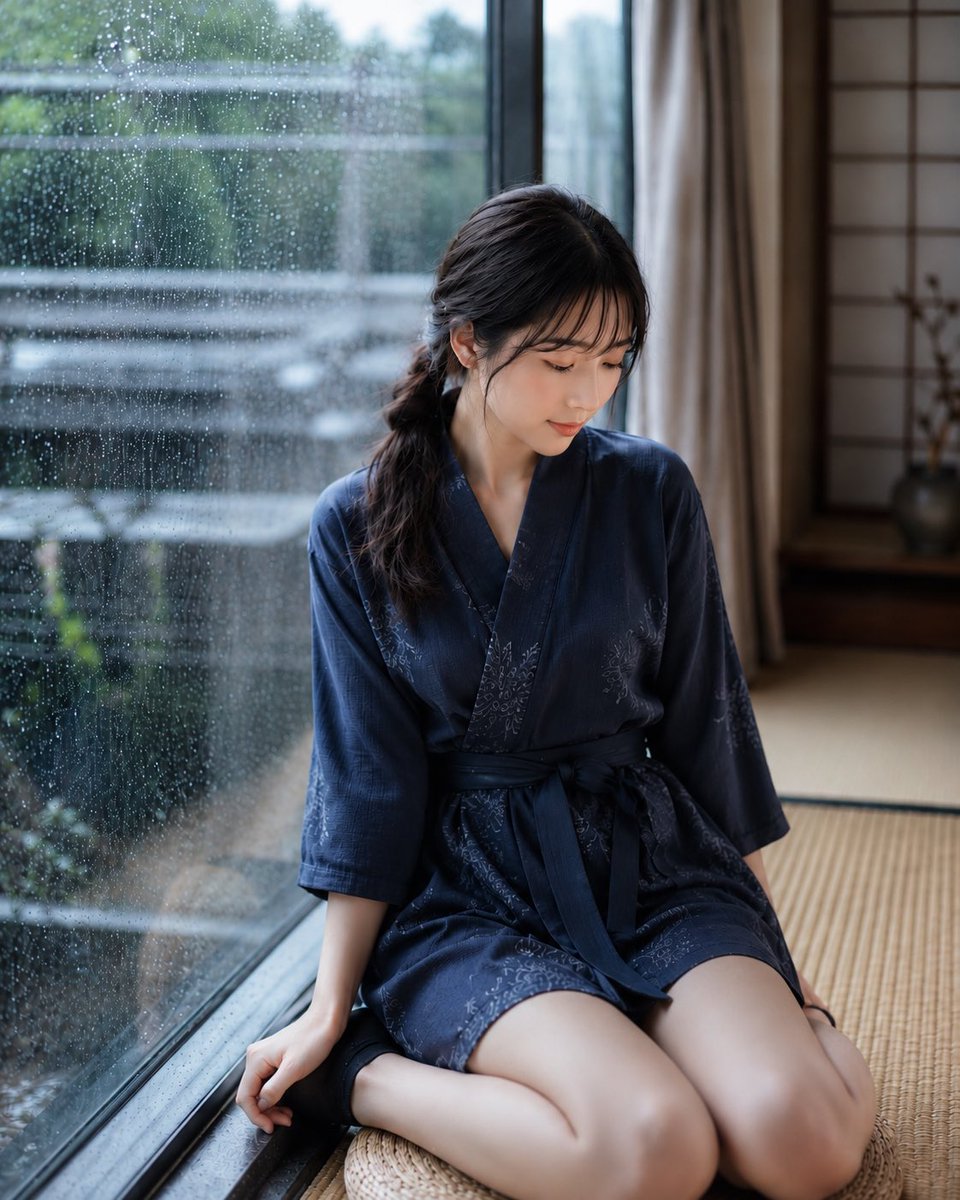
Rainy Day Japanese Inn Portrait
A highly detailed prompt for generating a serene, atmospheric portrait of a woman in a traditional Japanese inn on a rainy day.
This is a GPT Image 2 prompt case for 人像角色. Use the copy-ready prompt below to generate similar visuals, and review Awesome GPT Image 2 Prompts attribution plus commercial-use rights before reuse.
Prompt
Copy-ready prompt
主体:{argument name="subject" default="雨天"}

人物/表情:{argument name="person" default="20 岁出头的女性"},黑色松散侧马尾,薄刘海,通透自然的皮肤,自然妆容,神情平静且眼帘低垂,气质安静优雅。

服装/姿势:{argument name="clothing" default="深蓝色日式家居服"},精致花卉刺绣,宽松剪裁配腰带,坐在窗边的榻榻米上,姿势自然,微微低头,一只手撑在地面。

背景/光影:带有雨滴的大窗户,窗外模糊的庭院绿植,带有榻榻米和障子的日式房间,安静的旅馆室内,雨天柔和的自然光,湿润而静谧的氛围。

构图/相机:竖构图,半身至膝盖以上的人像,人物位于画面右侧,35mm 镜头,浅景深,自然摄影风格,窗户上的雨滴与背景呈现柔和虚化。

质感/风格:高清晰度,4K 画质,自然皮肤纹理,写实 AI 人像,日式人像,柔和色调,雨天的通透感,电影级布光,优雅安静的旅馆摄影风格。

负面提示词:低质量,不自然的手,扭曲的脸,多余的手指,变形的身体,过度处理,过度曝光,破损的衣服,文字,标志,水印
Prompt variables
Editable argument placeholders found in the prompt, with their default values.
More cases in this category
Prioritized by category, input mode compatibility, quality, and lower risk.
Reuse and source notes
Use this prompt safely after previewing the case.
- 1.Copy the prompt or open it directly in Dovoo with the generation button.
- 2.Adjust variables, aspect ratio, and reference images for your own use case.
- 3.Before publishing or paid usage, verify source rights, attribution requirements, and brand or likeness risks.
Can I use this prompt commercially?
Commercial-use status is allowed. Review the original source, license, brand constraints, and legal requirements before paid usage.
Where does this case come from?
This case is imported from Awesome GPT Image 2 Prompts; keep attribution visible and check the source URL before reuse.