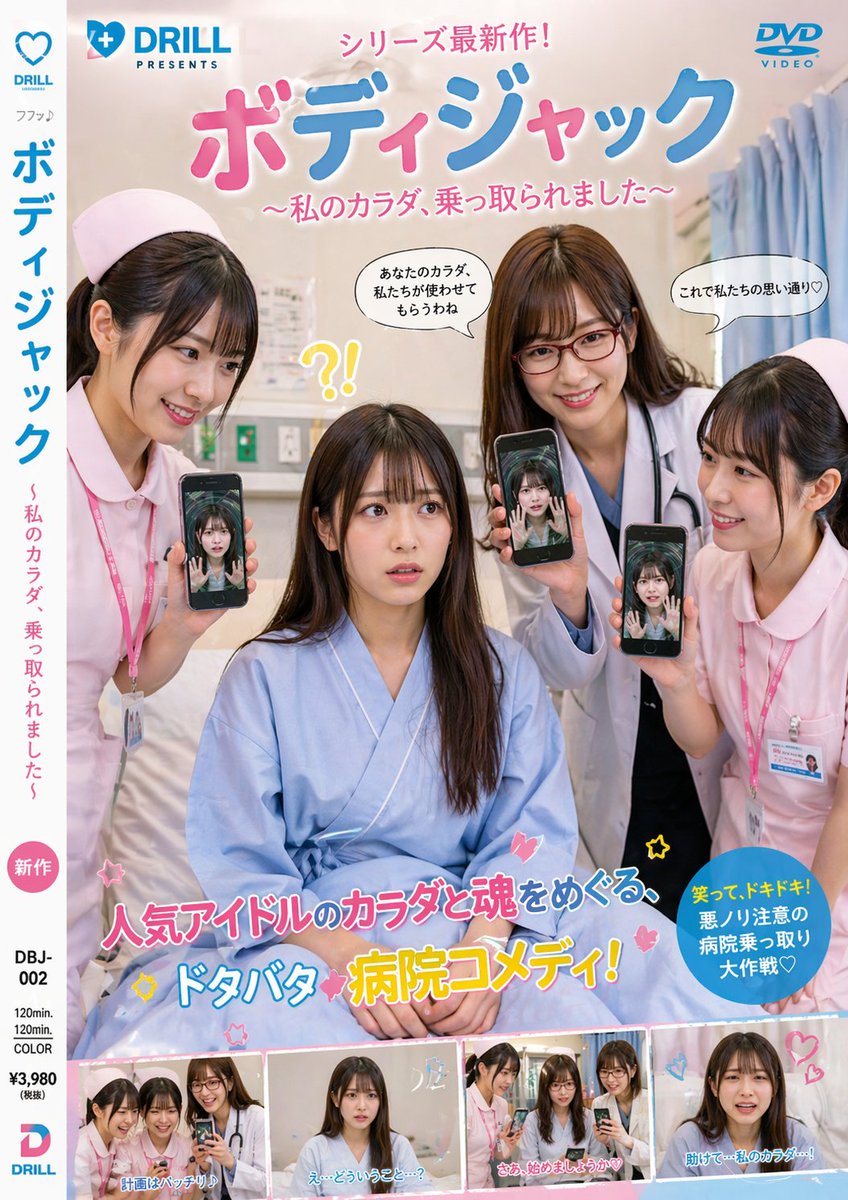
Japanese Hospital Comedy DVD Cover
A glossy photorealistic Japanese DVD jacket featuring a hospital body-swap comedy setup, ideal for generating commercial-style movie cover art.
This is a GPT Image 2 prompt case for Product & Commercial. Use the copy-ready prompt below to generate similar visuals, and review Awesome GPT Image 2 Prompts attribution plus commercial-use rights before reuse.
Free 1K preview
Generate one preview image instantly, no sign-up required.
Prompt
Copy-ready prompt
A photorealistic Japanese DVD cover styled like a commercial live-action comedy-thriller release, shot vertically with glossy retail packaging design. The cover shows a hospital room interior with soft beige walls, a bed, curtains on the right, and subtle medical fixtures in the background. In the center foreground, 1 seated young Japanese woman in a loose light-blue hospital gown sits on a bed, looking confused and vulnerable. Around her stand 3 young Japanese female medical staff: 2 nurses in pale pink uniforms with matching nurse caps and ID badges, and 1 doctor in a white coat with a stethoscope. Each of the 3 standing women is holding up a smartphone toward the camera, and each phone screen shows the seated woman’s face or body as if her consciousness has been transferred into their devices, creating a body-jack possession theme. The overall tone is playful, absurd, and slightly eerie, like a Japanese idol movie or hospital comedy DVD jacket. Use a polished magazine-quality layout with bold Japanese typography and colorful pop graphics. At the very top, place a small blue publisher logo on the left reading {argument name="studio name" default="DRILL PRESENTS"} with a heart icon, and a blue DVD VIDEO logo on the top right. Across the top center, add a pink Japanese banner line reading "シリーズ最新作!". Below it, make the main title huge, rounded, glossy, and bubbly in pink and blue Japanese text: {argument name="main title" default="ボディジャック"}. Under the title, add a pink subtitle in Japanese: {argument name="subtitle" default="~私のカラダ、乗っ取られました~"}. Add 3 comic-style speech bubbles near the upper characters: one saying "あなたのカラダ、私たちが使わせてもらうわね", one saying "これで私たちの思い通り♡", and 1 yellow startled reaction near the seated woman that reads "?!". On the left spine area, create a white vertical strip with blue and pink Japanese text repeating the title and subtitle, plus a small pink circle label reading "新作". At the bottom center, place a large flashy Japanese catchphrase in mixed pink, blue, white, and yellow outlined lettering: "人気アイドルのカラダと魂をめぐる、ドタバタ病院コメディ!" with small stars and heart doodles around it. On the lower right, add a blue circular burst with yellow and white Japanese text: "笑って、ドキドキ!悪ノリ注意の病院乗っ取り大作戦♡". Along the bottom edge, include exactly 4 small rectangular preview stills from the film, each bordered like DVD scene thumbnails, showing the same hospital characters in slightly different poses; add short Japanese captions on each thumbnail, including lines similar to "計画はバッチリ!", "え…どういうこと…?", "さあ、始めましょうか♡", and "助けて…私のカラダ…!". In the lower left margin include DVD package metadata in black text such as catalog number "DBJ-002", duration "120min.", "COLOR", and price "¥3,980 (税抜)", plus a small blue-and-pink DRILL logo. Bright retail-ready composition, realistic people, commercial Japanese movie jacket aesthetics, slightly campy, high-resolution, clean print design.Prompt variables
Editable argument placeholders found in the prompt, with their default values.
Best for
- - Product & Commercial visual exploration
- - Image generation and reference-image edits
- - Reusable briefs that keep source attribution visible
Change these parts
- - Subject, product, character, or scene
- - Aspect ratio, camera, lighting, and background
- - Brand, text, color, and output constraints
Recommended model and settings
- - Model: gpt-image-2
- - Input mode: Text to Image
- - Aspect ratio: source
- - Commercial status: review original source
How to use this prompt
- 1. Copy the prompt and preserve its structure for the first test.
- 2. Replace the subject, context, and publishing channel.
- 3. Change one camera, lighting, or style variable per iteration.
- 4. Inspect the output, source, text, and rights before reuse.
Limitations, source, and reuse cautions
- - Generated output is an editable draft, not factual, legal, or rights evidence.
- - Review the linked source, people, brands, logos, text, and third-party media before commercial use.
More cases in this category
Prioritized by category, input mode compatibility, quality, and lower risk.

Reuse and source notes
Use this prompt safely after previewing the case.
- 1.Copy the prompt or open it directly in Dovoo with the generation button.
- 2.Adjust variables, aspect ratio, and reference images for your own use case.
- 3.Before publishing or paid usage, verify source rights, attribution requirements, and brand or likeness risks.
Can I use this prompt commercially?
Commercial-use status is allowed. Review the original source, license, brand constraints, and legal requirements before paid usage.
Where does this case come from?
This case is imported from Awesome GPT Image 2 Prompts; keep attribution visible and check the source URL before reuse.