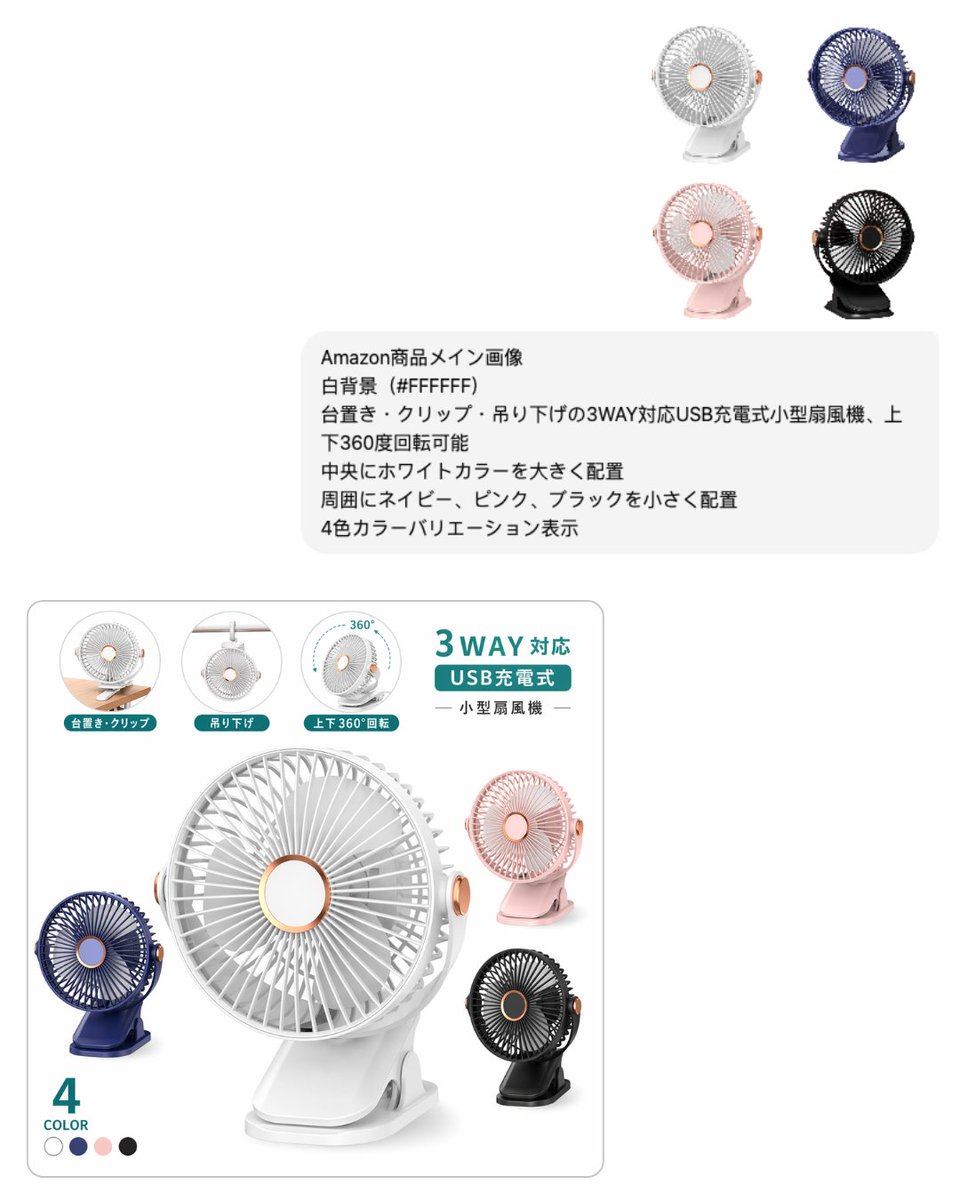
Japanese E-commerce Fan Main Image
This generates a clean Japanese marketplace-style product image for a compact USB rechargeable fan, suitable for Amazon or EC listing main visuals and promotional mockups.
This is a GPT Image 2 prompt case for Product & Commercial. Use the copy-ready prompt below to generate similar visuals, and review Awesome GPT Image 2 Prompts attribution plus commercial-use rights before reuse.
Free 1K preview
Generate one preview image instantly, no sign-up required.
Prompt
Copy-ready prompt
{"type":"e-commerce product main image mockup","style":"clean Japanese marketplace listing visual, minimal, bright, commercial studio composite","background":{"color":"#FFFFFF"},"product":{"category":"small USB rechargeable fan","design":"compact portable desk fan with circular grille, rose-gold accent ring at the center and side knob, flat base clip stand, usable as tabletop, clip-on, or hanging fan, head tilts and rotates vertically","main_color":"{argument name="main product color" default="white"}","variant_count":4,"variants":["white","navy","pink","black"]},"layout":{"canvas":"square composition with wide white negative space","sections":[{"title":"top-right color lineup","position":"upper right","count":4,"labels":["white","navy","pink","black"],"description":"four small product renders arranged in a 2 by 2 grid"},{"title":"instruction text block","position":"upper middle-right","count":6,"labels":["Amazon商品メイン画像","白背景(#FFFFFF)","台置き・クリップ・吊り下げの3WAY対応USB充電式小型扇風機、上下360度回転可能","中央にホワイトカラーを大きく配置","周囲にネイビー、ピンク、ブラックを小さく配置","4色カラーバリエーション表示"],"description":"rounded light gray note box with six lines of Japanese text"},{"title":"main product card","position":"bottom left","count":9,"labels":["台置き・クリップ","吊り下げ","上下360°回転","3WAY対応","USB充電式","小型扇風機","4","COLOR","white navy pink black"],"description":"large rounded rectangle product feature card with hero product and feature icons"}],"centerpiece":"oversized {argument name="main product color" default="white"} fan placed prominently inside the bottom product card, angled slightly to the right with soft shadow"},"feature_icons":{"count":3,"items":[{"label":"台置き・クリップ","description":"small circular inset showing the fan clipped to a wooden desk edge"},{"label":"吊り下げ","description":"small circular inset showing the fan hanging from above"},{"label":"上下360°回転","description":"small circular inset with a curved 360-degree arrow around the fan"}]},"text":{"headline":"{argument name="headline text" default="Supports 3 methods"}","subheadline":"{argument name="subheadline text" default="USB charging"}","product_label":"{argument name="product label" default="Small fan"}","color_count":"4 COLOR"},"visual_details":{"materials":"matte plastic body with subtle metallic rose-gold accents","lighting":"soft high-key studio lighting, gentle gray shadows, crisp product cutout look","graphics":"teal accent labels and badges, thin gray borders, clean Japanese marketplace typography","composition_notes":"show the white fan largest in the center, with navy at lower left, pink at upper right, and black at lower right inside the product card; keep overall layout airy and premium"}}Prompt variables
Editable argument placeholders found in the prompt, with their default values.
Best for
- - Product & Commercial visual exploration
- - Image generation and reference-image edits
- - Reusable briefs that keep source attribution visible
Change these parts
- - Subject, product, character, or scene
- - Aspect ratio, camera, lighting, and background
- - Brand, text, color, and output constraints
Recommended model and settings
- - Model: gpt-image-2
- - Input mode: Text to Image
- - Aspect ratio: source
- - Commercial status: review original source
How to use this prompt
- 1. Copy the prompt and preserve its structure for the first test.
- 2. Replace the subject, context, and publishing channel.
- 3. Change one camera, lighting, or style variable per iteration.
- 4. Inspect the output, source, text, and rights before reuse.
Limitations, source, and reuse cautions
- - Generated output is an editable draft, not factual, legal, or rights evidence.
- - Review the linked source, people, brands, logos, text, and third-party media before commercial use.
More cases in this category
Prioritized by category, input mode compatibility, quality, and lower risk.






Reuse and source notes
Use this prompt safely after previewing the case.
- 1.Copy the prompt or open it directly in Dovoo with the generation button.
- 2.Adjust variables, aspect ratio, and reference images for your own use case.
- 3.Before publishing or paid usage, verify source rights, attribution requirements, and brand or likeness risks.
Can I use this prompt commercially?
Commercial-use status is allowed. Review the original source, license, brand constraints, and legal requirements before paid usage.
Where does this case come from?
This case is imported from Awesome GPT Image 2 Prompts; keep attribution visible and check the source URL before reuse.