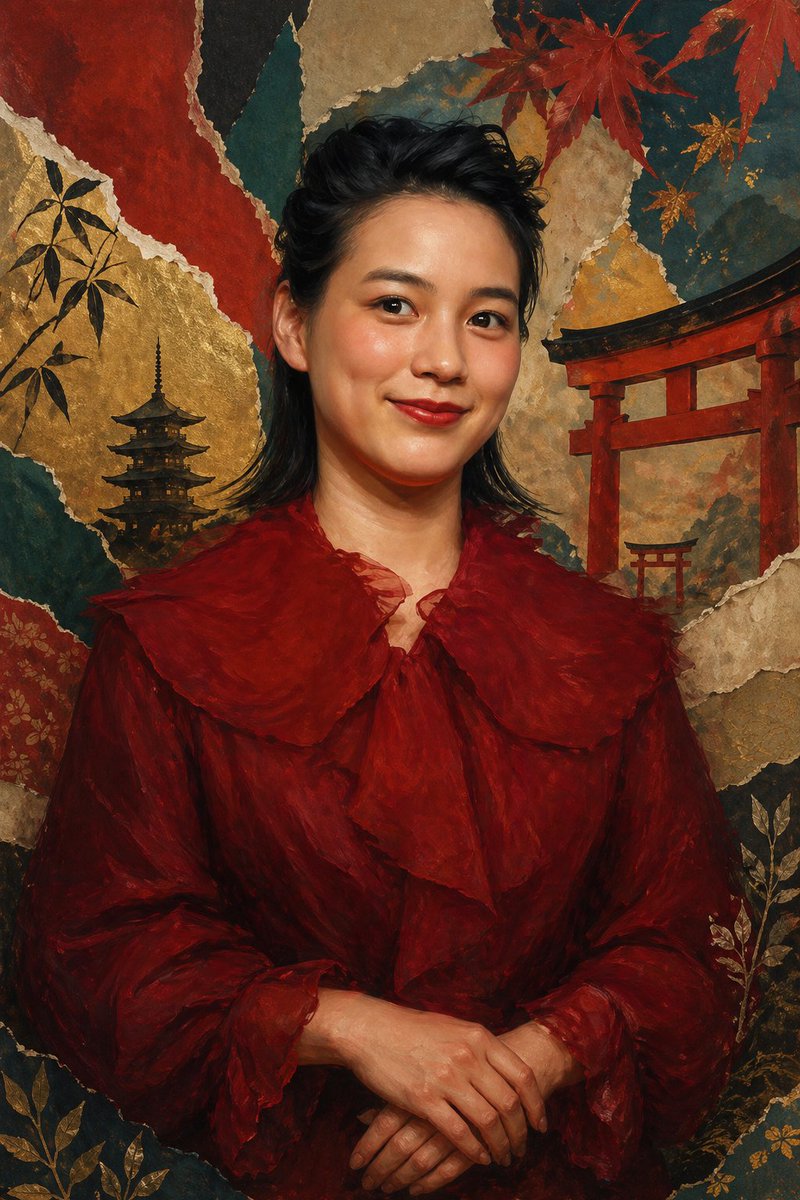
Japanese Collage Portrait in Crimson
This prompt generates an elegant anonymized fine-art portrait with a crimson ruffled outfit against a richly textured Japanese-inspired gold-leaf collage background, suitable for editorial art or poster design.
This is a GPT Image 2 prompt case for Portrait & Character. Use the copy-ready prompt below to generate similar visuals, and review Awesome GPT Image 2 Prompts attribution plus commercial-use rights before reuse.
Free 1K preview
Generate one preview image instantly, no sign-up required.
Prompt
Copy-ready prompt
A refined vertical fine-art portrait of {argument name="subject" default="a Japanese actress and singer"} shown from about the waist up, centered and facing forward, with dark black wavy mullet-length hair brushed back from the forehead and softly framing the ears and neck, wearing a dramatic deep crimson chiffon blouse or dress with oversized translucent ruffles at the collar, chest, and sleeve cuffs. Her hands are gently folded at the lower center of the frame in a calm formal pose. The face area is deliberately obscured by a flat rectangular skin-toned block with no facial features visible, creating an anonymized editorial-art effect. The background is an elaborate Japanese-inspired collage made of torn washi-paper textures and gilded surfaces, with exactly 2 red torii gates on the right side at different scales, exactly 1 dark five-story pagoda on the left side, red maple leaves across the upper right, bamboo silhouettes on the upper left, and delicate gold botanical motifs in the lower corners. Use a rich palette of burgundy, vermilion, burnt umber, black, teal, parchment, and gold leaf, with painterly brushwork, softly blended shadows, antique screen painting aesthetics, and luxurious museum-quality lighting. The composition should feel elegant, moody, and ceremonial, mixing contemporary portrait photography with traditional Japanese byobu and nihonga influences.Prompt variables
Editable argument placeholders found in the prompt, with their default values.
Best for
- - Portrait & Character visual exploration
- - Image generation and reference-image edits
- - Reusable briefs that keep source attribution visible
Change these parts
- - Subject, product, character, or scene
- - Aspect ratio, camera, lighting, and background
- - Brand, text, color, and output constraints
Recommended model and settings
- - Model: gpt-image-2
- - Input mode: Text to Image
- - Aspect ratio: source
- - Commercial status: review original source
How to use this prompt
- 1. Copy the prompt and preserve its structure for the first test.
- 2. Replace the subject, context, and publishing channel.
- 3. Change one camera, lighting, or style variable per iteration.
- 4. Inspect the output, source, text, and rights before reuse.
Limitations, source, and reuse cautions
- - Generated output is an editable draft, not factual, legal, or rights evidence.
- - Review the linked source, people, brands, logos, text, and third-party media before commercial use.
More cases in this category
Prioritized by category, input mode compatibility, quality, and lower risk.





Reuse and source notes
Use this prompt safely after previewing the case.
- 1.Copy the prompt or open it directly in Dovoo with the generation button.
- 2.Adjust variables, aspect ratio, and reference images for your own use case.
- 3.Before publishing or paid usage, verify source rights, attribution requirements, and brand or likeness risks.
Can I use this prompt commercially?
Commercial-use status is allowed. Review the original source, license, brand constraints, and legal requirements before paid usage.
Where does this case come from?
This case is imported from Awesome GPT Image 2 Prompts; keep attribution visible and check the source URL before reuse.