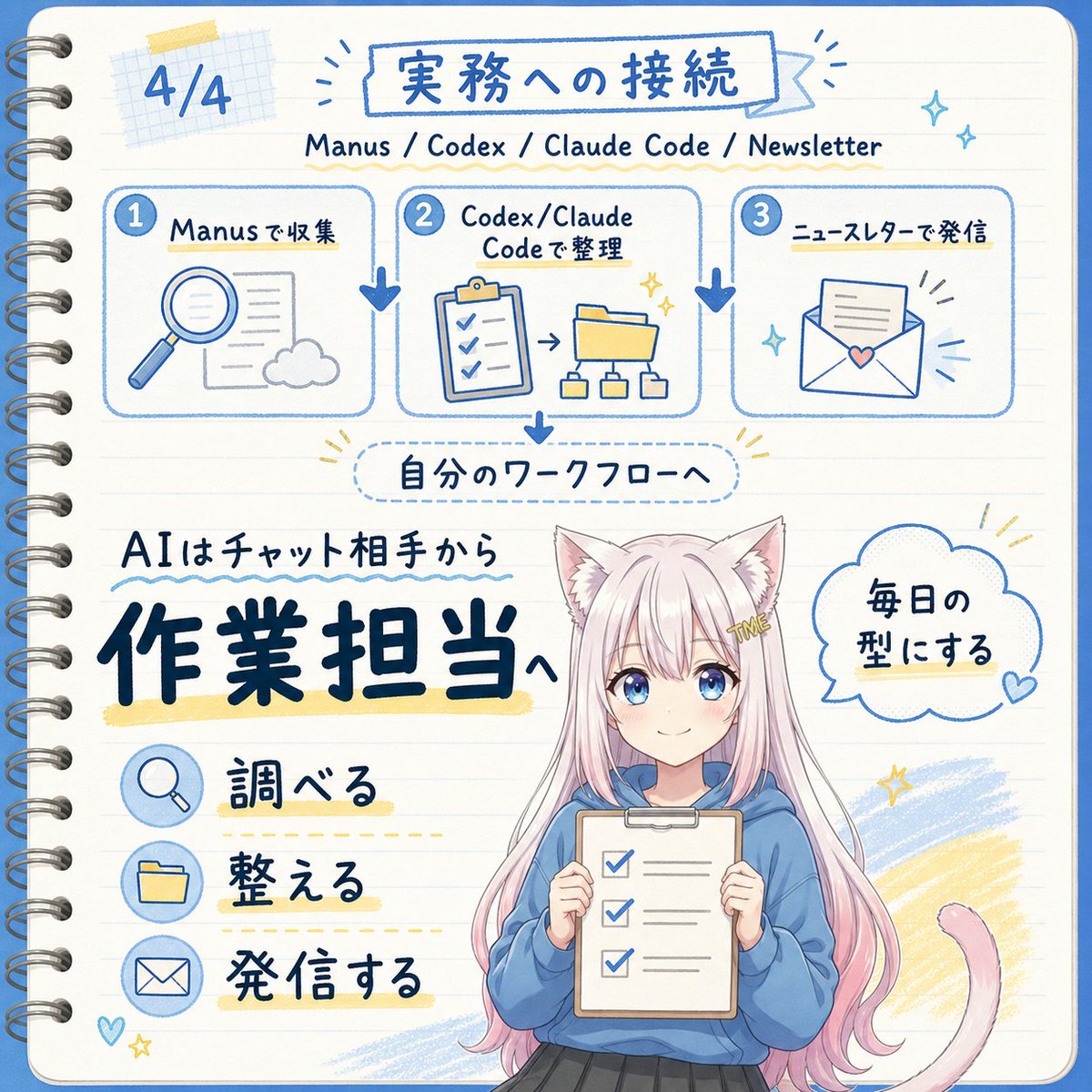
Japanese AI Workflow Notebook Infographic
Generate an adorable Japanese-style hand-drawn notebook infographic showcasing the AI workflow from collecting, organizing, to publishing communications.
Prompt
Copy-ready prompt
Objective: Create a square, Japanese-style hand-drawn notebook infographic about transforming AI from a chat partner into an operations/work assistant, featuring a cute anime mascot at the bottom. Canvas: 1:1 square image, cream-colored lined notebook paper background, rounded corners, blue border, visible metal spiral binding on the left, soft grid paper tape decoration in the upper left corner, accented with blue/yellow brushstrokes. Overall style should be simple, friendly, handwritten, and similar to shorthand. Text content: Use Japanese handwritten font. Page number in the upper left corner: "4/4". Main title within a blue-bordered banner:{argument name="main title" default="Connecting to practical work"} The subtitle below reads: "Manus / Codex / Claude Code / Newsletter". The tag within the dotted rounded rectangle in the center of the page reads: "自分のワークフローへ". The large core information in the lower left corner reads: "AIはチャット相手から", with extra-large, bold, dark blue text above it.{argument name="main message" default="To the person in charge of the work"} The speech bubble to the right of the character:{argument name="speech bubble text" default="Make it a daily routine"} Layout: The top third contains three horizontally arranged interconnected workflow cards, each with a numbered blue circle and a rounded blue outline. Card 1, labeled "Manusで収集" (Manusで収集), displays a magnifying glass, document, and cloud icons. Card 2, labeled "Codex/Claude Codeで整理" (Codex/Claude Codeで整理), displays a clipboard list, arrows, folders, and a small hierarchy diagram. Card 3, labeled "ニュースレターで発信" (Newsletterで発信), displays an envelope with a paper and heart-shaped pattern. Thick blue downward arrows are added between the cards, and another blue arrow points downwards from the middle card to the dotted workflow label. Bottom half: The left side contains three action bars with circular blue icons and Japanese labels: 1) Magnifying glass icon with "調べる" (to arrange), 2) Folder icon with "整える" (to organize), 3) Envelope icon with "発信する" (to send letters). Add underlines or highlights to each label using light yellow marker strokes and dashed guide lines. Character details: A cute anime cat-eared mascot is positioned in the center of the bottom right corner. She is depicted above her knees, with long, light pink hair, white cat ears, and a pink cat tail curling to the right. A gold hair clip bears the word "ME." She wears a loose blue hoodie and a dark skirt, and holds a clipboard with three checked checkboxes. The face area is intentionally obscured with a simple beige rectangle to indicate anonymity. For customization, please use [contact information].{argument name="character hair color" default="pastel pink"} hair color and{argument name="hoodie color" default="blue"} Hoodie. Visual style: Blue ink line drawing, complemented by bold dark blue font, pale yellow highlights, soft sky blue doodle fill, and small sparkles, hearts, and radiating emphasis lines. Adopting a cheerful educational communication aesthetic, blending hand-drawn projector pages with cute anime illustrations. Keep text clear and legible, with balanced spacing, avoiding a realistic style. Constraints: Includes 3 workflow cards and 3 action bars. Except for the subheading line, no additional panels, numbered steps, watermarks, logos, or English translations may be added to the image.Prompt variables
Editable argument placeholders found in the prompt, with their default values.
Variable
main title
Default
Connecting to practical work
Variable
main message
Default
To the person in charge of the work
Variable
speech bubble text
Default
Make it a daily routine
Variable
character hair color
Default
pastel pink
Variable
hoodie color
Default
blue
More cases in this category
Prioritized by category, input mode compatibility, quality, and lower risk.
Technical manual infographic style
text to imageunknown

Origami-style global infographic
text to imageunknown

Cloudflare Catch-All Email Routing Infographic
text to imageunknown

Hermes Agent Hand-drawn Shorthand Infographic
text to imageunknown

Infographic about paradoxes in advanced physics
text to imageunknown

Gundam series timeline infographic
text to imageunknown
Reuse and source notes
Use this prompt safely after previewing the case.
- 1.Copy the prompt or open it directly in Dovoo with the generation button.
- 2.Adjust variables, aspect ratio, and reference images for your own use case.
- 3.Before publishing or paid usage, verify source rights, attribution requirements, and brand or likeness risks.
Can I use this prompt commercially?
Commercial-use status is unknown. Review the original source, license, brand constraints, and legal requirements before paid usage.
Where does this case come from?
This case is imported from YouMind OpenLab awesome-gpt-image-2; keep attribution visible and check the source URL before reuse.