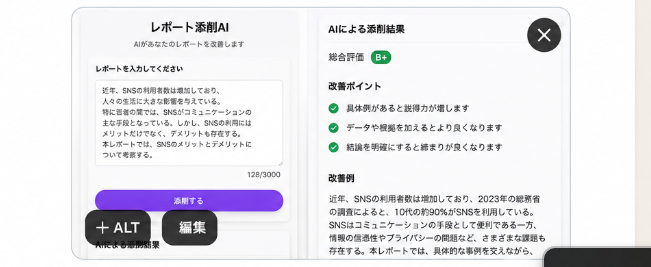
Japanese AI Report Correction App Mockup
A polished Japanese SaaS-style UI mockup for an AI report correction app, ideal for social media demand testing or startup concept validation.
This is a GPT Image 2 prompt case for 产品商业. Use the copy-ready prompt below to generate similar visuals, and review Awesome GPT Image 2 Prompts attribution plus commercial-use rights before reuse.
Prompt
Copy-ready prompt
目标:制作一个简洁、逼真的移动端 AI 报告检查应用设计稿,以浅灰色背景上的圆角白色模态框形式呈现,适用于在社交媒体上进行需求测试。应用名称应为 {argument name="app title" default="レポート添削AI"},界面需呈现出成品级 UI 的质感。

画布:宽幅横向图片,比例约为 16:7。在中心放置一个带有柔和阴影、细浅灰色边框和亮白色背景的大型圆角矩形应用窗口。添加细微的垂直分隔线和极浅的渐变,使其呈现出精致的 SaaS/移动端网页界面感。

布局:应用窗口内需包含 2 个主要内容面板。左侧面板为报告输入区,右侧面板为 AI 润色结果区。在模态框右上角放置一个带有白色“×”的深色圆形关闭按钮。在模态框左下角添加两个悬浮的深色胶囊状按钮,分别标注为“+ ALT”和“編集”。右下角边缘处可见一个被画面裁剪的深色圆角条状物。

左侧面板细节:顶部居中显示标题“レポート添削AI”及较小的副标题“AIがあなたのレポートを改善します”。下方添加分区标签“レポートを入力してください”。展示一个大型文本输入框,内含一段关于年轻人使用 SNS 的日语报告示例;在文本框右下角包含一个小型字符计数器“128/3000”。在文本框下方放置一个醒目的紫色圆角按钮,标注为“添削する”。按钮下方添加一行微型说明文字“AIによる添削開始”。

右侧面板细节:添加标题“AIによる添削結果”。显示一行评分,标签为“総合評価”,右侧配有一个标注为“B+”的绿色小圆角徽章。随后创建一个“改善ポイント”部分,包含 3 个检查清单项,每项前均带有绿色圆形勾选图标:1) “具体例があると説得力が増します”,2) “データや根拠を加えるとより良くなります”,3) “結論を明確にすると締まりが良くなります”。在此下方添加“改善例”部分,包含一段日语润色后的文本,开头为“近年、SNSの利用者数は増加しており、2023年の総務省の調査によると、10代の約90%がSNSを利用している。”,后续内容为易读的小号日语正文。

视觉风格:极简主义日语产品 UI,Apple 风格圆角,清晰的无衬线日语字体,黑色及深灰色文字,绿色成功色调,带有轻微渐变的紫色主 CTA 按钮,充足的留白,逼真的柔和阴影,高分辨率截图质感。

约束条件:UI 文字必须严格按照指定使用日语,除 2 个主面板外不得添加额外面板,检查清单项必须正好 3 个,画面中不得出现人物、插画、水印、浏览器边框或手机外壳。
Prompt variables
Editable argument placeholders found in the prompt, with their default values.
More cases in this category
Prioritized by category, input mode compatibility, quality, and lower risk.
Reuse and source notes
Use this prompt safely after previewing the case.
- 1.Copy the prompt or open it directly in Dovoo with the generation button.
- 2.Adjust variables, aspect ratio, and reference images for your own use case.
- 3.Before publishing or paid usage, verify source rights, attribution requirements, and brand or likeness risks.
Can I use this prompt commercially?
Commercial-use status is allowed. Review the original source, license, brand constraints, and legal requirements before paid usage.
Where does this case come from?
This case is imported from Awesome GPT Image 2 Prompts; keep attribution visible and check the source URL before reuse.