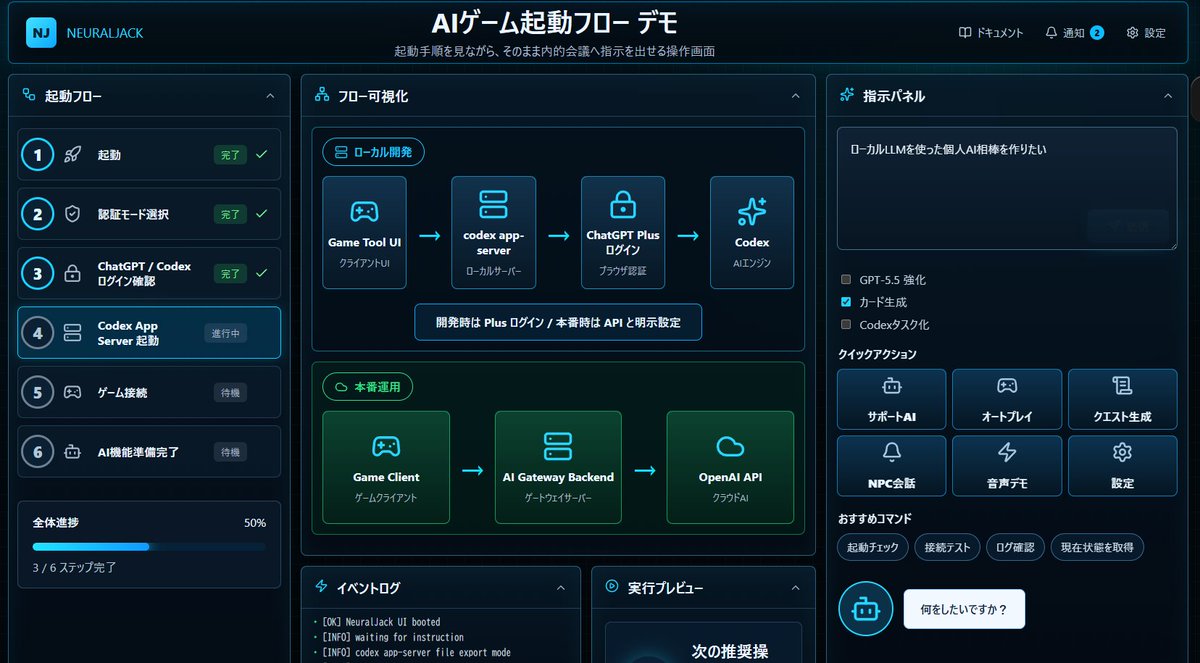
Japanese AI Game Launch Dashboard
Generates a futuristic Japanese dark-mode dashboard mockup for visualizing an AI game startup flow and issuing automation instructions.
This is a gpt-image-2 prompt case for 平面海报. Use the copy-ready prompt below to generate similar visuals, and review Awesome Seedance 2.0 Video Prompts attribution plus commercial-use rights before reuse.
Prompt
Copy-ready prompt
{
  "type": "futuristic dark-mode Japanese web dashboard UI mockup",
  "app_brand": "{argument name=\"app brand\" default=\"NEURALJACK\"}",
  "main_title": "{argument name=\"main title\" default=\"AI Game Launch Process Demonstration\"}",
  "subtitle": "The interface allows users to view the startup steps and send commands directly to internal meetings.",
  "style": {
    "theme": "cyberpunk SaaS control panel, deep navy and black background, glowing cyan borders, neon blue accents, rounded cards, subtle gradients, compact Japanese typography",
    "canvas": "wide 16:9 screenshot-like composition",
    "lighting": "soft blue glow, high contrast, polished product demo look"
  },
  "layout": {
    "top_bar": {
      "position": "full width top",
      "left_logo": "rounded square cyan NJ icon plus brand text",
      "center_title": "large bold Japanese title",
      "right_nav_count": 3,
      "right_nav_items": [
        "document",
        "Notice (with blue badge 2)",
        "set up"
      ]
    },
    "left_sidebar": {
      "title": "Startup process",
      "position": "left column",
      "step_count": 6,
      "steps": [
        {
          "number": 1,
          "label": "start up",
          "status": "Completed",
          "icon": "rocket",
          "state": "completed with green check"
        },
        {
          "number": 2,
          "label": "Select authentication mode",
          "status": "Completed",
          "icon": "shield",
          "state": "completed with green check"
        },
        {
          "number": 3,
          "label": "ChatGPT / Codex Login Confirmation",
          "status": "Completed",
          "icon": "lock",
          "state": "completed with green check"
        },
        {
          "number": 4,
          "label": "Codex App Server Startup",
          "status": "in progress",
          "icon": "server",
          "state": "active highlighted cyan"
        },
        {
          "number": 5,
          "label": "Game connection",
          "status": "standby",
          "icon": "gamepad",
          "state": "waiting dim"
        },
        {
          "number": 6,
          "label": "AI functionality is ready.",
          "status": "standby",
          "icon": "robot",
          "state": "waiting dim"
        }
      ],
      "progress_card": {
        "label": "Overall progress",
        "value": "50%",
        "detail": "Steps 3/6 completed",
        "bar": "cyan progress bar halfway filled"
      }
    },
    "center_panel": {
      "title": "Process Visualization",
      "position": "main center column",
      "sections_count": 2,
      "sections": [
        {
          "title": "Local development",
          "position": "upper center",
          "node_count": 4,
          "nodes": [
            "Game Tool UI / Client UI",
            "codex app-server / local server",
            "ChatGPT Plus Login/Browser Authentication",
            "Codex / AI Engine"
          ],
          "connectors": "three cyan arrows left to right",
          "note": "Use Plus login during development / explicitly set to API in production environment"
        },
        {
          "title": "Officially in operation",
          "position": "middle center",
          "node_count": 3,
          "nodes": [
            "Game Client",
            "AI Gateway Backend / Gateway Server",
            "OpenAI API / Cloud AI"
          ],
          "connectors": "two cyan arrows left to right",
          "accent": "green glowing section border"
        }
      ]
    },
    "bottom_center": {
      "panel_count": 2,
      "panels": [
        {
          "title": "Event Log",
          "position": "bottom left of center",
          "visible_log_lines_count": 3,
          "visible_log_lines": [
            "[OK] NeuralJack UI is now running.",
            "[INFO] Awaiting instructions",
            "[INFO] Codex App-Server File Export Mode"
          ]
        },
        {
          "title": "Run Preview",
          "position": "bottom right of center",
          "content": "The next recommended step is to make the preview card (dark preview card with large text) visible near the bottom."
        }
      ]
    },
    "right_panel": {
      "title": "Command Panel",
      "position": "right column",
      "instruction_box": {
        "text": "{argument name=\"instruction text\" default=\"I want to create a personal AI companion using a local LLM.\"}",
        "appearance": "large dark textarea with subtle send button area"
      },
      "checkbox_count": 3,
      "checkboxes": [
        {
          "label": "GPT-5.5 Enhanced",
          "state": "unchecked"
        },
        {
          "label": "Card generation",
          "state": "checked cyan"
        },
        {
          "label": "Codex Task-based",
          "state": "unchecked"
        }
      ],
      "quick_actions": {
        "title": "Quick Operation",
        "button_count": 6,
        "buttons": [
          "Support AI",
          "Auto play",
          "Task generation",
          "NPC Dialogue",
          "Voice demonstration",
          "set up"
        ],
        "arrangement": "2 rows by 3 columns, icon above label on each button"
      },
      "recommended_commands": {
        "title": "Recommended instructions",
        "chip_count": 4,
        "chips": [
          "Start check",
          "Connection test",
          "Log confirmation",
          "Get the current state"
        ]
      },
      "chat_prompt": {
        "bot_icon": "cyan circular robot icon",
        "speech_bubble": "{argument name=\"chat bubble text\" default=\"What do you want to do?\"}"
      }
    }
  },
  "rendering_notes": "Make the interface look like an actual implemented browser app screenshot rather than a flat illustration. Use crisp Japanese text, thin cyan outlines, rounded rectangles, small icons, active step glow, and dense but readable spacing."
}
Prompt variables
Editable argument placeholders found in the prompt, with their default values.
More cases in this category
Prioritized by category, input mode compatibility, quality, and lower risk.






Reuse and source notes
Use this prompt safely after previewing the case.
- 1.Copy the prompt or open it directly in Dovoo with the generation button.
- 2.Adjust variables, aspect ratio, and reference images for your own use case.
- 3.Before publishing or paid usage, verify source rights, attribution requirements, and brand or likeness risks.
Can I use this prompt commercially?
Commercial-use status is restricted. Review the original source, license, brand constraints, and legal requirements before paid usage.
Where does this case come from?
This case is imported from Awesome Seedance 2.0 Video Prompts; keep attribution visible and check the source URL before reuse.