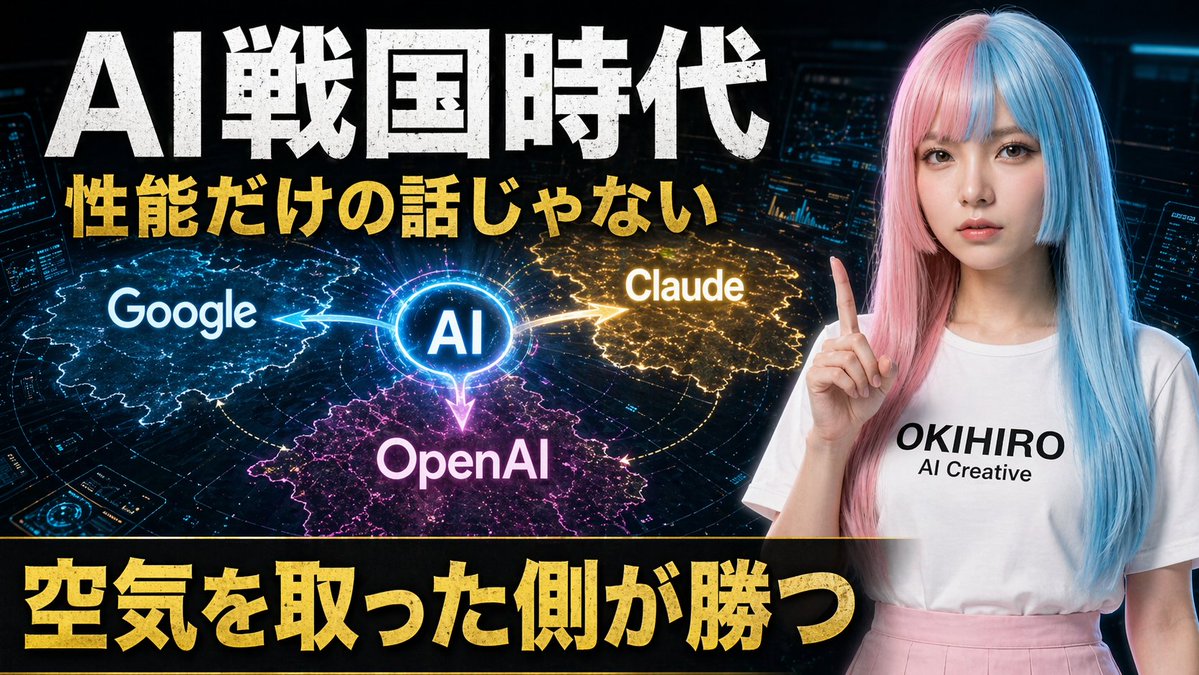
Japanese AI Battle YouTube Thumbnail
This prompt generates a dramatic Japanese-language AI competition thumbnail with 3 competing brand zones and a futuristic presenter, ideal for YouTube or social media tech commentary.
This is a GPT Image 2 prompt case for Graphic & Poster. Use the copy-ready prompt below to generate similar visuals, and review Awesome GPT Image 2 Prompts attribution plus commercial-use rights before reuse.
Free 1K preview
Generate one preview image instantly, no sign-up required.
Prompt
Copy-ready prompt
A bold Japanese YouTube thumbnail about the AI competition era, 16:9 widescreen, high contrast, dramatic tech-news style. Use a dark futuristic control-room background filled with 3 glowing holographic dashboard screens and blue cyber interface elements around the edges. On the left and center, place a luminous circular hub labeled “AI” in bright blue, with 3 directional glowing energy arrows branching outward to competing platforms: “Google” on the left in a blue electric region, “Claude” on the upper right in a gold electric region, and “OpenAI” at the bottom center in a magenta-purple electric region. Add a subtle world-map or territory-battle visualization effect under each brand region, like illuminated digital land masses or influence zones. On the right side, show a young Japanese-looking woman from waist up, facing forward, wearing a long straight split-color wig with pastel pink on one side and pastel blue on the other, a plain white T-shirt with the printed text “OKIHIRO AI Creative”, and a light pink skirt. She raises one index finger beside her face in a presenter pose. Show every face clearly with natural, detailed facial features. Across the top, add huge distressed white Japanese headline text: {argument name="headline text" default="AI Sengoku Era"}. Beneath it, add a second line in bold gold Japanese text: {argument name="subheadline text" default="性能だけの話じゃない"}. Across the bottom, place a wide black banner with massive bold gold Japanese text: {argument name="bottom text" default="空気を取った側が勝つ"}. Make the typography oversized, gritty, and attention-grabbing, with slight glow and drop shadow. Use a color palette of black, electric blue, gold, magenta, and neon white, with intense contrast and thumbnail readability.Prompt variables
Editable argument placeholders found in the prompt, with their default values.
Best for
- - Graphic & Poster visual exploration
- - Image generation and reference-image edits
- - Reusable briefs that keep source attribution visible
Change these parts
- - Subject, product, character, or scene
- - Aspect ratio, camera, lighting, and background
- - Brand, text, color, and output constraints
Recommended model and settings
- - Model: gpt-image-2
- - Input mode: Text to Image
- - Aspect ratio: source
- - Commercial status: review original source
How to use this prompt
- 1. Copy the prompt and preserve its structure for the first test.
- 2. Replace the subject, context, and publishing channel.
- 3. Change one camera, lighting, or style variable per iteration.
- 4. Inspect the output, source, text, and rights before reuse.
Limitations, source, and reuse cautions
- - Generated output is an editable draft, not factual, legal, or rights evidence.
- - Review the linked source, people, brands, logos, text, and third-party media before commercial use.
More cases in this category
Prioritized by category, input mode compatibility, quality, and lower risk.





Reuse and source notes
Use this prompt safely after previewing the case.
- 1.Copy the prompt or open it directly in Dovoo with the generation button.
- 2.Adjust variables, aspect ratio, and reference images for your own use case.
- 3.Before publishing or paid usage, verify source rights, attribution requirements, and brand or likeness risks.
Can I use this prompt commercially?
Commercial-use status is allowed. Review the original source, license, brand constraints, and legal requirements before paid usage.
Where does this case come from?
This case is imported from Awesome GPT Image 2 Prompts; keep attribution visible and check the source URL before reuse.