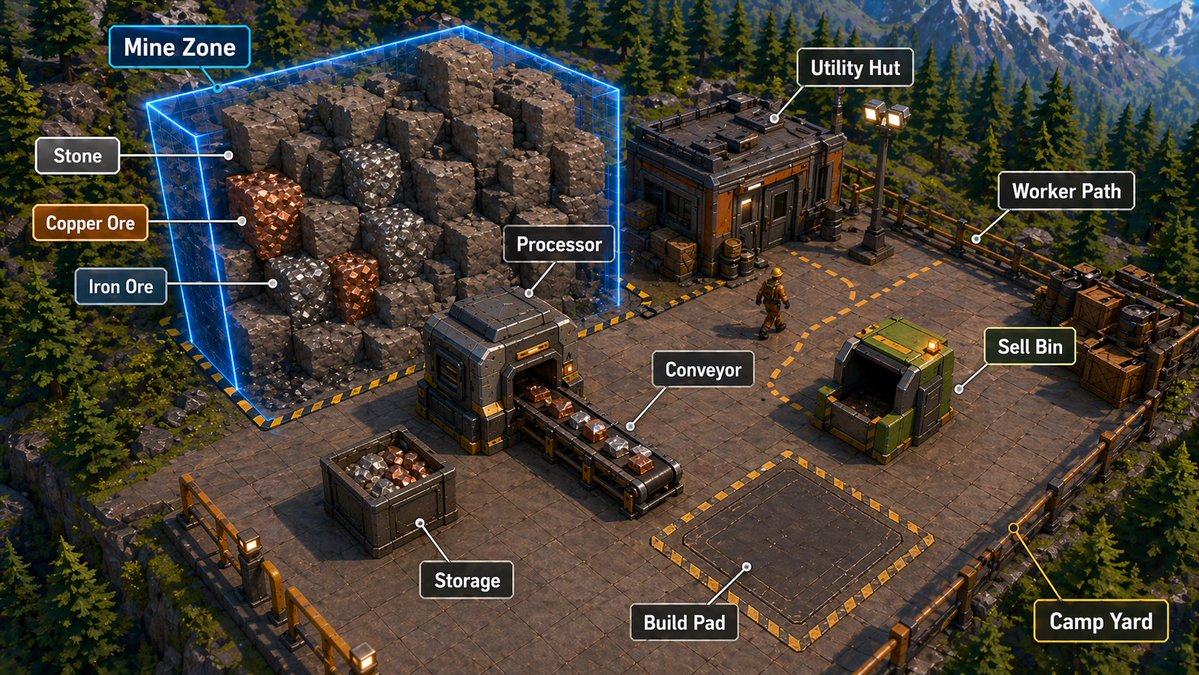
Annotated Isometric Mining Outpost
Generates a labeled isometric game-style mining base diagram for explaining resource gathering, processing, storage, and building zones.
This is a GPT Image 2 prompt case for Anime & Game. Use the copy-ready prompt below to generate similar visuals, and review Awesome GPT Image 2 Prompts attribution plus commercial-use rights before reuse.
Free 1K preview
Generate one preview image instantly, no sign-up required.
Prompt
Copy-ready prompt
{
  "type": "isometric 3D game tutorial screenshot / annotated base-building infographic",
  "scene": "A polished, high-detail isometric view of a mining outpost platform built on a cliff in a dense evergreen mountain forest, with snow-capped mountains in the far background, cinematic late-afternoon lighting, realistic game-engine materials, crisp shadows, and a clean strategy-game UI overlay.",
  "camera": "wide isometric three-quarter top-down camera, showing the entire square industrial platform and surrounding forested terrain",
  "environment": {
    "setting": "{argument name=\"environment setting\" default=\"alpine conifer forest with rocky cliffs and distant snowy mountains\"}",
    "mood": "adventurous construction-sim atmosphere, readable gameplay layout, premium survival automation game aesthetic",
    "lighting": "warm directional sunlight with cool blue mountain haze and glowing industrial lamps"
  },
  "main_layout": {
    "platform": "large square metal-and-concrete floor deck with railings around the edges, hazard-striped borders, gridded tiles, crates, barrels, lamps, cables, and industrial props",
    "mine_zone": "large glowing transparent neon-blue rectangular prism enclosing a pile of blocky voxel-like rock chunks on the left side of the platform",
    "resources": "visible rock blocks include gray stone, shiny orange copper ore, and shiny silver iron ore embedded among larger brown-gray stone blocks",
    "processing_area": "compact industrial processor machine near the center-left, receiving ore from the mine side and outputting onto a conveyor belt",
    "conveyor": "short black-and-metal conveyor belt carrying small ore blocks toward the center",
    "storage": "open square storage crate in the lower-left foreground filled with mixed gray, orange, and silver ore chunks",
    "utility_hut": "small rugged industrial building at the upper-right with dark panels, orange accents, rooftop equipment, crates, barrels, and nearby floodlights",
    "sell_bin": "green industrial sell container on the right side with an open dark mouth and glowing orange indicator light",
    "build_pad": "empty rectangular construction pad in the lower-middle/right area, outlined by yellow-and-black hazard stripes",
    "worker_path": "dashed orange route line curving across the platform between the hut, work area, and sell bin",
    "camp_yard": "fenced lower-right corner area marked by railings and platform edge details",
    "worker": "one small construction worker wearing a yellow hard hat and industrial outfit walking along the dashed path"
  },
  "annotations": {
    "style": "game UI callout labels with rounded black rectangles, white bold sans-serif text, thin white leader lines ending in small white dots; selected callouts have blue, orange, green, or yellow accent outlines matching their target",
    "count": 12,
    "labels": [
      {
        "text": "Mine Zone",
        "target": "glowing blue mine volume around rock pile",
        "position": "upper-left",
        "accent": "cyan-blue outline"
      },
      {
        "text": "Stone",
        "target": "gray stone blocks inside the mine zone",
        "position": "left"
      },
      {
        "text": "Copper Ore",
        "target": "orange metallic ore block",
        "position": "left-middle",
        "accent": "copper-orange outline"
      },
      {
        "text": "Iron Ore",
        "target": "silver metallic ore block",
        "position": "left-lower",
        "accent": "steel-blue outline"
      },
      {
        "text": "Processor",
        "target": "central industrial processing machine",
        "position": "center"
      },
      {
        "text": "Utility Hut",
        "target": "small building at upper-right",
        "position": "top-right"
      },
      {
        "text": "Worker Path",
        "target": "dashed orange walking route near upper-right walkway",
        "position": "right-upper"
      },
      {
        "text": "Sell Bin",
        "target": "green sell container on right",
        "position": "right-middle",
        "accent": "green outline"
      },
      {
        "text": "Conveyor",
        "target": "ore conveyor belt in the center",
        "position": "center-lower"
      },
      {
        "text": "Storage",
        "target": "ore-filled crate in lower-left",
        "position": "left-lower"
      },
      {
        "text": "Build Pad",
        "target": "empty hazard-striped construction rectangle",
        "position": "center-lower"
      },
      {
        "text": "Camp Yard",
        "target": "lower-right fenced platform corner",
        "position": "bottom-right",
        "accent": "yellow outline"
      }
    ]
  },
  "text_customization": {
    "mine_label": "{argument name=\"mine zone label\" default=\"Mine Zone\"}",
    "processor_label": "{argument name=\"processor label\" default=\"Processor\"}",
    "sell_bin_label": "{argument name=\"sell bin label\" default=\"Sell Bin\"}",
    "build_pad_label": "{argument name=\"build pad label\" default=\"Build Pad\"}"
  },
  "visual_style": "AAA stylized-realistic strategy game screenshot, highly detailed isometric render, clean readable UI labels, sharp focus, saturated but natural colors, 16:9 composition, no watermark, no people close-up, no extra unreadable text"
}
Prompt variables
Editable argument placeholders found in the prompt, with their default values.
Best for
- - Anime & Game visual exploration
- - Image generation and reference-image edits
- - Reusable briefs that keep source attribution visible
Change these parts
- - Subject, product, character, or scene
- - Aspect ratio, camera, lighting, and background
- - Brand, text, color, and output constraints
Recommended model and settings
- - Model: gpt-image-2
- - Input mode: Text to Image
- - Aspect ratio: source
- - Commercial status: review original source
How to use this prompt
- 1. Copy the prompt and preserve its structure for the first test.
- 2. Replace the subject, context, and publishing channel.
- 3. Change one camera, lighting, or style variable per iteration.
- 4. Inspect the output, source, text, and rights before reuse.
Limitations, source, and reuse cautions
- - Generated output is an editable draft, not factual, legal, or rights evidence.
- - Review the linked source, people, brands, logos, text, and third-party media before commercial use.
More cases in this category
Prioritized by category, input mode compatibility, quality, and lower risk.
Reuse and source notes
Use this prompt safely after previewing the case.
- 1.Copy the prompt or open it directly in Dovoo with the generation button.
- 2.Adjust variables, aspect ratio, and reference images for your own use case.
- 3.Before publishing or paid usage, verify source rights, attribution requirements, and brand or likeness risks.
Can I use this prompt commercially?
Commercial-use status is allowed. Review the original source, license, brand constraints, and legal requirements before paid usage.
Where does this case come from?
This case is imported from Awesome GPT Image 2 Prompts; keep attribution visible and check the source URL before reuse.