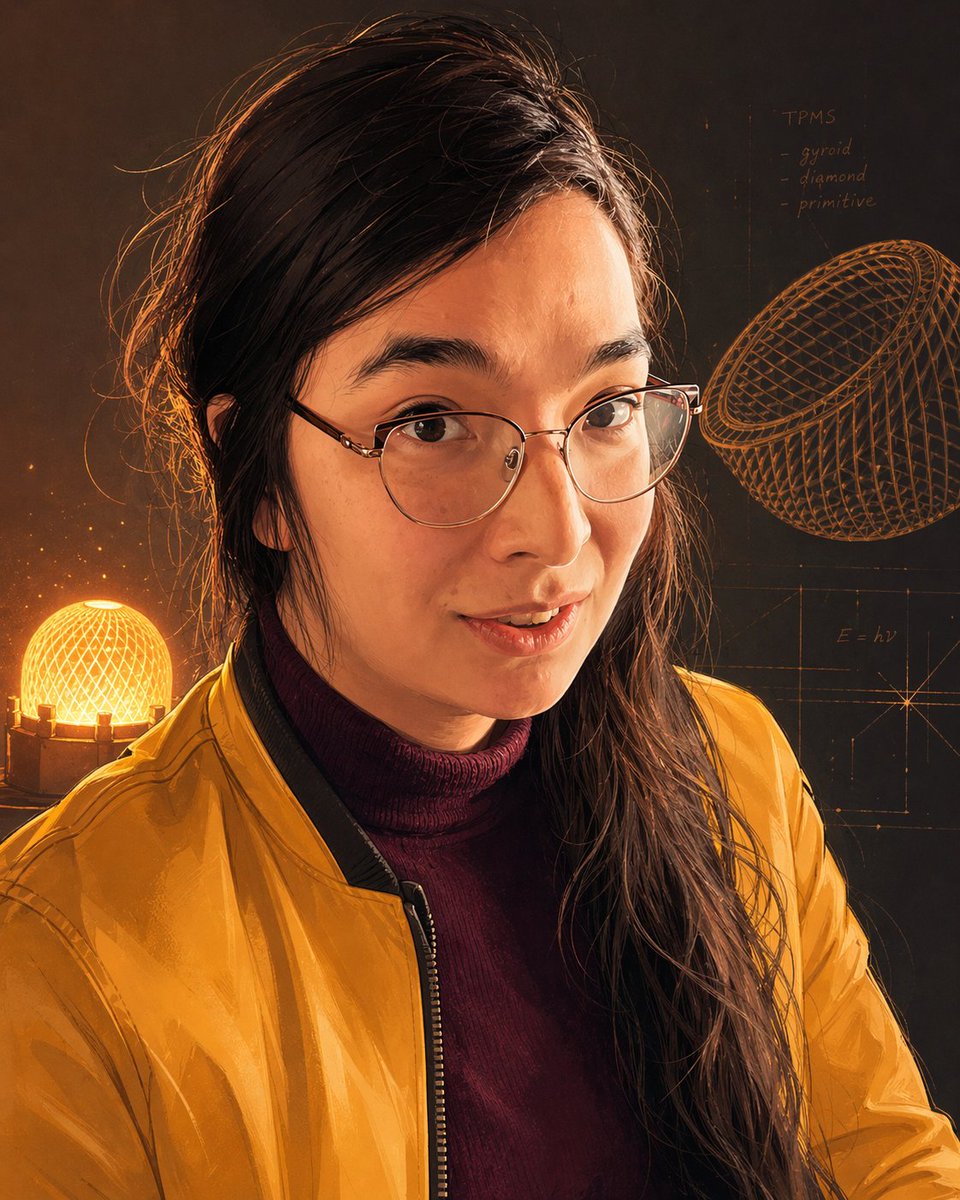
Inventor Portrait Memory Map
This prompt generates a flattering stylized portrait of a woman surrounded by scientific memory-map visuals, ideal for personal branding, concept art, or speculative interface design.
This is a GPT Image 2 prompt case for Portrait & Character. Use the copy-ready prompt below to generate similar visuals, and review Awesome GPT Image 2 Prompts attribution plus commercial-use rights before reuse.
Free 1K preview
Generate one preview image instantly, no sign-up required.
Prompt
Copy-ready prompt
A stylized half-body portrait of {argument name="subject" default="a brilliant young woman inventor"} in a dark, moody studio, rendered as a warm amber-and-copper digital painting with semi-realistic detail and subtle sketch-like linework. She faces forward in a relaxed upright pose, cropped from about mid-torso upward, with long dark brown hair swept loosely over one shoulder, a few flyaway strands rim-lit by orange backlight, and thin clear-framed eyeglasses partly visible. Dress her in a glossy mustard-yellow bomber jacket over a deep burgundy turtleneck sweater. The lighting is dramatic and cinematic: a glowing spherical lattice lamp sits behind her on the left, casting a golden halo and warm edge light around her hair and jacket, while the rest of the background fades into charcoal brown shadow. Behind her, integrate the feeling of a visual memory map or inventor's mind palace: faint technical sketches, geometric construction lines, and handwritten scientific notes drawn directly onto the background like illuminated chalk. Include exactly 2 large wireframe forms on the right side: 1 tilted basket-like lattice ellipsoid near the upper right and 1 faint rectangular diagram with axis-like guide lines near the lower right. Include exactly 1 glowing lattice sphere lamp on the lower left. Add small handwritten text in the upper right that reads “TPMS” with three bullet-like lines underneath: “gyroid”, “diamond”, and “primitive”, and a small formula note reading “E = hv” near the right-center. The overall mood should feel intelligent, elegant, flattering, and slightly futuristic, like a portrait merged with a conceptual memory interface. Use a rich palette of burnt orange, gold, auburn, brown-black, and wine red, with high contrast, luminous highlights, and a polished editorial-art finish.Prompt variables
Editable argument placeholders found in the prompt, with their default values.
Best for
- - Portrait & Character visual exploration
- - Image generation and reference-image edits
- - Reusable briefs that keep source attribution visible
Change these parts
- - Subject, product, character, or scene
- - Aspect ratio, camera, lighting, and background
- - Brand, text, color, and output constraints
Recommended model and settings
- - Model: gpt-image-2
- - Input mode: Text to Image
- - Aspect ratio: source
- - Commercial status: review original source
How to use this prompt
- 1. Copy the prompt and preserve its structure for the first test.
- 2. Replace the subject, context, and publishing channel.
- 3. Change one camera, lighting, or style variable per iteration.
- 4. Inspect the output, source, text, and rights before reuse.
Limitations, source, and reuse cautions
- - Generated output is an editable draft, not factual, legal, or rights evidence.
- - Review the linked source, people, brands, logos, text, and third-party media before commercial use.
More cases in this category
Prioritized by category, input mode compatibility, quality, and lower risk.





Reuse and source notes
Use this prompt safely after previewing the case.
- 1.Copy the prompt or open it directly in Dovoo with the generation button.
- 2.Adjust variables, aspect ratio, and reference images for your own use case.
- 3.Before publishing or paid usage, verify source rights, attribution requirements, and brand or likeness risks.
Can I use this prompt commercially?
Commercial-use status is allowed. Review the original source, license, brand constraints, and legal requirements before paid usage.
Where does this case come from?
This case is imported from Awesome GPT Image 2 Prompts; keep attribution visible and check the source URL before reuse.