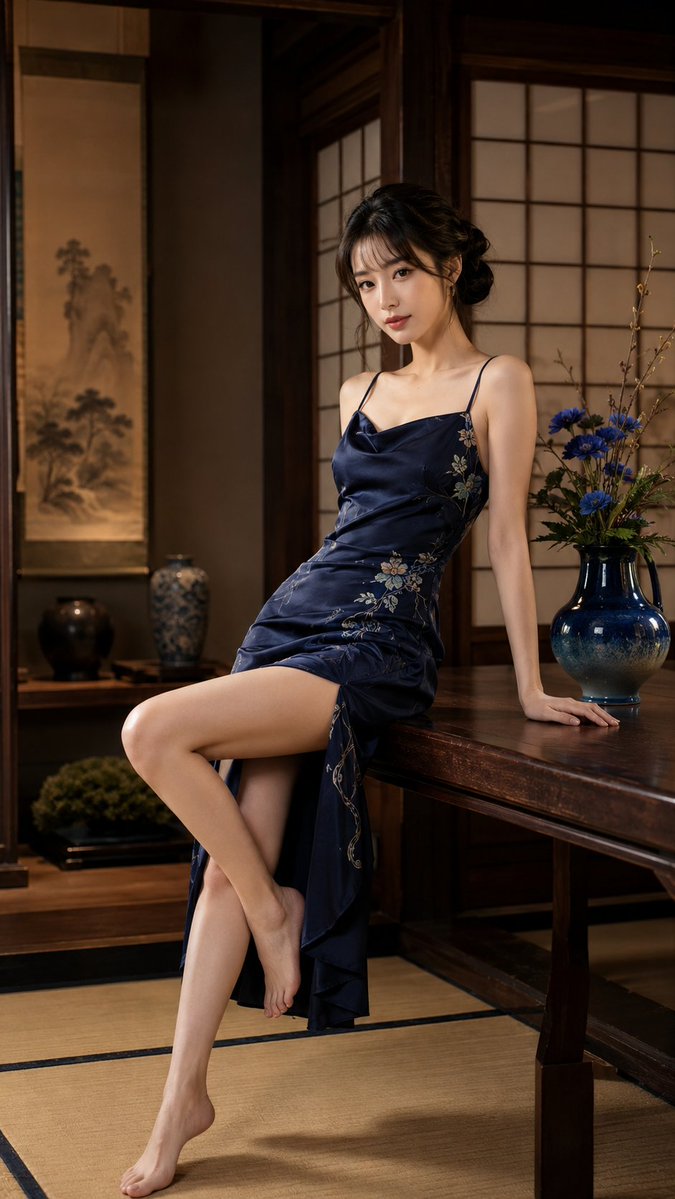
Japanese Woman in Indigo Dress
A detailed structured prompt for generating an elegant woman in a traditional Japanese room wearing a satin indigo dress.
This is a GPT Image 2 prompt case for 人像角色. Use the copy-ready prompt below to generate similar visuals, and review Awesome GPT Image 2 Prompts attribution plus commercial-use rights before reuse.
Need the full prompt set? Use the 人像角色 topic hub for more related examples, or open the GPT Image 2 prompt library for the full example index, reusable structures, and source attribution.
Prompt
Copy-ready prompt
主体:{argument name="subject" default="身着靛蓝色连衣裙的女性"}

人物/表情:{argument name="person" default="20 岁出头的女性,皮肤白皙透亮,鹅蛋脸,黑色松散发髻,薄刘海,自然日系妆容,恬静微笑,温柔地注视着镜头"}

服装/姿势:光泽感靛蓝色缎面长裙,精致的日式花卉刺绣,细肩带,优雅的女性轮廓,坐在木桌边缘,单手撑在桌上,双腿自然交叠,赤足

背景/光影:宁静的日式房间,障子门,榻榻米,壁龛,挂轴,陶瓷花瓶,蓝色花卉的日式插花,充满木质温暖的空间,温暖的室内光线,安静且高质感的氛围

构图/相机:竖构图 9:16,全身肖像,微斜构图,85mm 人像镜头,浅景深,背景柔焦的电影感肖像,人物置于画面中央附近的优雅构图

质感/风格:高清,4K 画质,自然皮肤纹理,光泽感面料质感,写实 AI 肖像,电影级布光,日系肖像,精致日式现代风,沉稳色调,杂志大片摄影

负面提示词:低质量,不自然的手部,崩坏的脸部,多余的手指,扭曲的身体,过度处理,不自然的腿部,过度曝光,文字,Logo,水印
Prompt variables
Editable argument placeholders found in the prompt, with their default values.
Variable
subject
Default
A woman wearing an indigo blue dress
Variable
person
Default
A woman in her early twenties, with fair and radiant skin, an oval face, loose black hair in a bun, thin bangs, natural Japanese-style makeup, a serene smile, and a gentle gaze at the camera.
More cases in this category
Prioritized by category, input mode compatibility, quality, and lower risk.

Reuse and source notes
Use this prompt safely after previewing the case.
- 1.Copy the prompt or open it directly in Dovoo with the generation button.
- 2.Adjust variables, aspect ratio, and reference images for your own use case.
- 3.Before publishing or paid usage, verify source rights, attribution requirements, and brand or likeness risks.
Can I use this prompt commercially?
Commercial-use status is allowed. Review the original source, license, brand constraints, and legal requirements before paid usage.
Where does this case come from?
This case is imported from Awesome GPT Image 2 Prompts; keep attribution visible and check the source URL before reuse.