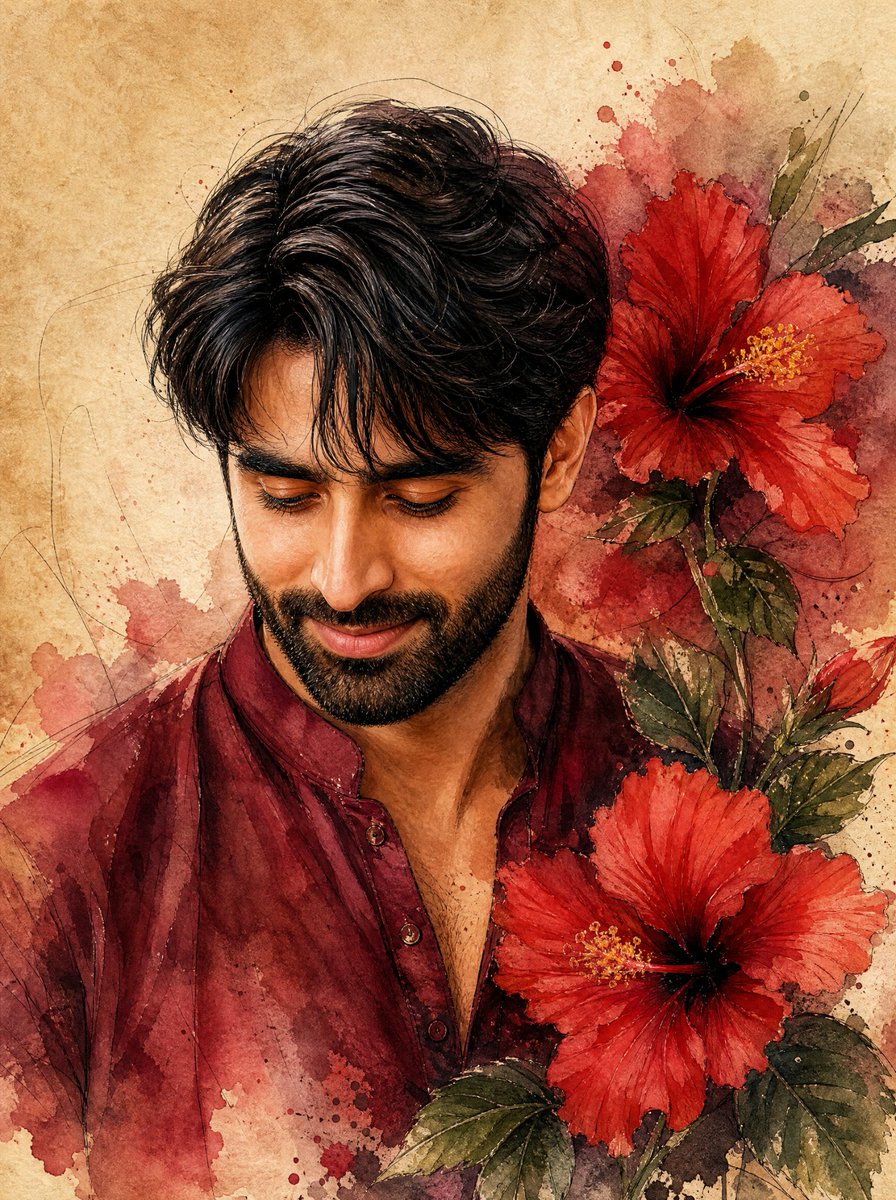
Watercolor Indian Man with Hibiscus
A vertical watercolor portrait prompt for creating a gentle young Indian man in a maroon kurta surrounded by red hibiscus flowers.
This is a GPT Image 2 prompt case for Portrait & Character. Use the copy-ready prompt below to generate similar visuals, and review Awesome GPT Image 2 Prompts attribution plus commercial-use rights before reuse.
Free 1K preview
Generate one preview image instantly, no sign-up required.
Prompt
Copy-ready prompt
Create a detailed watercolor portrait on warm aged parchment paper of a handsome young {argument name="ethnicity" default="native Indian"} man shown from the chest up, facing slightly left and looking downward with a warm, gentle closed-mouth smile. He has wavy, voluminous {argument name="hair color" default="black"} hair with loose strands over the forehead, thick eyebrows, expressive downcast eyes, a straight nose, and a neatly trimmed soft stubble beard. Dress him in a traditional {argument name="kurta color" default="deep maroon"} cotton kurta with a short open collar and small buttons, rendered with translucent watercolor washes and subtle fabric folds. Place exactly two large vibrant red hibiscus flowers beside him on the right side: one near the upper right behind his head and one larger flower near the lower right foreground, both with dark centers and yellow stamens. Add green hibiscus leaves and stems around the flowers, with loose red and brown watercolor splashes blending into the background. Use fine ink-like sketch lines for hair, facial contours, flower veins, and decorative swirls, with realistic facial detail but painterly edges. The composition should feel romantic, elegant, and organic, with earthy beige paper texture, maroon and crimson paint blooms, soft shadows, no text, no watermark, and a vertical portrait orientation.Prompt variables
Editable argument placeholders found in the prompt, with their default values.
Best for
- - Portrait & Character visual exploration
- - Image generation and reference-image edits
- - Reusable briefs that keep source attribution visible
Change these parts
- - Subject, product, character, or scene
- - Aspect ratio, camera, lighting, and background
- - Brand, text, color, and output constraints
Recommended model and settings
- - Model: gpt-image-2
- - Input mode: Text to Image
- - Aspect ratio: source
- - Commercial status: review original source
How to use this prompt
- 1. Copy the prompt and preserve its structure for the first test.
- 2. Replace the subject, context, and publishing channel.
- 3. Change one camera, lighting, or style variable per iteration.
- 4. Inspect the output, source, text, and rights before reuse.
Limitations, source, and reuse cautions
- - Generated output is an editable draft, not factual, legal, or rights evidence.
- - Review the linked source, people, brands, logos, text, and third-party media before commercial use.
More cases in this category
Prioritized by category, input mode compatibility, quality, and lower risk.
Reuse and source notes
Use this prompt safely after previewing the case.
- 1.Copy the prompt or open it directly in Dovoo with the generation button.
- 2.Adjust variables, aspect ratio, and reference images for your own use case.
- 3.Before publishing or paid usage, verify source rights, attribution requirements, and brand or likeness risks.
Can I use this prompt commercially?
Commercial-use status is allowed. Review the original source, license, brand constraints, and legal requirements before paid usage.
Where does this case come from?
This case is imported from Awesome GPT Image 2 Prompts; keep attribution visible and check the source URL before reuse.