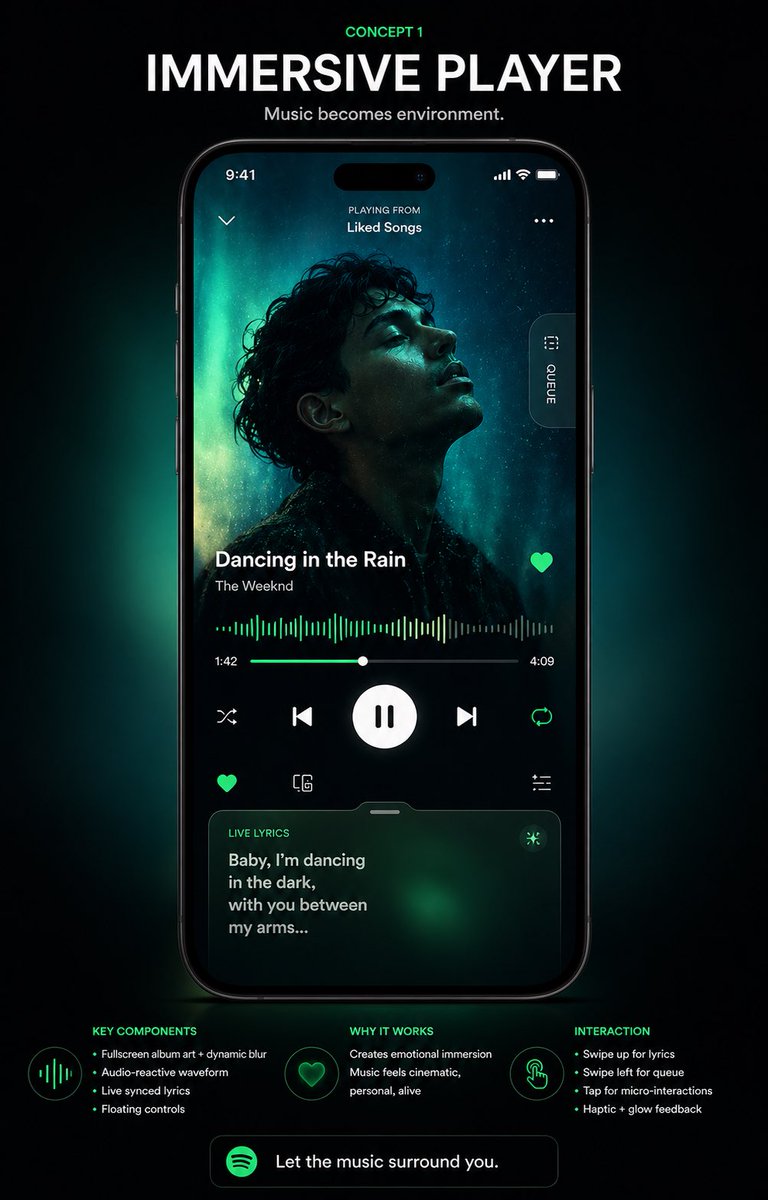
Immersive Music Player UI Poster
A premium concept poster showcasing a futuristic immersive music player interface on a smartphone, ideal for app redesign presentations, portfolio shots, and social media design reveals.
This is a GPT Image 2 prompt case for Graphic & Poster. Use the copy-ready prompt below to generate similar visuals, and review Awesome GPT Image 2 Prompts attribution plus commercial-use rights before reuse.
Free 1K preview
Generate one preview image instantly, no sign-up required.
Prompt
Copy-ready prompt
{
  "type": "music app UI concept poster",
  "style": "premium futuristic mobile app showcase, dark mode, cinematic product presentation, Spotify-inspired green neon glow, high contrast, sleek glassmorphism, polished tech advertising aesthetic",
  "format": "vertical poster with centered smartphone mockup on a black background",
  "headline": {
    "kicker": "CONCEPT 1",
    "title": "IMMERSIVE PLAYER",
    "subtitle": "Music becomes environment."
  },
  "device": {
    "type": "modern black smartphone",
    "position": "center",
    "screen": {
      "app": "immersive music player",
      "status_bar": {
        "time": "9:41",
        "icons_count": 3
      },
      "top_area": {
        "left_icon_count": 1,
        "center_text_lines": 2,
        "texts": [
          "PLAYING FROM",
          "Liked Songs"
        ],
        "right_icon_count": 1
      },
      "artwork": {
        "shape": "large full-screen background portrait with a centered square album cover overlay",
        "subject": "moody silhouette portrait of a curly-haired singer against teal aurora-like lighting",
        "dominant_colors": [
          "deep black",
          "cyan",
          "emerald green",
          "cyan glow"
        ]
      },
      "side_tab": {
        "count": 1,
        "label": "QUEUE",
        "orientation": "vertical pill button on right edge"
      },
      "track_info": {
        "song_title": "{argument name=\"song title\" default=\"Dancing in the Rain\"}",
        "artist_name": "{argument name=\"artist name\" default=\"The Weeknd\"}",
        "favorite_icon": true
      },
      "playback": {
        "waveform": "audio-reactive neon green waveform spanning the width",
        "time_labels": [
          "1:42",
          "4:09"
        ],
        "progress_slider": true,
        "main_controls": {
          "count": 5,
          "items": [
            "shuffle",
            "previous",
            "large play/pause button",
            "next",
            "repeat"
          ]
        },
        "secondary_controls": {
          "count": 4,
          "items": [
            "favorite",
            "device or connect icon",
            "settings or sliders icon",
            "small utility icon row integrated above lyrics card"
          ]
        }
      },
      "lyrics_card": {
        "title": "LIVE LYRICS",
        "text": "{argument name=\"lyric text\" default=\"Baby, I’m dancing in the dark, with you between my arms...\"}",
        "style": "rounded translucent card with green atmospheric glow",
        "bottom_position": true
      }
    }
  },
  "layout": {
    "sections": [
      {
        "title": "KEY COMPONENTS",
        "position": "bottom left",
        "count": 4,
        "labels": [
          "Fullscreen album art + dynamic blur",
          "Audio-reactive waveform",
          "Live synced lyrics",
          "Floating controls"
        ]
      },
      {
        "title": "WHY IT WORKS",
        "position": "bottom center",
        "count": 2,
        "labels": [
          "Creates emotional immersion",
          "Music feels cinematic, personal, alive"
        ]
      },
      {
        "title": "INTERACTION",
        "position": "bottom right",
        "count": 4,
        "labels": [
          "Swipe up for lyrics",
          "Swipe left for queue",
          "Tap for micro-interactions",
          "Haptic + glow feedback"
        ]
      }
    ],
    "footer_cta": {
      "count": 1,
      "text": "{argument name=\"cta text\" default=\"Let the music surround you.\"}",
      "icon": "green circular music app logo"
    }
  },
  "lighting": "soft emerald backglow radiating behind the phone, subtle vignette, luminous edges, premium showroom feel",
  "color_palette": [
    "black",
    "charcoal",
    "white",
    "Spotify green",
    "emerald green",
    "cyan"
  ],
  "quality": "high-end UI case study render, sharp typography, realistic device reflections, clean spacing, presentation-ready Behance/Dribbble poster"
}
Prompt variables
Editable argument placeholders found in the prompt, with their default values.
Best for
- - Graphic & Poster visual exploration
- - Image generation and reference-image edits
- - Reusable briefs that keep source attribution visible
Change these parts
- - Subject, product, character, or scene
- - Aspect ratio, camera, lighting, and background
- - Brand, text, color, and output constraints
Recommended model and settings
- - Model: gpt-image-2
- - Input mode: Text to Image
- - Aspect ratio: source
- - Commercial status: review original source
How to use this prompt
- 1. Copy the prompt and preserve its structure for the first test.
- 2. Replace the subject, context, and publishing channel.
- 3. Change one camera, lighting, or style variable per iteration.
- 4. Inspect the output, source, text, and rights before reuse.
Limitations, source, and reuse cautions
- - Generated output is an editable draft, not factual, legal, or rights evidence.
- - Review the linked source, people, brands, logos, text, and third-party media before commercial use.
More cases in this category
Prioritized by category, input mode compatibility, quality, and lower risk.





Reuse and source notes
Use this prompt safely after previewing the case.
- 1.Copy the prompt or open it directly in Dovoo with the generation button.
- 2.Adjust variables, aspect ratio, and reference images for your own use case.
- 3.Before publishing or paid usage, verify source rights, attribution requirements, and brand or likeness risks.
Can I use this prompt commercially?
Commercial-use status is allowed. Review the original source, license, brand constraints, and legal requirements before paid usage.
Where does this case come from?
This case is imported from Awesome GPT Image 2 Prompts; keep attribution visible and check the source URL before reuse.