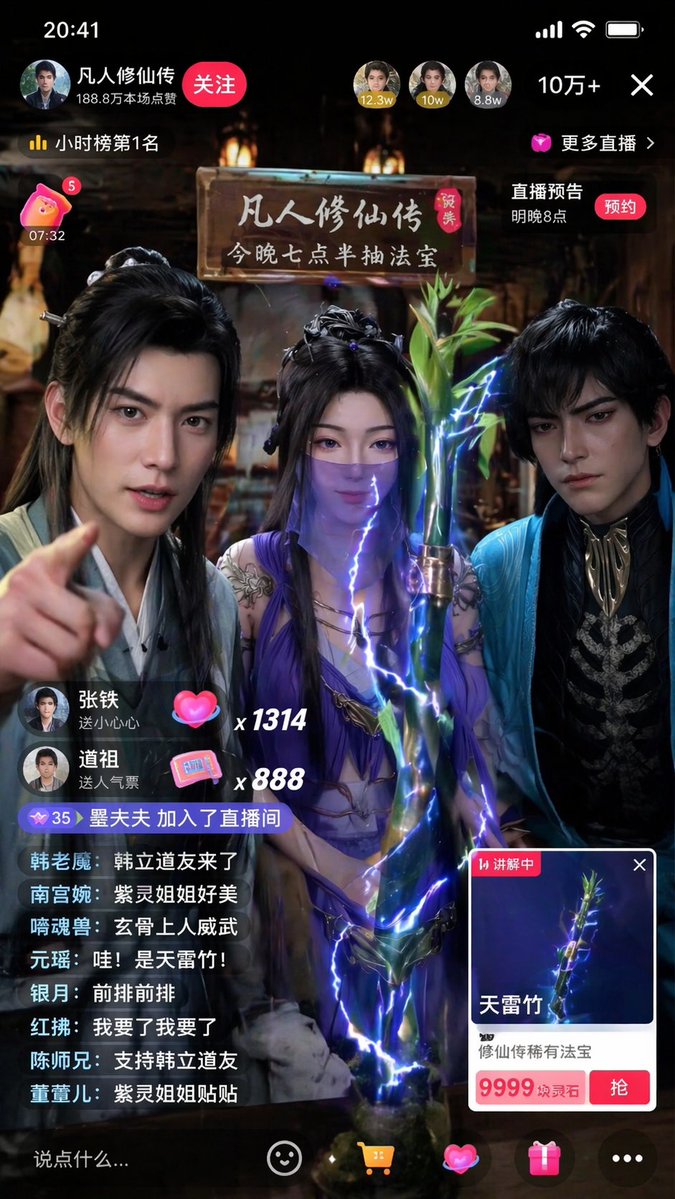
Immersive Cultivation Novel Livestream Prompt
A highly detailed prompt for generating a vertical smartphone screenshot of a livestream featuring characters from 'A Will Eternal' selling magical items.
This is a GPT Image 2 prompt case for Portrait & Character. Use the copy-ready prompt below to generate similar visuals, and review Awesome GPT Image 2 Prompts attribution plus commercial-use rights before reuse.
Free 1K preview
Generate one preview image instantly, no sign-up required.
Prompt
Copy-ready prompt
Generate a 9:16 vertical smartphone screenshot of a realistic Douyin livestream. The theme is {argument name="livestream theme" default="three characters from 'A Record of a Mortal's Journey to Immortality' selling magical treasures"}. Three people are in the frame, with their temperaments from left to right referencing Han Li, Zi Ling, and Xuan Gu. Do not show character names or use anime style; they should look like immortal cultivation streamers with a strong sense of reality. Clothing, makeup, and temperament should retain the Eastern immortal style while fitting realistic camera effects. The current item on display is {argument name="displayed item" default="'Thunderbolt Bamboo'"}, placed prominently in the foreground center. The item card should clearly display 'Thunderbolt Bamboo' and {argument name="item price" default="'9999 Spirit Stones'"}. The bamboo should have a rare treasure texture with clear details and a subtle, realistic lightning aura. The atmosphere should be lively with realistic UI, bullet comments, likes, and viewer counts. Bullet comments should feature relevant character nicknames like real fan interaction. The overall effect must look like a popular Chinese livestream screenshot—real, bustling, and having a mobile feel. No anime illustrations, movie posters, or game art. No English UI or exaggerated magic effects.Prompt variables
Editable argument placeholders found in the prompt, with their default values.
Best for
- - Portrait & Character visual exploration
- - Image generation and reference-image edits
- - Reusable briefs that keep source attribution visible
Change these parts
- - Subject, product, character, or scene
- - Aspect ratio, camera, lighting, and background
- - Brand, text, color, and output constraints
Recommended model and settings
- - Model: gpt-image-2
- - Input mode: Text to Image
- - Aspect ratio: source
- - Commercial status: review original source
How to use this prompt
- 1. Copy the prompt and preserve its structure for the first test.
- 2. Replace the subject, context, and publishing channel.
- 3. Change one camera, lighting, or style variable per iteration.
- 4. Inspect the output, source, text, and rights before reuse.
Limitations, source, and reuse cautions
- - Generated output is an editable draft, not factual, legal, or rights evidence.
- - Review the linked source, people, brands, logos, text, and third-party media before commercial use.
More cases in this category
Prioritized by category, input mode compatibility, quality, and lower risk.




Reuse and source notes
Use this prompt safely after previewing the case.
- 1.Copy the prompt or open it directly in Dovoo with the generation button.
- 2.Adjust variables, aspect ratio, and reference images for your own use case.
- 3.Before publishing or paid usage, verify source rights, attribution requirements, and brand or likeness risks.
Can I use this prompt commercially?
Commercial-use status is allowed. Review the original source, license, brand constraints, and legal requirements before paid usage.
Where does this case come from?
This case is imported from Awesome GPT Image 2 Prompts; keep attribution visible and check the source URL before reuse.