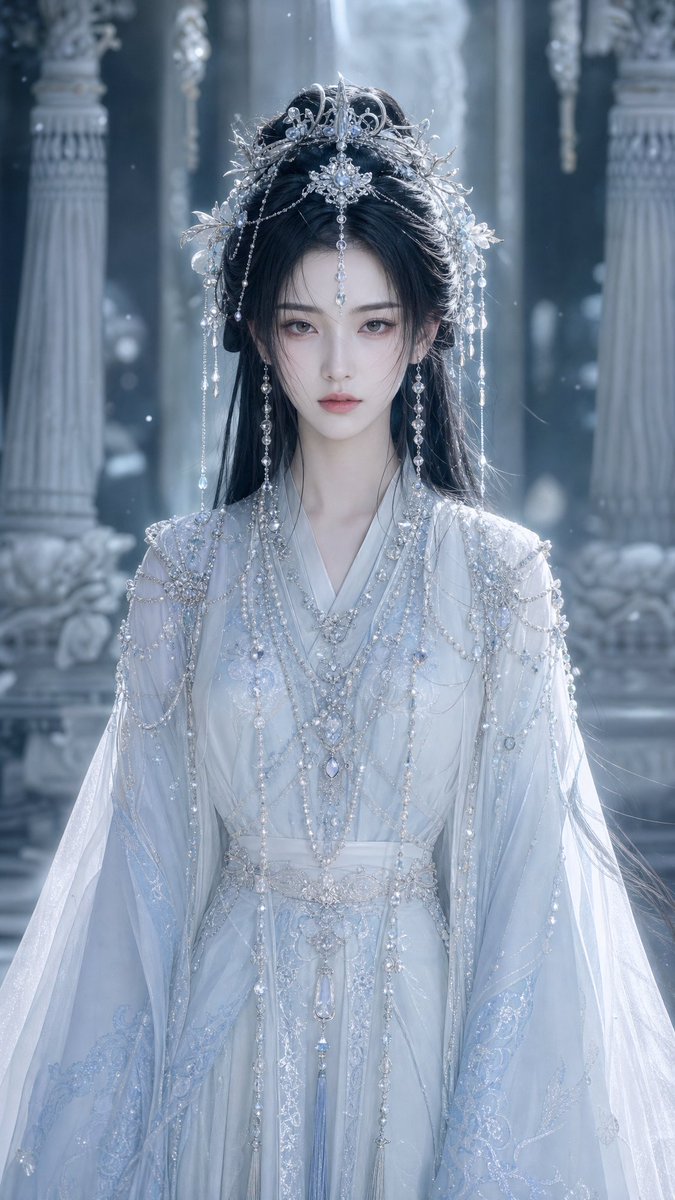
Icy Xianxia Princess Portrait
A vertical cinematic portrait prompt for generating an ornate ancient Chinese fantasy princess in a frozen palace setting.
This is a GPT Image 2 prompt case for Portrait & Character. Use the copy-ready prompt below to generate similar visuals, and review Awesome GPT Image 2 Prompts attribution plus commercial-use rights before reuse.
Free 1K preview
Generate one preview image instantly, no sign-up required.
Prompt
Copy-ready prompt
Create a vertical cinematic ancient Chinese fantasy portrait of a noble princess in an icy palace, shown from mid-thigh to head in a centered frontal composition. The subject is {argument name="character gender" default="a young woman"} with long flowing {argument name="hair color" default="black hair"}, wearing an ethereal {argument name="robe color" default="white and pale ice-blue"} hanfu-inspired ceremonial gown with translucent wide sleeves, layered silk, delicate embroidery, silver filigree, pearl chains, crystal drops, and ornate beaded shoulder drapes. Give her an elaborate silver phoenix crown and hair ornaments with many dangling pearls, crystals, floral metalwork, and thin chains framing both sides of the face. The expression should be serene and regal, with refined beauty, but keep the face unobstructed and natural. The background is a grand frozen palace hall with tall carved columns, pale stone reliefs, soft mist, floating snow or dust particles, and cool blue-gray light. Use shallow depth of field, luminous backlighting, high-detail jewelry, sparkling highlights, soft volumetric haze, elegant xianxia costume-drama styling, ultra-realistic fashion photography, 9:16 vertical aspect ratio. Avoid modern objects, text, logos, harsh colors, exaggerated anatomy, and visible facial covering.Prompt variables
Editable argument placeholders found in the prompt, with their default values.
Best for
- - Portrait & Character visual exploration
- - Image generation and reference-image edits
- - Reusable briefs that keep source attribution visible
Change these parts
- - Subject, product, character, or scene
- - Aspect ratio, camera, lighting, and background
- - Brand, text, color, and output constraints
Recommended model and settings
- - Model: gpt-image-2
- - Input mode: Text to Image
- - Aspect ratio: source
- - Commercial status: review original source
How to use this prompt
- 1. Copy the prompt and preserve its structure for the first test.
- 2. Replace the subject, context, and publishing channel.
- 3. Change one camera, lighting, or style variable per iteration.
- 4. Inspect the output, source, text, and rights before reuse.
Limitations, source, and reuse cautions
- - Generated output is an editable draft, not factual, legal, or rights evidence.
- - Review the linked source, people, brands, logos, text, and third-party media before commercial use.
More cases in this category
Prioritized by category, input mode compatibility, quality, and lower risk.





Reuse and source notes
Use this prompt safely after previewing the case.
- 1.Copy the prompt or open it directly in Dovoo with the generation button.
- 2.Adjust variables, aspect ratio, and reference images for your own use case.
- 3.Before publishing or paid usage, verify source rights, attribution requirements, and brand or likeness risks.
Can I use this prompt commercially?
Commercial-use status is allowed. Review the original source, license, brand constraints, and legal requirements before paid usage.
Where does this case come from?
This case is imported from Awesome GPT Image 2 Prompts; keep attribution visible and check the source URL before reuse.