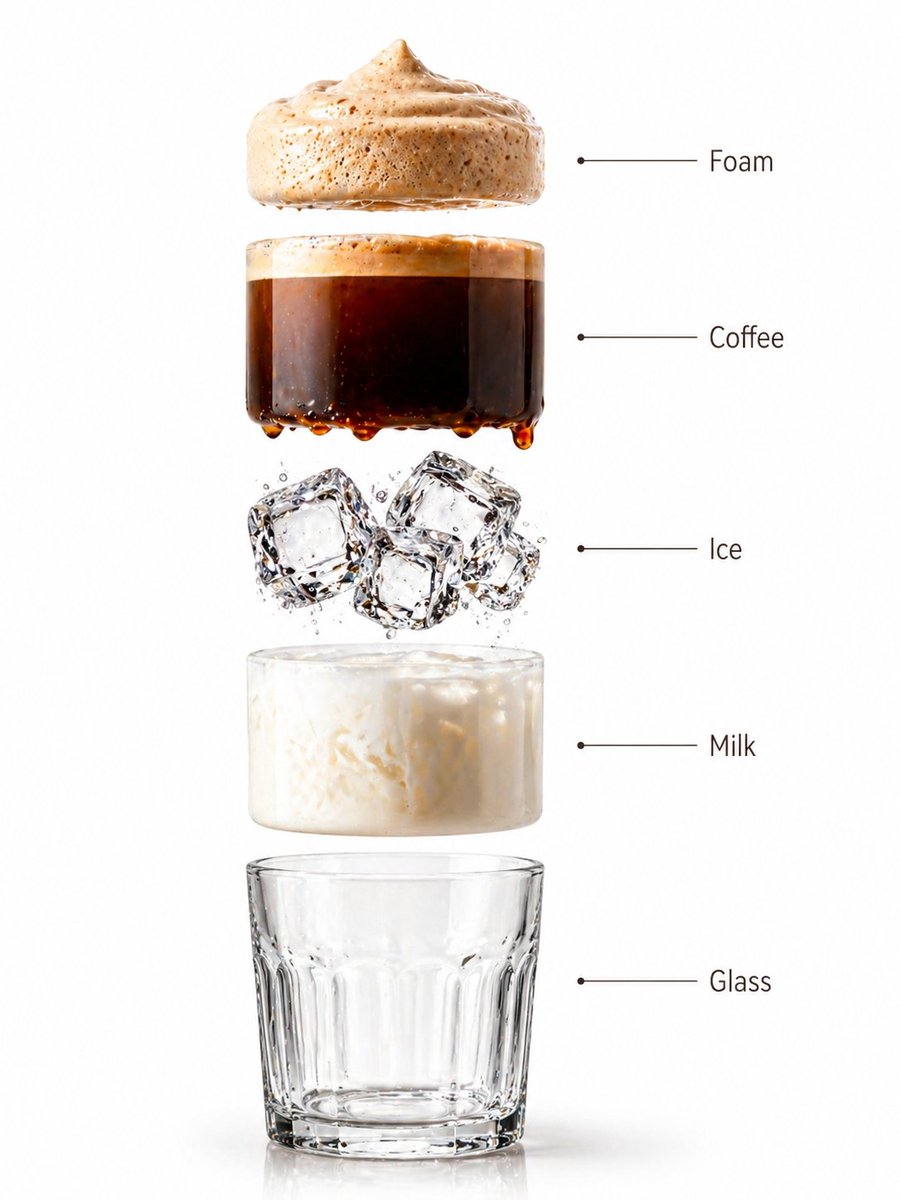
Premium Beverage Studio Photography
A high-end product photography prompt for beverages, focusing on realistic liquid swirls, ice transparency, and studio lighting.
This is a GPT Image 2 prompt case for Product & Commercial. Use the copy-ready prompt below to generate similar visuals, and review Awesome GPT Image 2 Prompts attribution plus commercial-use rights before reuse.
Free 1K preview
Generate one preview image instantly, no sign-up required.
Prompt
Copy-ready prompt
A high-end café-style product photograph of a transparent glass filled with iced coffee, centered against a soft beige and cream seamless studio background. The drink shows a rich dark coffee base blending with creamy milk swirls, creating a smooth gradient effect. Several clear ice cubes are visible with realistic transparency and light refraction. The glass has subtle condensation droplets, adding freshness. Soft natural studio lighting creates delicate highlights and a clean shadow beneath the glass. Ultra-sharp focus, premium beverage advertisement style, DSLR macro photography, hyper realistic, 8K. Create a hyper-realistic exploded vertical infographic composition of an iced coffee. Top → Bottom structure: Foam Layer (light creamy foam with soft airy texture) → Coffee Liquid (rich dark espresso layer with smooth gradient) → Ice Cubes (transparent cubes with sharp edges and reflections) → Milk Layer (soft creamy white layer with smooth blend effect) → Glass Base (clear minimal glass structure) All elements must be perfectly centered, evenly spaced, and aligned vertically. Use a soft beige seamless background with clean café-style lighting and subtle realistic shadows beneath each floating element. The composition should feel like a premium beverage ad combined with a clean infographic layout. Add clean minimalist text labels with thin pointer lines using these exact labels: “Foam” “Coffee” “Ice” “Milk” “Glass” Ultra-realistic liquid detail, sharp reflections, premium commercial photography, 8K.
Best for
- - Product & Commercial visual exploration
- - Image generation and reference-image edits
- - Reusable briefs that keep source attribution visible
Change these parts
- - Subject, product, character, or scene
- - Aspect ratio, camera, lighting, and background
- - Brand, text, color, and output constraints
Recommended model and settings
- - Model: gpt-image-2
- - Input mode: Text to Image
- - Aspect ratio: source
- - Commercial status: review original source
How to use this prompt
- 1. Copy the prompt and preserve its structure for the first test.
- 2. Replace the subject, context, and publishing channel.
- 3. Change one camera, lighting, or style variable per iteration.
- 4. Inspect the output, source, text, and rights before reuse.
Limitations, source, and reuse cautions
- - Generated output is an editable draft, not factual, legal, or rights evidence.
- - Review the linked source, people, brands, logos, text, and third-party media before commercial use.
More cases in this category
Prioritized by category, input mode compatibility, quality, and lower risk.




Reuse and source notes
Use this prompt safely after previewing the case.
- 1.Copy the prompt or open it directly in Dovoo with the generation button.
- 2.Adjust variables, aspect ratio, and reference images for your own use case.
- 3.Before publishing or paid usage, verify source rights, attribution requirements, and brand or likeness risks.
Can I use this prompt commercially?
Commercial-use status is allowed. Review the original source, license, brand constraints, and legal requirements before paid usage.
Where does this case come from?
This case is imported from Awesome GPT Image 2 Prompts; keep attribution visible and check the source URL before reuse.