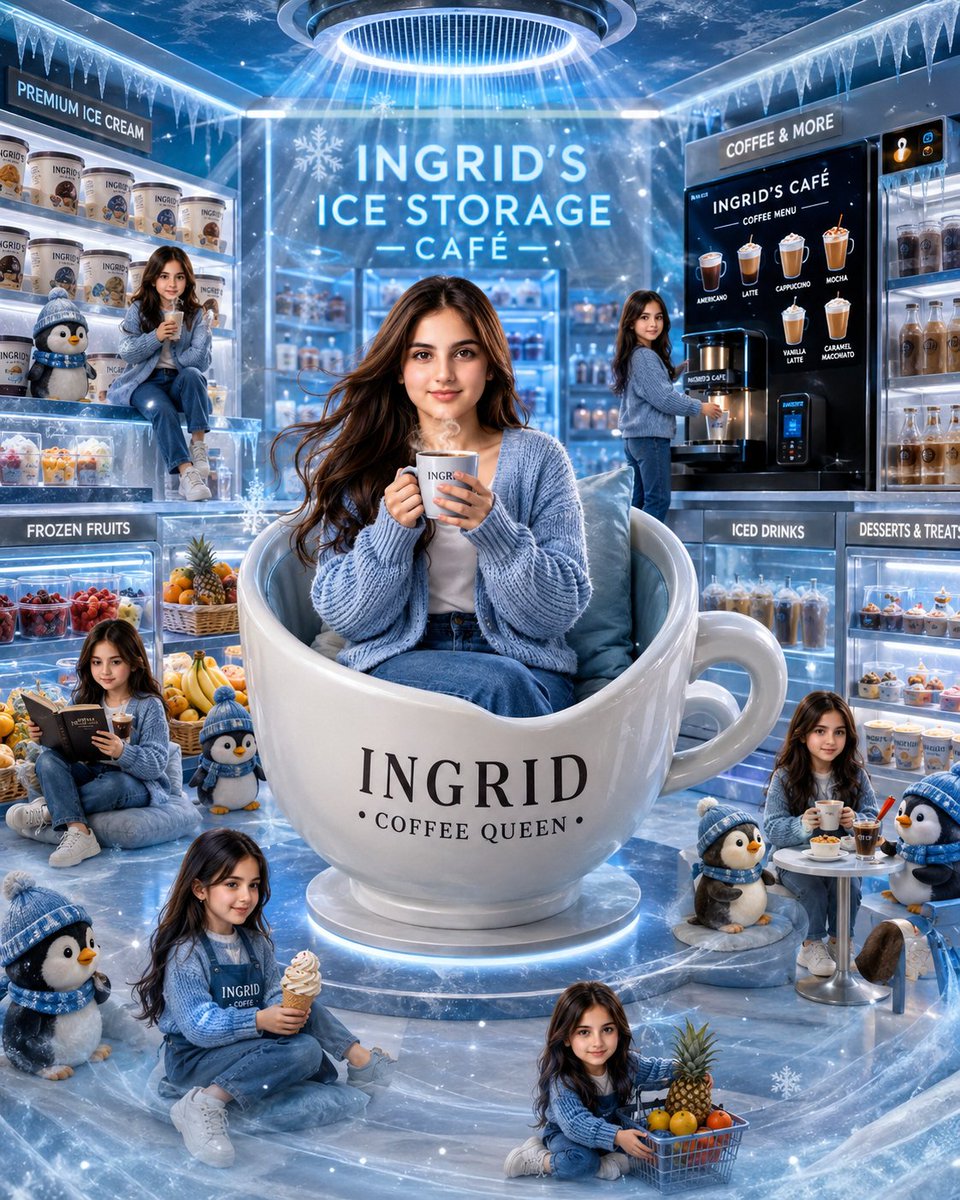
Ingrid Ice Storage Café Fantasy Scene
Generates a cinematic icy-blue fantasy café portrait with a central character in a giant coffee mug chair, miniature character copies, penguins, desserts, and branded signage.
This is a GPT Image 2 prompt case for Product & Commercial. Use the copy-ready prompt below to generate similar visuals, and review Awesome GPT Image 2 Prompts attribution plus commercial-use rights before reuse.
Free 1K preview
Generate one preview image instantly, no sign-up required.
Prompt
Copy-ready prompt
Goal: Create a whimsical cinematic luxury ice-blue café scene starring {argument name="character name" default="Ingrid"}, using the uploaded person as the exact face reference if provided, with face identity locked and repeated consistently across every character version.

Canvas: Square 4:5-feeling vertical composition, ultra-detailed glossy 3D illustration / cinematic digital art, icy blue and white palette, sparkling frost, snowflakes, cool mist, reflective frozen marble floor, bright rim lighting, and a magical winter café atmosphere.

Main subject: Center the main {argument name="character name" default="Ingrid"} seated inside an oversized glossy white ceramic mug chair shaped like a giant coffee cup. The mug has a large handle on the right and is labeled in elegant black serif text: "INGRID" with smaller text below: "• COFFEE QUEEN •". She wears a cozy oversized {argument name="cardigan color" default="pale ice-blue"} knitted cardigan, white top, blue jeans, and holds a hot coffee cup with both hands. Her long wavy brown hair flows naturally, and she sits on soft pale-blue cushions inside the cup.

Environment and signage: Set the scene inside a premium frozen café called "INGRID'S ICE STORAGE — CAFÉ —" in large glowing white-blue letters on the back wall. Add icicles hanging from the ceiling edges, frosted glass walls, glowing display cases, and a circular ceiling light above the main subject casting radiant blue beams downward. Include these visible signs exactly: "PREMIUM ICE CREAM" above the left freezer shelves, "FROZEN FRUITS" on the lower-left case, "COFFEE & MORE" above the right coffee station, "INGRID'S CAFÉ" on the black coffee menu board, "ICED DRINKS" on the lower-right drink case, and "DESSERTS & TREATS" on the dessert display.

Repeated character count: Show exactly 7 total versions of {argument name="character name" default="Ingrid"}: 1 large central Ingrid in the giant mug chair; 1 mini Ingrid sitting on the left ice-cream shelf holding a drink; 1 mini Ingrid standing at the right coffee machine; 1 mini Ingrid sitting lower left reading a menu and drinking coffee; 1 mini Ingrid sitting near the bottom-left foreground holding a soft-serve ice cream cone and wearing an Ingrid café apron; 1 mini Ingrid sitting bottom center with a small shopping basket of fruit; and 1 mini Ingrid sitting at a small round café table on the right holding coffee.

Penguin count: Include exactly 5 cute plush-like penguins wearing blue winter hats and scarves: 1 on the left shelf beside the mini Ingrid; 1 small penguin near the lower center-left beside the reader; 1 large penguin in the bottom-left foreground; 1 small penguin near the right side of the giant mug; and 1 penguin beside the right café table.

Food and drink details: Add frozen shelves filled with branded ice-cream tubs labeled with the character name, iced drinks in bottles and cups, desserts in glass cases, whipped cream treats, pastries, and colorful frozen fruit. Include a fruit basket with pineapple, oranges, lemons, and berries near the bottom center. The right black coffee menu board should show exactly 6 illustrated drink options labeled: Americano, Latte, Cappuccino, Mocha, Vanilla Latte, and Caramel Macchiato.

Style: Hyper-detailed, glossy, high-end fantasy café advertising look, rich reflections, soft volumetric light, blue-white neon glow, snow particles, frosty glass, polished ceramic, cozy knit textures, cute miniature characters, and charming winter mascot energy.

Constraints: Keep all faces consistent with the reference person if one is provided. Do not add extra character copies beyond the 7 specified, and do not add extra penguins beyond the 5 specified. Keep the text legible and centered where described. No watermark, no logo, no distorted hands, no unreadable main signage.
Prompt variables
Editable argument placeholders found in the prompt, with their default values.
Best for
- - Product & Commercial visual exploration
- - Image generation and reference-image edits
- - Reusable briefs that keep source attribution visible
Change these parts
- - Subject, product, character, or scene
- - Aspect ratio, camera, lighting, and background
- - Brand, text, color, and output constraints
Recommended model and settings
- - Model: gpt-image-2
- - Input mode: Text to Image
- - Aspect ratio: source
- - Commercial status: review original source
How to use this prompt
- 1. Copy the prompt and preserve its structure for the first test.
- 2. Replace the subject, context, and publishing channel.
- 3. Change one camera, lighting, or style variable per iteration.
- 4. Inspect the output, source, text, and rights before reuse.
Limitations, source, and reuse cautions
- - Generated output is an editable draft, not factual, legal, or rights evidence.
- - Review the linked source, people, brands, logos, text, and third-party media before commercial use.
More cases in this category
Prioritized by category, input mode compatibility, quality, and lower risk.

Reuse and source notes
Use this prompt safely after previewing the case.
- 1.Copy the prompt or open it directly in Dovoo with the generation button.
- 2.Adjust variables, aspect ratio, and reference images for your own use case.
- 3.Before publishing or paid usage, verify source rights, attribution requirements, and brand or likeness risks.
Can I use this prompt commercially?
Commercial-use status is allowed. Review the original source, license, brand constraints, and legal requirements before paid usage.
Where does this case come from?
This case is imported from Awesome GPT Image 2 Prompts; keep attribution visible and check the source URL before reuse.