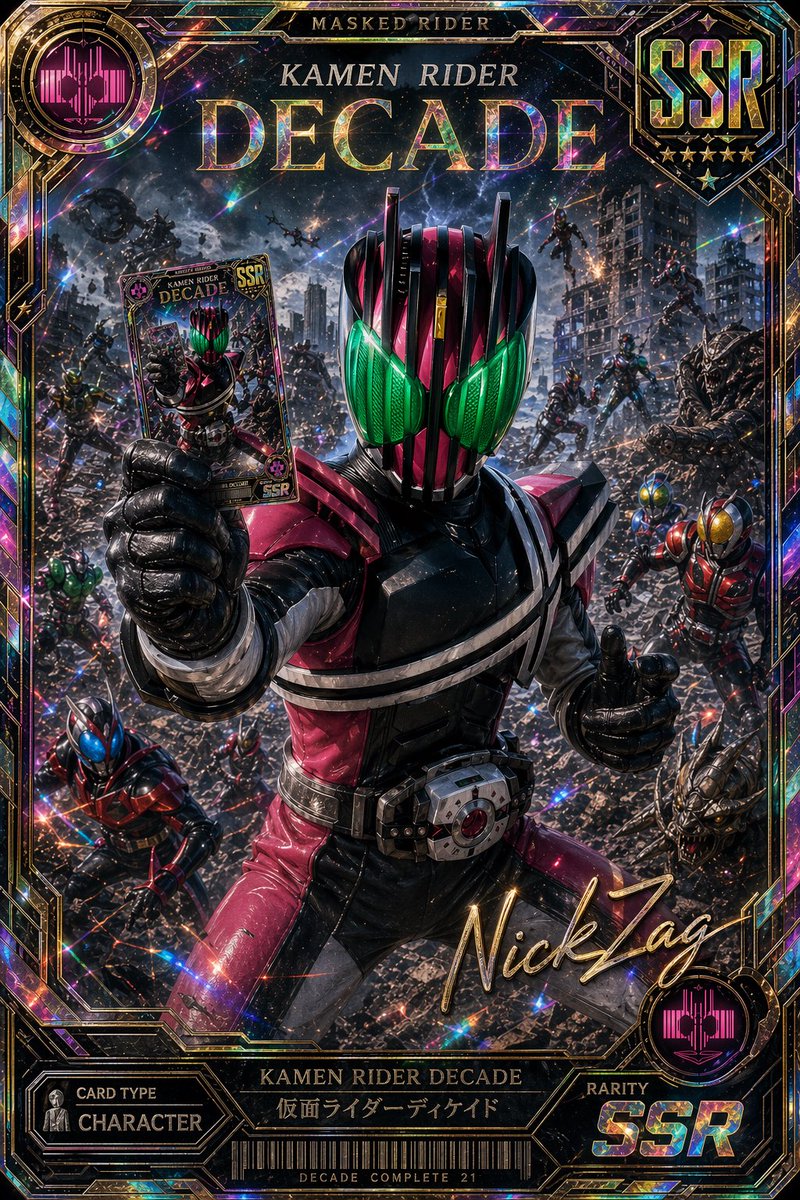
Holographic Kamen Rider Decade SSR Card
This prompt generates a premium holographic tokusatsu trading card featuring Kamen Rider Decade in a dramatic battle scene, ideal for collectible card art, poster designs, or gacha-style character promos.
This is a GPT Image 2 prompt case for Anime & Game. Use the copy-ready prompt below to generate similar visuals, and review Awesome GPT Image 2 Prompts attribution plus commercial-use rights before reuse.
Free 1K preview
Generate one preview image instantly, no sign-up required.
Prompt
Copy-ready prompt
A hyper-detailed premium collectible trading card illustration of {argument name="hero name" default="Kamen Rider Decade"} in the center foreground, posed in a ruined futuristic city battlefield under a dramatic cosmic night sky. The armored hero wears a glossy magenta, black, and white suit with a segmented helmet and large luminous green compound eyes, facing the viewer in a powerful stance. One arm is thrust forward toward the camera, holding up a character card between black gloved fingers so the card is clearly visible in forced perspective; the other hand gives a confident thumbs-up. The belt device is prominent at the waist. Surrounding the hero are exactly 8 secondary figures and monsters scattered through the rubble and midair battle scene: 1 blue-and-red armored rider crouching in the bottom left foreground, 1 red-and-gold armored rider on the right midground, 2 small rider figures in the distant center background, 2 flying figures in the upper background, and 2 monstrous enemy creatures on the right side, one mid-right and one bottom-right. The environment is dense with collapsed buildings, broken concrete, sparks, smoke, debris, and cinematic action lighting. Render the whole image as a luxurious holographic SSR card with an ornate prismatic foil border, glittering rainbow refractions, metallic gold filigree framing, and layered collectible-card UI. At the top center, large embossed title text reads {argument name="title text" default="KAMEN RIDER DECADE"}, with smaller text above reading "MASKED RIDER". In the top right is a large metallic badge reading {argument name="rarity label" default="SSR"} with 5 gold stars beneath it. In the top left and bottom right are 2 circular magenta crest icons. In the lower center is a gold cursive signature reading {argument name="signature text" default="NickZág"}. Along the bottom frame are 4 labeled UI sections: left panel "CARD TYPE" over "CHARACTER", center nameplate "KAMEN RIDER DECADE" with Japanese subtitle "仮面ライダーディケイド", a barcode panel beneath, and right panel "RARITY" over "SSR". Add tiny footer text under the barcode reading {argument name="footer text" default="DECADE COMPLETE 21"}. Style: ultra-detailed tokusatsu hero art, cinematic photoreal armor textures, dramatic depth, explosive action composition, premium gacha card design, holographic foil print effects, sharp focus on the main hero and card, highly polished game-card promotional artwork.Prompt variables
Editable argument placeholders found in the prompt, with their default values.
Best for
- - Anime & Game visual exploration
- - Image generation and reference-image edits
- - Reusable briefs that keep source attribution visible
Change these parts
- - Subject, product, character, or scene
- - Aspect ratio, camera, lighting, and background
- - Brand, text, color, and output constraints
Recommended model and settings
- - Model: gpt-image-2
- - Input mode: Text to Image
- - Aspect ratio: source
- - Commercial status: review original source
How to use this prompt
- 1. Copy the prompt and preserve its structure for the first test.
- 2. Replace the subject, context, and publishing channel.
- 3. Change one camera, lighting, or style variable per iteration.
- 4. Inspect the output, source, text, and rights before reuse.
Limitations, source, and reuse cautions
- - Generated output is an editable draft, not factual, legal, or rights evidence.
- - Review the linked source, people, brands, logos, text, and third-party media before commercial use.
More cases in this category
Prioritized by category, input mode compatibility, quality, and lower risk.




Reuse and source notes
Use this prompt safely after previewing the case.
- 1.Copy the prompt or open it directly in Dovoo with the generation button.
- 2.Adjust variables, aspect ratio, and reference images for your own use case.
- 3.Before publishing or paid usage, verify source rights, attribution requirements, and brand or likeness risks.
Can I use this prompt commercially?
Commercial-use status is allowed. Review the original source, license, brand constraints, and legal requirements before paid usage.
Where does this case come from?
This case is imported from Awesome GPT Image 2 Prompts; keep attribution visible and check the source URL before reuse.