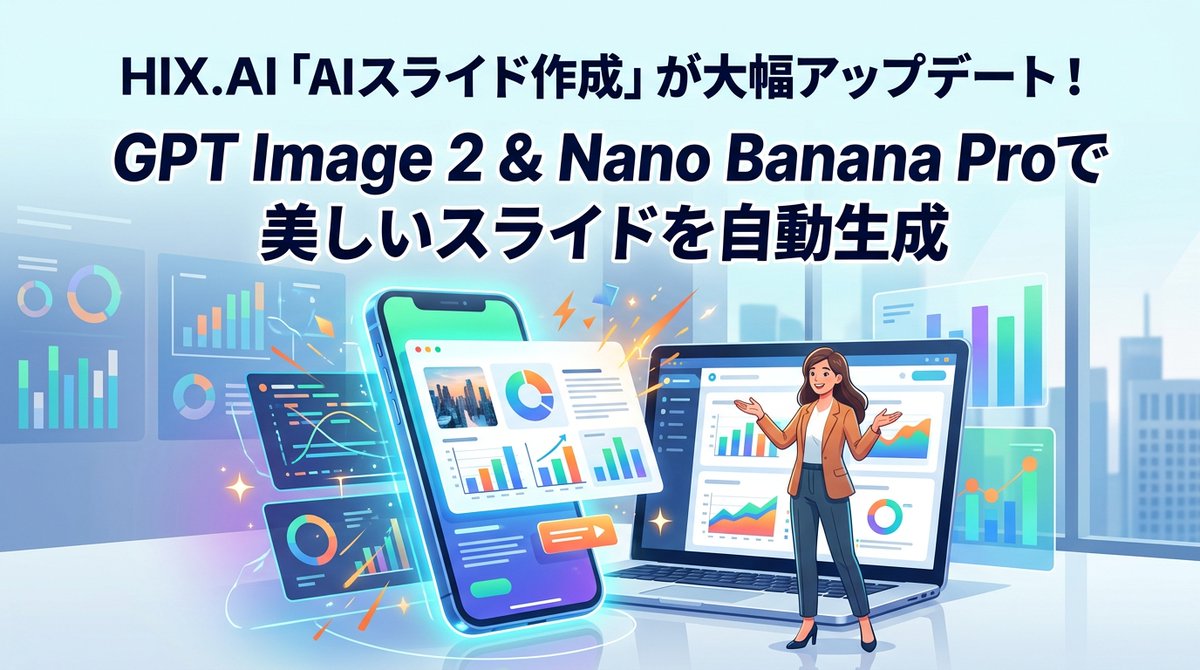
HIX.AI Slide Update Banner
Creates a polished Japanese SaaS announcement banner promoting automated slide generation with GPT Image 2 and Nano Banana Pro.
This is a GPT Image 2 prompt case for 产品商业. Use the copy-ready prompt below to generate similar visuals, and review Awesome GPT Image 2 Prompts attribution plus commercial-use rights before reuse.
Prompt
Copy-ready prompt
{
  "type": "用于软件更新公告的宽幅促销横幅插图",
  "aspect_ratio": "16:9",
  "style": "简洁现代的矢量插图,光泽感 SaaS 营销设计,柔和的渐变,清晰的排版,充满活力的青色和蓝色发光效果,微妙的深度感,企业科技美学",
  "language": "Chinese标题文本,包含英文产品名称",
  "canvas": {
    "background": "明亮的办公室室内环境,带有淡蓝色玻璃窗,隐约的城市天际线轮廓,柔和的日光,光亮的地板反射",
    "color_palette": "浅青色,天蓝色,海军蓝,蓝绿色,薄荷绿,橙色点缀火花,白色面板"
  },
  "text": {
    "top_headline": "{argument name=\"top headline text\" default=\"HIX.AI「AI Slides 生成」重大更新!\"}",
    "main_headline_line_1": "{argument name=\"main headline line one\" default=\"通过 GPT Image 2 和 Nano Banana Pro\"}",
    "main_headline_line_2": "{argument name=\"main headline line two\" default=\"自动生成精美 Slides\"}",
    "typography": "大型粗体圆角无衬线字体,深海军蓝填充,两条主标题行带有厚实的白色描边或发光效果,居中置于顶部,具有强烈的层级感"
  },
  "main_scene": {
    "centerpiece": "一部倾斜的智能手机竖立在左中位置,带有发光的青色轮廓,显示着包含图表、照片缩略图、文本块和彩色饼图的 Slides 生成界面",
    "laptop": "右中位置放置着一台打开的笔记本电脑,屏幕显示着分析类 Slides 编辑器仪表板,包含侧边栏导航、柱状图、折线图、圆环图以及一个小型的演示者插图区域",
    "presenter": "{argument name=\"presenter description\" default=\"一位女性商务演示者站在笔记本电脑前,身穿棕褐色西装外套、白衬衫、深蓝色长裤、黑色高跟鞋,留着长波浪棕色头发,双臂张开做出讲解姿势,面部简化模糊处理\"}",
    "effects": "橙色闪电、小火花、发光的弧线以及智能手机和仪表板周围的五彩纸屑状装饰线条,以暗示自动化生成过程"
  },
  "ui_components": {
    "count": 8,
    "items": [
      "前景中 1 部倾斜的智能手机界面",
      "前景中 1 台打开的笔记本电脑界面",
      "1 张位于手机上方中央的悬浮白色 Slides 卡片,包含照片缩略图、饼图、段落行、柱状图和橙色播放按钮",
      "手机左下方 1 个深色悬浮代码与折线图面板",
      "左下方附近 1 个深色悬浮圆环图与柱状图面板",
      "最左侧 1 个半透明分析仪表板面板,包含柱状图和圆环图",
      "手机上方 1 个小型半透明折线图面板",
      "右侧 1 个半透明图表面板,包含垂直柱状图和折线图"
    ]
  },
  "composition": "标题占据上方 40%;设备和演示者占据下方 60%;智能手机位于中心偏左,笔记本电脑位于中心偏右,演示者站在笔记本电脑前;悬浮面板左右分布以保持平衡;无边框,无水印",
  "rendering_instructions": "使图像精致且易读,适合作为社交媒体公告横幅;保持所有图表具有装饰性但清晰可见;保留准确的Chinese标题文本;在海军蓝标题和明亮的青色背景之间使用高对比度"
}
Prompt variables
Editable argument placeholders found in the prompt, with their default values.
More cases in this category
Prioritized by category, input mode compatibility, quality, and lower risk.
Reuse and source notes
Use this prompt safely after previewing the case.
- 1.Copy the prompt or open it directly in Dovoo with the generation button.
- 2.Adjust variables, aspect ratio, and reference images for your own use case.
- 3.Before publishing or paid usage, verify source rights, attribution requirements, and brand or likeness risks.
Can I use this prompt commercially?
Commercial-use status is allowed. Review the original source, license, brand constraints, and legal requirements before paid usage.
Where does this case come from?
This case is imported from Awesome GPT Image 2 Prompts; keep attribution visible and check the source URL before reuse.