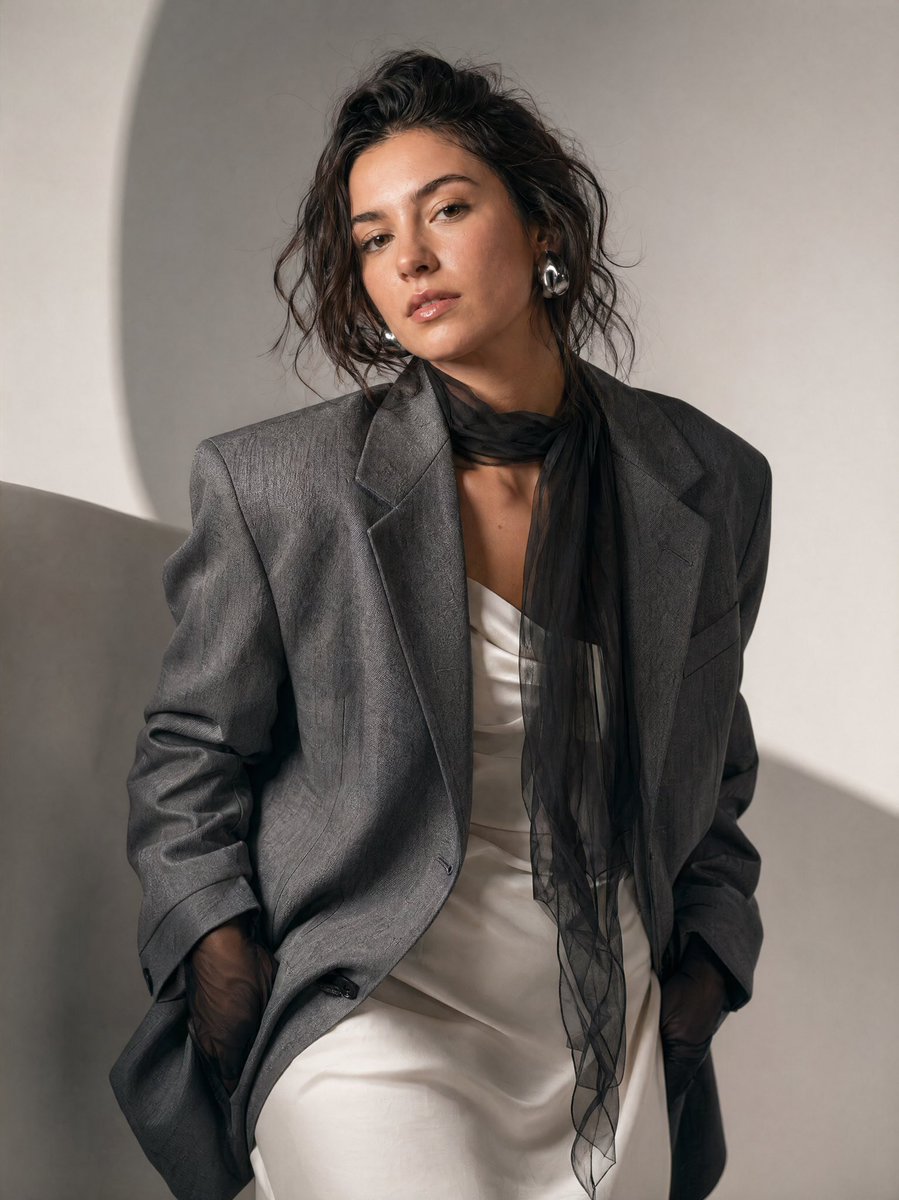
High-Fashion Editorial Portrait Prompt
A detailed fashion photography prompt for generating a luxury editorial portrait in a minimalist studio setting.
This is a GPT Image 2 prompt case for Fashion & Beauty. Use the copy-ready prompt below to generate similar visuals, and review Awesome GPT Image 2 Prompts attribution plus commercial-use rights before reuse.
Free 1K preview
Generate one preview image instantly, no sign-up required.
Prompt
Copy-ready prompt
A high-fashion editorial portrait of a {argument name="subject" default="woman"} in a {argument name="setting" default="minimalist studio setting"}. She is leaning slightly forward and tilting her head, creating a dynamic, asymmetrical composition. Her expression is neutral and confident, with a slightly intense gaze directed toward the camera.

She wears a structured, oversized {argument name="clothing" default="gray blazer"} with a subtle textured pattern over a soft white dress. Around her neck is a sheer black scarf that drapes loosely and flows downward, adding contrast and movement. Her hands are partially tucked into the blazer, with sheer black gloves visible.

Her hair is styled in a slightly messy, effortless updo with loose strands framing her face. She wears bold, modern silver earrings. Her makeup is natural and dewy, with softly defined eyes and neutral lips.

The lighting is soft and diffused, creating gentle shadows and a clean, editorial feel. The background is minimal, featuring smooth, light gray tones with subtle curved shapes that add depth without distraction.

The color palette is muted and sophisticated: gray, white, and black dominate the scene. The overall mood is elegant, contemporary, and slightly moody, resembling a luxury fashion magazine shoot. Style keywords: fashion editorial, minimalist, soft lighting, neutral tones, modern elegance, high detail, shallow depth of field, studio photography, cinematic composition.
Prompt variables
Editable argument placeholders found in the prompt, with their default values.
Best for
- - Fashion & Beauty visual exploration
- - Image generation and reference-image edits
- - Reusable briefs that keep source attribution visible
Change these parts
- - Subject, product, character, or scene
- - Aspect ratio, camera, lighting, and background
- - Brand, text, color, and output constraints
Recommended model and settings
- - Model: gpt-image-2
- - Input mode: Text to Image
- - Aspect ratio: source
- - Commercial status: review original source
How to use this prompt
- 1. Copy the prompt and preserve its structure for the first test.
- 2. Replace the subject, context, and publishing channel.
- 3. Change one camera, lighting, or style variable per iteration.
- 4. Inspect the output, source, text, and rights before reuse.
Limitations, source, and reuse cautions
- - Generated output is an editable draft, not factual, legal, or rights evidence.
- - Review the linked source, people, brands, logos, text, and third-party media before commercial use.
More cases in this category
Prioritized by category, input mode compatibility, quality, and lower risk.
Reuse and source notes
Use this prompt safely after previewing the case.
- 1.Copy the prompt or open it directly in Dovoo with the generation button.
- 2.Adjust variables, aspect ratio, and reference images for your own use case.
- 3.Before publishing or paid usage, verify source rights, attribution requirements, and brand or likeness risks.
Can I use this prompt commercially?
Commercial-use status is allowed. Review the original source, license, brand constraints, and legal requirements before paid usage.
Where does this case come from?
This case is imported from Awesome GPT Image 2 Prompts; keep attribution visible and check the source URL before reuse.