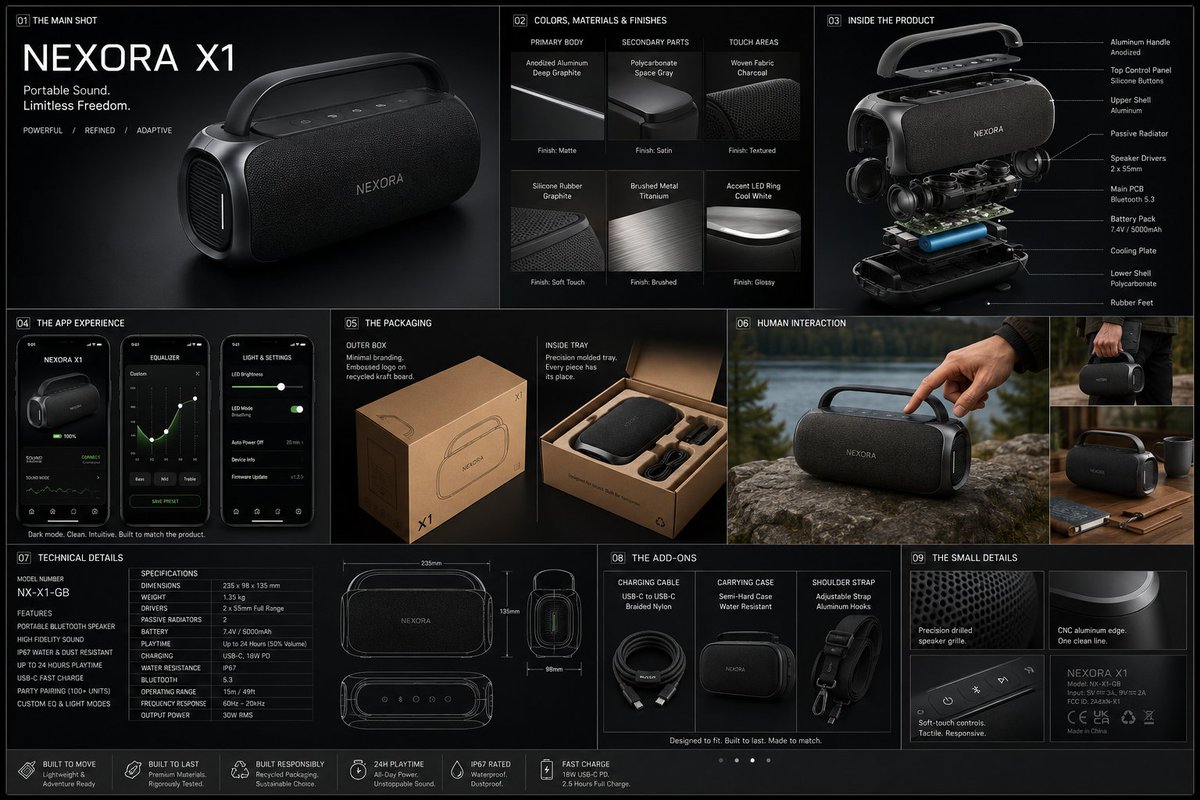
Professional Physical Product Design Board
A highly structured technical prompt for creating a professional product design poster, featuring exploded views, materials, and digital screen layouts.
This is a GPT Image 2 prompt case for Product & Commercial. Use the copy-ready prompt below to generate similar visuals, and review Awesome GPT Image 2 Prompts attribution plus commercial-use rights before reuse.
Free 1K preview
Generate one preview image instantly, no sign-up required.
Prompt
Copy-ready prompt
{
 "prompt": {
"title": "High-End Physical Product Design Board",     "trigger": "Upload a simple sketch or outline of a product. Use it to build a full, professional product design poster—the kind that wins over investors and gets featured on top design websites.",          "prime_directive": {
"rule": "Every shape, material, screen, and accessory must come directly from the lines and style of the uploaded sketch.",
"enforcement": "Do not use standard templates. Look closely at the shape. Build a complete physical and digital world from its basic design."
 },

"format": {
"orientation": "Horizontal",
"aspect_ratio": "16:9",
"layout": "Clean technical grid",
"composition": "Neat, spacious, and purposeful—balancing big, beautiful images with clear technical details"
},
"sections": {
"01_product_header": {
"label": "The Main Shot",
"elements": [
"{argument name="product name" default="Product name"} in strong, clean text",
"Short product goal—5 words max, sharp and clear",
"Three main feeling words (e.g., {argument name="style keywords" default="Smooth / Tough / Smart"})"
]
},
"02_materials_system": {
"label": "Colors, Materials, and Finishes",
"palettes": {
"primary_body": "Main materials (e.g., {argument name="primary materials" default="dark metal, smooth plastic"})",
"secondary_parts": "Materials for buttons, ports, or edges",
"touch_areas": "Materials you feel (e.g., soft rubber, textured fabric)"
},
"per_material_display": [
"Close-up picture of the material",
"Material name",
"Finish type (matte, shiny, or rough)"
]
},

"03_exploded_view": {
"label": "Inside the Product",
"components": [
"Outer shell floating above the inside parts",
"Visible battery, main circuit board, or switches",
"Connecting wires and cooling parts"
],
"requirement": "Must look like it can actually be built in real life, with clear guide lines."
},
"04_digital_screen": {
"label": "The App or Screen",
"define": [
"The main device screen or a mobile app that controls it",
"The screen design must match the physical product's shape"
],
"visual_tiles": {
"count": "2–3 key screens",
"style": "Dark mode with high contrast and simple buttons"
}
},
"05_unboxing_experience": {
"label": "The Packaging",
"rule": "The box must look premium, sturdy, and environmentally friendly.",
"mockups": [
{
"type": "Outer Box",
"detail": "Clean logo pressed into thick, high-quality cardboard"
},
{
"type": "Inside Tray",
"detail": "Perfectly cut spaces to hold the product and wires safely"
}
]
},
"06_real_world_use": {
"label": "Human Interaction",
"scenarios": [
"Product sitting naturally on a desk or outdoors",
"A person's hand pressing the main button or holding the handle",
"Realistic lighting and shadows that match the background"
],
"requirement": "Must look like a real photograph to show the actual size of the item."
},
"07_text_and_specs": {
"label": "Technical Details",
"tiers": {
"model_number": "Clear, typewriter-style text for small numbers"
}
}
}
}
Prompt variables
Editable argument placeholders found in the prompt, with their default values.
Best for
- - Product & Commercial visual exploration
- - Image generation and reference-image edits
- - Reusable briefs that keep source attribution visible
Change these parts
- - Subject, product, character, or scene
- - Aspect ratio, camera, lighting, and background
- - Brand, text, color, and output constraints
Recommended model and settings
- - Model: gpt-image-2
- - Input mode: Text to Image
- - Aspect ratio: source
- - Commercial status: review original source
How to use this prompt
- 1. Copy the prompt and preserve its structure for the first test.
- 2. Replace the subject, context, and publishing channel.
- 3. Change one camera, lighting, or style variable per iteration.
- 4. Inspect the output, source, text, and rights before reuse.
Limitations, source, and reuse cautions
- - Generated output is an editable draft, not factual, legal, or rights evidence.
- - Review the linked source, people, brands, logos, text, and third-party media before commercial use.
More cases in this category
Prioritized by category, input mode compatibility, quality, and lower risk.

Reuse and source notes
Use this prompt safely after previewing the case.
- 1.Copy the prompt or open it directly in Dovoo with the generation button.
- 2.Adjust variables, aspect ratio, and reference images for your own use case.
- 3.Before publishing or paid usage, verify source rights, attribution requirements, and brand or likeness risks.
Can I use this prompt commercially?
Commercial-use status is allowed. Review the original source, license, brand constraints, and legal requirements before paid usage.
Where does this case come from?
This case is imported from Awesome GPT Image 2 Prompts; keep attribution visible and check the source URL before reuse.