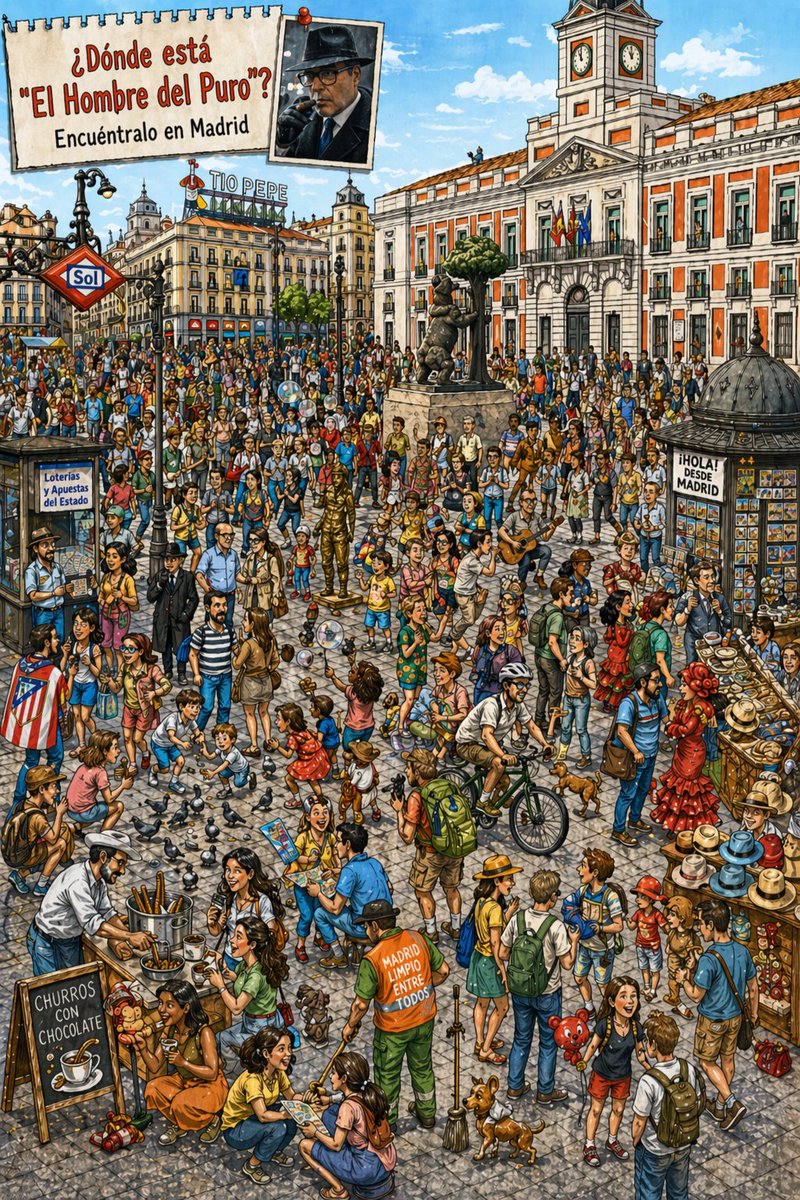
Hidden-Object Madrid Plaza Puzzle
This prompt generates a busy illustrated search-and-find poster of Puerta del Sol in Madrid, ideal for hidden-object games, social posts, or travel-themed puzzle art.
This is a GPT Image 2 prompt case for Illustration & Art. Use the copy-ready prompt below to generate similar visuals, and review Awesome GPT Image 2 Prompts attribution plus commercial-use rights before reuse.
Free 1K preview
Generate one preview image instantly, no sign-up required.
Prompt
Copy-ready prompt
A highly detailed and colorful “Where’s Waldo?” style illustration depicting {argument name="city" default="¿Dónde está \"El Hombre del Puro\"?"} a crowded public square. The perspective is at street level, with a bright daytime backdrop of blue skies and white clouds. The scene is filled with dozens of pedestrians, tourists, vendors, children, musicians, and scenes of everyday life, employing a fine hand-drawn inking combined with digital painting in an editorial cartoon style, with clear lines, detailed cobblestone textures, expressive character faces, and extremely rich visual storytelling. The location is Puerta del Sol square, clearly identifiable through 4 key landmarks: the red diamond-shaped Sol metro sign on the left, the Tío Pepe rooftop advertisement in the mid-left background, the “Bear and the Tree” statue without a rider in the mid-ground, and the dominant Royal Post Office building (Real Casa de Correos) with the Spanish flag hanging on the balcony on the right background. In the upper left corner, add a pinned, torn-edge paper poster with Spanish text {argument name="headline text" default="¿Dónde está \"El Hombre del Puro\"?"} on the first line and {argument name="subtitle text" default="Encuéntralo en Madrid"} on the second line; next to it, pin a small portrait photo of the target person, wearing a dark fedora, a dark coat, and smoking a cigar, like a clue card. Fill the square with a lively and busy crowd scene, including 2 flamenco dancers in red dresses on the right, 1 guitarist on the mid-right, 1 cyclist riding a bicycle in the mid-right foreground, 1 cleaner in orange and green municipal uniform in the mid-foreground, 1 churro stand with a blackboard sign reading “CHURROS CON CHOCOLATE” in the lower left corner, 1 lottery booth with “Loterías y Apuestas del Estado” on the left, 1 postcard/newspaper stand with a sign reading “¡HOLA! DESDE MADRID” on the right, 1 hat display stall piled with hats on the far right, 1 fully gold-painted living statue performer on the mid-left, 1 bubble performer blowing semi-transparent bubbles, and numerous pigeons scattered in the foreground, with 2 small dogs in the mid-bottom. The scene also includes families with backpacks, children squatting next to pigeons, tourists taking photos, people holding maps, shoppers, and street audiences dressed in various summer clothes. The hidden target person {argument name="target character" default="El Hombre del Puro"} should be cleverly embedded somewhere within the crowd, not in the center, visually matching the dark hat, dark clothing, and cigar in the clue portrait, making him difficult to find but not impossible. The overall composition should be tight, full of fun “find it” energy, with warm Mediterranean tones and rich urban details.Prompt variables
Editable argument placeholders found in the prompt, with their default values.
Best for
- - Illustration & Art visual exploration
- - Image generation and reference-image edits
- - Reusable briefs that keep source attribution visible
Change these parts
- - Subject, product, character, or scene
- - Aspect ratio, camera, lighting, and background
- - Brand, text, color, and output constraints
Recommended model and settings
- - Model: gpt-image-2
- - Input mode: Text to Image
- - Aspect ratio: source
- - Commercial status: review original source
How to use this prompt
- 1. Copy the prompt and preserve its structure for the first test.
- 2. Replace the subject, context, and publishing channel.
- 3. Change one camera, lighting, or style variable per iteration.
- 4. Inspect the output, source, text, and rights before reuse.
Limitations, source, and reuse cautions
- - Generated output is an editable draft, not factual, legal, or rights evidence.
- - Review the linked source, people, brands, logos, text, and third-party media before commercial use.
More cases in this category
Prioritized by category, input mode compatibility, quality, and lower risk.





Reuse and source notes
Use this prompt safely after previewing the case.
- 1.Copy the prompt or open it directly in Dovoo with the generation button.
- 2.Adjust variables, aspect ratio, and reference images for your own use case.
- 3.Before publishing or paid usage, verify source rights, attribution requirements, and brand or likeness risks.
Can I use this prompt commercially?
Commercial-use status is allowed. Review the original source, license, brand constraints, and legal requirements before paid usage.
Where does this case come from?
This case is imported from Awesome GPT Image 2 Prompts; keep attribution visible and check the source URL before reuse.