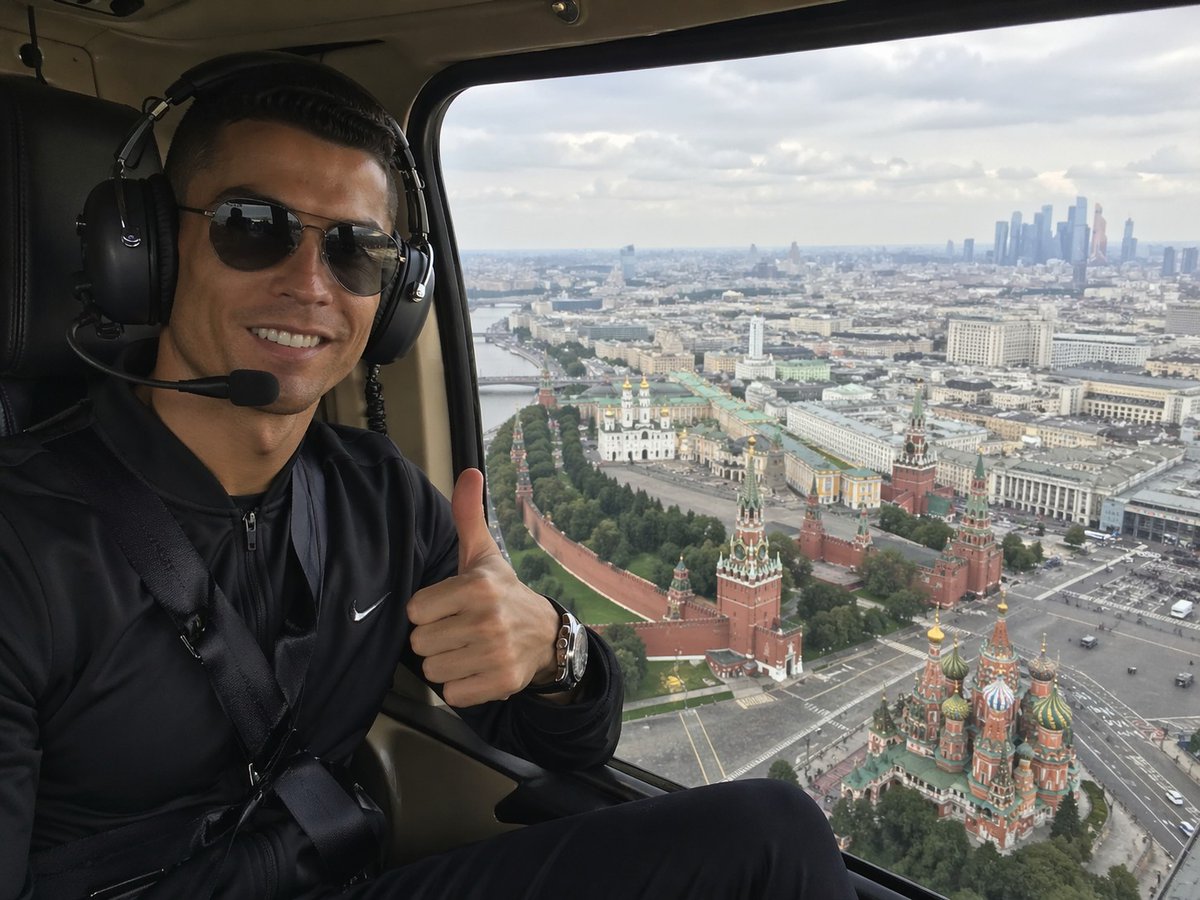
Helicopter Selfie Over Moscow
This prompt generates a realistic travel selfie inside a helicopter with a thumbs-up passenger and an aerial view of the Kremlin and Saint Basil's Cathedral, ideal for tourism or lifestyle imagery.
This is a GPT Image 2 prompt case for Portrait & Character. Use the copy-ready prompt below to generate similar visuals, and review Awesome GPT Image 2 Prompts attribution plus commercial-use rights before reuse.
Free 1K preview
Generate one preview image instantly, no sign-up required.
Prompt
Copy-ready prompt
A realistic smartphone-style travel photo taken inside a helicopter cabin, showing a seated passenger on the left side of the frame and a sweeping aerial view of Moscow through a large window on the right. The person is wearing a black zip-up athletic jacket with a small white swoosh logo, a seatbelt across the chest, a metallic wristwatch, and large black aviation headphones with a microphone boom. Show every face clearly with natural, detailed facial features, and they are giving a thumbs-up gesture toward the camera. The helicopter interior is dark, with black leather seating and beige cabin trim framing the window. Outside the window, capture an overcast daytime panorama of central Moscow from above, with the Kremlin walls and towers clearly visible, the colorful onion domes of Saint Basil's Cathedral in the lower right, a broad cityscape stretching into the distance, and a cluster of modern skyscrapers on the far right horizon. Use natural diffused light, realistic urban detail, mild atmospheric haze, and the candid composition of a tourist selfie shot from a helicopter ride, wide-angle but not distorted.
Best for
- - Portrait & Character visual exploration
- - Image generation and reference-image edits
- - Reusable briefs that keep source attribution visible
Change these parts
- - Subject, product, character, or scene
- - Aspect ratio, camera, lighting, and background
- - Brand, text, color, and output constraints
Recommended model and settings
- - Model: gpt-image-2
- - Input mode: Text to Image
- - Aspect ratio: source
- - Commercial status: review original source
How to use this prompt
- 1. Copy the prompt and preserve its structure for the first test.
- 2. Replace the subject, context, and publishing channel.
- 3. Change one camera, lighting, or style variable per iteration.
- 4. Inspect the output, source, text, and rights before reuse.
Limitations, source, and reuse cautions
- - Generated output is an editable draft, not factual, legal, or rights evidence.
- - Review the linked source, people, brands, logos, text, and third-party media before commercial use.
More cases in this category
Prioritized by category, input mode compatibility, quality, and lower risk.




Reuse and source notes
Use this prompt safely after previewing the case.
- 1.Copy the prompt or open it directly in Dovoo with the generation button.
- 2.Adjust variables, aspect ratio, and reference images for your own use case.
- 3.Before publishing or paid usage, verify source rights, attribution requirements, and brand or likeness risks.
Can I use this prompt commercially?
Commercial-use status is allowed. Review the original source, license, brand constraints, and legal requirements before paid usage.
Where does this case come from?
This case is imported from Awesome GPT Image 2 Prompts; keep attribution visible and check the source URL before reuse.