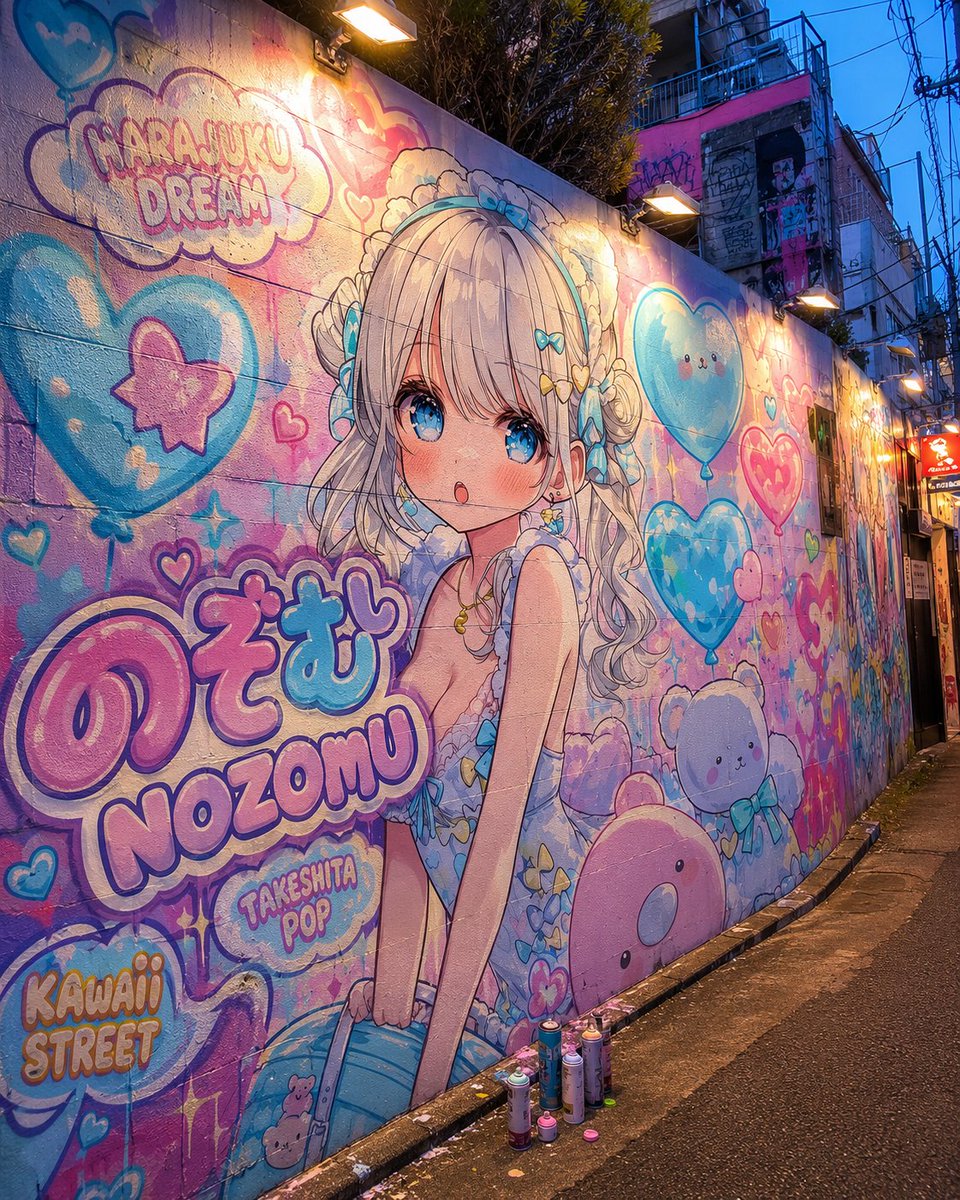
Harajuku Kawaii Graffiti Murals
Generate a photorealistic Harajuku alleyway mural featuring customizable Kawaii anime characters and pop art graffiti text.
Prompt
Copy-ready prompt
Objective: To create a photorealistic image of a street scene at dusk, showcasing a pop art mural in the style of Harajuku Takeshita Street. The mural would be painted directly on the walls of a narrow concrete alleyway, featuring a character named {argument name="character name" default="NOZOMU"} An original anime girl mural. Canvas: 1:1 square image, wide-angle street view, extending diagonally along a narrow city alley. The mural covers the entire left wall and extends into the distance. The background features a wet, dark asphalt pavement, kerbstones at the base, dense power lines and building facades, and a deep blue twilight sky. Subject: A large mural of a Kawaii anime girl, positioned slightly to the left. She possesses {argument name="hair color" default="Silver Gold"} She has long, wavy twin tails with soft bangs, large, sparkling blue eyes, rosy cheeks, and a slightly parted mouth, giving her a shy and adorable expression. She wears a light blue Harajuku-style ruffled outfit, adorned with lace, bows, heart-shaped accessories, butterfly decorations, and a headband with a blue bow. Her pose is slightly forward, with her hands close to the hem of her skirt, presenting a delicate anime illustration quality that blends realistically into the rough wall texture. Graffiti Layout and Text: Contains 5 clearly readable text areas: 1) Cloud-shaped bubble text "HARAJUKU DREAM" in the upper left corner, 2) Large Japanese bubble text "のぞむ" below, 3) Large Roman letters "NOZOMU" below it, 4) A small bubble text saying "TAKESHITA POP", 5) Bubble text saying "KAWAII STREET" in the lower left corner. The text uses pink, light purple, cyan, and white, with bold outlines, a spray-paint texture, a flowing paint effect, and highlights. Mural Decorative Elements: Eight striking Kawaii-themed motifs surround the character: 1) A large blue heart-shaped balloon with a pink star on the left; 2) A smiling blue heart-shaped balloon in the upper right; 3) A pinkish-red heart-shaped balloon in the center of the right; 4) A small, fluffy white cloud mascot in the lower right; 5) A round, pink seal-shaped mascot in the lower right corner; 6) A teddy bear graffiti near the center of the lower left; 7) A cloud-shaped title bubble in the upper left corner; 8) A cluster of pastel hearts and glitter graffiti around the name. Smaller hearts, stars, bubbles, paint drops, and pop art outlines are added to ensure the eight large motifs remain clearly identifiable. Lighting and Ambient: Rectangular warm-toned wall lamps mounted above the mural cast golden spots and luster on the wall, contrasting with the cool, dusky blue ambient light. The wall texture, the seams between concrete blocks, paint particles, and weathering marks are showcased, and several spray paint cans are placed on the curb in front of the mural. Visual Style: Combining realistic Japanese back alley photography with adorable pastel anime street art. Color Scheme:{argument name="color palette" default="Marshmallow powder, sky blue, light purple, cream, and neon cyan"} High detail, vibrant saturation, cinematic twilight lighting, authentic Harajuku alleyway atmosphere, no one walking in front of the mural, no watermark.Prompt variables
Editable argument placeholders found in the prompt, with their default values.
Variable
character name
Default
NOZOMU
Variable
hair color
Default
Silver Gold
Variable
color palette
Default
Marshmallow powder, sky blue, light purple, cream, and neon cyan
More cases in this category
Prioritized by category, input mode compatibility, quality, and lower risk.

Cinematic Fashion Editor Portrait
text to imageunknown

Dark Pop Style Cheshire Cat Girl
text to imageunknown

Ultimate 3D CGI Cartoon Characters
text to imageunknown

A grid puzzle of the lifestyle I yearn for
text to imageunknown

Water Spirit Fantasy Illustration
text to imageunknown

Portraits in a Sea of Flowers at Dawn
text to imageunknown
Reuse and source notes
Use this prompt safely after previewing the case.
- 1.Copy the prompt or open it directly in Dovoo with the generation button.
- 2.Adjust variables, aspect ratio, and reference images for your own use case.
- 3.Before publishing or paid usage, verify source rights, attribution requirements, and brand or likeness risks.
Can I use this prompt commercially?
Commercial-use status is unknown. Review the original source, license, brand constraints, and legal requirements before paid usage.
Where does this case come from?
This case is imported from YouMind OpenLab awesome-gpt-image-2; keep attribution visible and check the source URL before reuse.